10.1.0
Major Features
Per-Joint Planning Costs
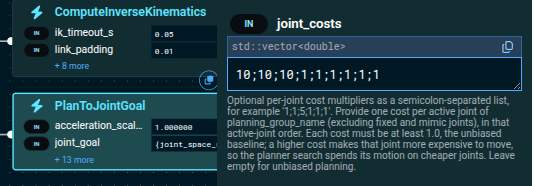
Not every joint is equally cheap to move. On a machine with hydraulic base joints and electric wrist joints, a plan that reaches the goal mostly with the wrist is worth preferring even when the raw shortest path would swing the heavy joints. MoveIt Pro can now bias which joints move by giving each one a cost, and the planner search, the solution ranking, and the inverse kinematics candidate selection all honor that preference. Costs are opt-in, so upgrading changes nothing until you set them. Core
Collision Padding for the World and for What the Robot Carries
Collision padding used to be something you applied to the robot's own links. It now extends to world objects and to attached bodies, so a payload can be given extra clearance while it is being placed without duplicating its collision mesh. Padding is applied to collision checking only, so the 3D Visualizer keeps drawing the exact geometry. Core
Collision Ghosts in the 3D Visualizer
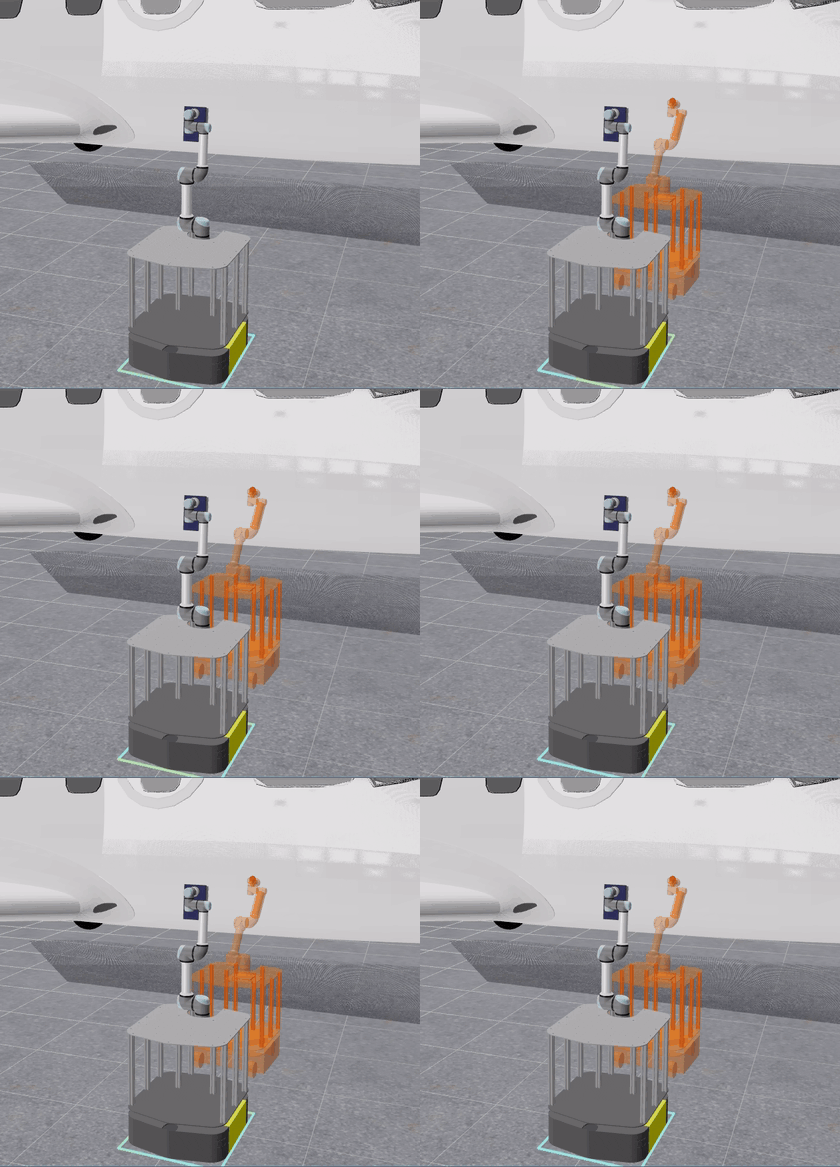
When motion is refused because a robot state is in collision, the 3D Visualizer now draws the robot in the offending pose as a translucent ghost, next to the red spheres marking where it touches. Previously the spheres were all you got, leaving you to picture the pose they belonged to. The ghost appears wherever a pose is rejected, whether a plan's start or goal is blocked, a trajectory fails validation, or an inverse kinematics target turns out to be reachable but blocked.
Inverse Kinematics That Says What Blocked the Pose
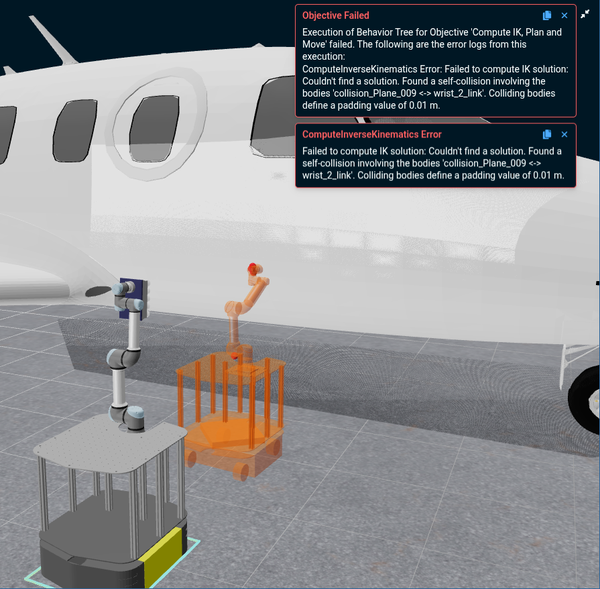
An inverse kinematics request refused for collision used to report only that no solution was found, leaving the cause to guesswork. ComputeInverseKinematics now names the colliding bodies in its failure message and draws red contact spheres on the rejected-pose preview in the 3D Visualizer, so the pair that stopped the solve is both named in the log and shown in place.
Alerts Without the Popups
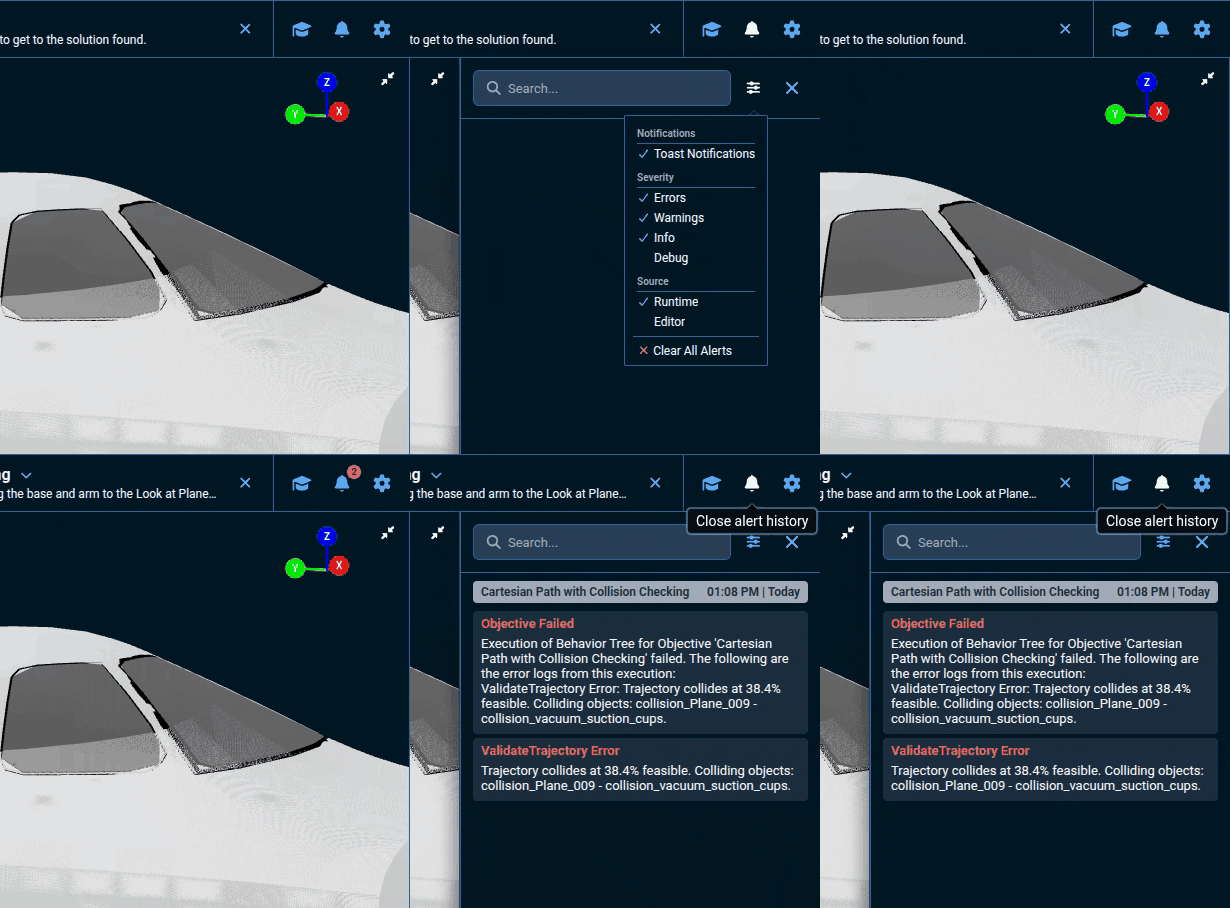
Alerts no longer have to interrupt what you are looking at. Turn off Toast Notifications in the Alert Sidebar's settings and popups stop appearing entirely; the sidebar icon instead carries a count of the alerts you have not seen, which clears when you open Alert History. Alert history and that unread mark are now kept per Runtime connection, so switching from one robot to another no longer shows you the other one's alerts. Toasts stay on by default, but the intent is to move away from them: interrupting the operator's view for every message does not scale with how much MoveIt Pro has to report, so the Alert Sidebar is where alerts are headed and the default is expected to follow in a later release.
Objective Authoring Through the Model Context Protocol
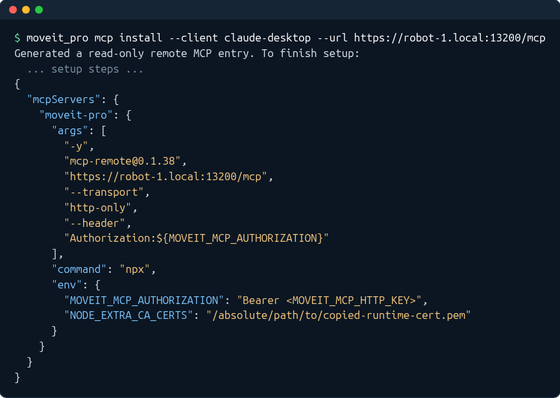
The MoveIt Pro Model Context Protocol (MCP) server gained the pieces an agent needs to author Objectives against a live Runtime: canonical local Objective validation, session identity and scope reporting, and a robot configuration that refreshes after a workspace build without reconnecting. It can also generate a ready-to-paste remote client entry for Claude Desktop and Cursor.
In-App Keyboard Shortcuts
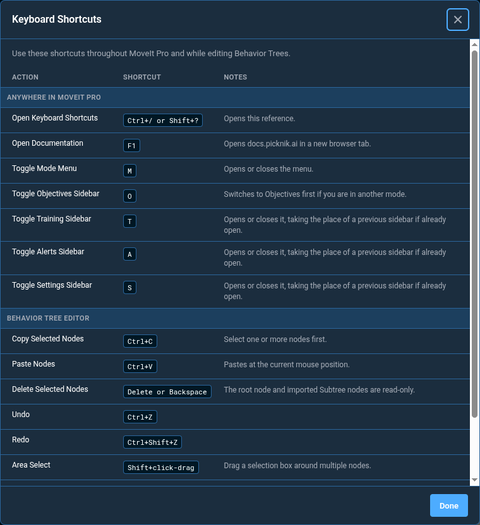
MoveIt Pro now ships a keyboard shortcut reference you can open from Settings or with Shift+?, listing the shortcuts for the platform you are on. Single-letter keys open each panel, and the reference is grouped by whether a shortcut works anywhere in MoveIt Pro or only in the Behavior Tree editor.
hangar_sim Revamped for Full Navigation
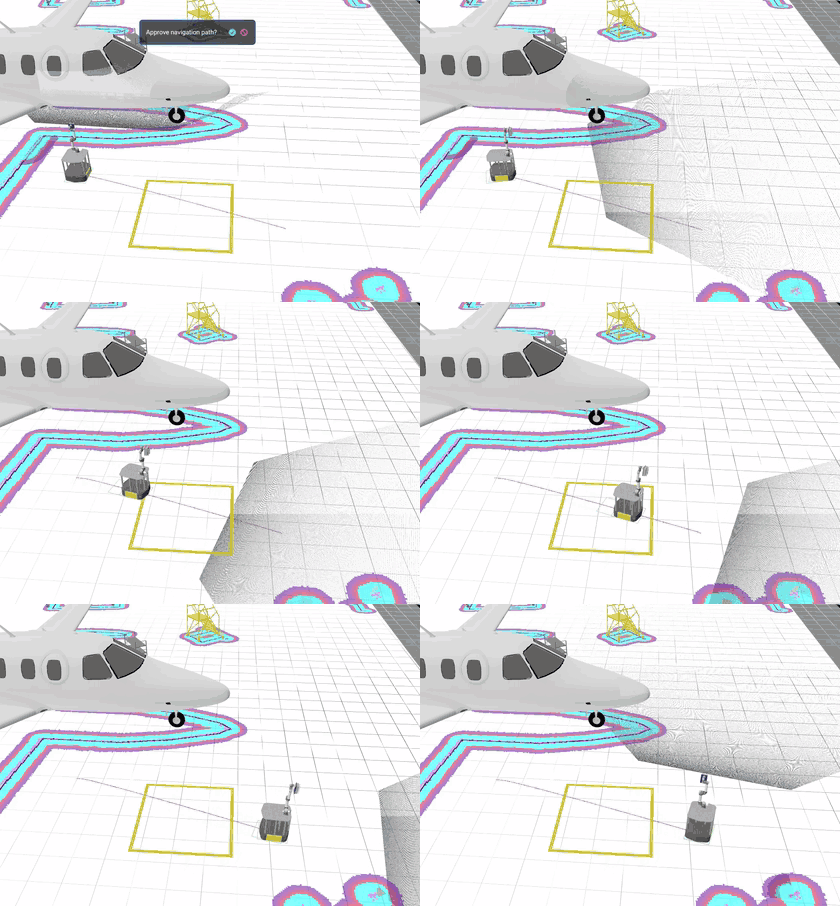
The hangar_sim reference application can now be driven around its map properly. Its mecanum wheels were remodeled so the mobile base rolls smoothly instead of juddering, the base height follows from that corrected geometry, and the navigation controller is pinned to a known-good version running open loop. Its teleoperation and box-moving Objectives were brought up to date with 10.0 along the way.
Enhancements
Integrated AI Models and GPU Acceleration
- A MoveIt Pro Trainer conversion that skips an episode for a low frame rate now names the frame rate the dataset is pinned to, and directs you to record the take into a new dataset created at a frame rate no higher than the camera rate.
Behavior and Library Improvements
Move to Named WaypointandMove to Cartesian Poseare the new names of the waypoint and pose motion Objectives, chosen for clearer intent. The previous names remain as deprecated compatibility aliases.Move to Cartesian Pose (JTC)now exposesmax_ik_solutionsandmax_mtc_solutions, so the planning budget can be tuned without editing the wrapped Objective. The defaults match the previous implicit values, so existing Objectives plan as before.ConvertDatasetgained anaction_sourceport, so an Objective can convert a recording that carries no commanded joint positions by labeling actions with the next recorded state. This matches the Action source setting on the Convert tab.
Simulation Improvements
- A simulated camera can now be turned off from the robot description with
<param name="camera_enabled">false</param>in its<sensor>block, so a camera defined in the MuJoCo scene is neither rendered nor published.
Discovery and Security
moveit_pro runnow prints the hostname, any detected configured IPv4 addresses, the frontend-key retrieval command, and, for named instances, the API port needed to connect the MoveIt Pro Desktop App from another computer. The credential itself is never exposed in startup output.
Misc User Interface Improvements
- Costmap colors in the 3D Visualizer now match RViz, so the inscribed radius and lethal obstacle costs are distinguishable at a glance instead of blending into a grey gradient.
- The
X-Axis (Front),Y-Axis (Side), andZ-Axis (Top)views now remember their zoom level between sessions, instead of reopening at a fixed zoom. UseReset Camerato return them to the default framing. - The Add Connection dialog now asks for the optional connection name after the frontend key, explains when a Runtime needs an alternate address, and identifies
3200as the default REST API port. - Connection failures in the MoveIt Pro Desktop App now name the address and ports that were tried and whether a stored frontend key was used, so a failure can be diagnosed from the message alone.
- The Planning Scene Editor gained a
Cloneaction that duplicates the selected keep-out zone, keeping its size and rotation and placing the copy beside the original. - The Task Constructor Debugger now selects a planning iteration's first stage on open, so its solutions and properties appear without an extra click. Sidebar spacing is tighter as well.
- The MoveIt Pro Desktop App now titles each window with the robot configuration, Runtime, and MoveIt Pro version it is connected to, so multiple open windows can be told apart in the window switcher.
- Long Behavior descriptions in the Behavior Tree editor are now cut off after ten lines, with a
Show Morecontrol to read the rest. - The MoveIt Pro Desktop App menus were reorganized: the canvas layout presets moved from the top navigation bar into Settings, under View and then Layout, and the About dialog now reports the connected Runtime version alongside the Desktop App version.
Reference Application Changes
Changes to the reference applications in moveit_pro_example_ws between 10.0.0 and 10.1.0.
- Added the
hand_eye_calibration_simrobot configuration package. hangar_simgates its forward stereo camera pair behind theenable_voconfiguration setting.hangar_simmakes theCartesian Path with Collision Checkingexample fail by design, to demonstrate a collision-checked Cartesian path being refused.lab_simconverts Behavior-collected training data with next-state action labels, wirestrajectory_timingintoSelect Region for Coverage Path, and raises the gripper stall velocity threshold above simulated contact chatter.vla_simraises the stacking Objective'sgoal_path_toleranceto 0.5.factory_simuses a reachable solid-face bracket grasp.kinova_simprepares the arm's starting posture for the admittance path example.- The shared
robotiq_descriptiongripper package, used by the Robotiq-equipped configurations, namespaces its activation General-Purpose Input/Output (GPIO) and removes command interfaces from mimic joints under mock hardware.
Documentation Improvements
- Added a how-to guide on biasing which joints move with per-joint planning costs.
- Added MoveIt Pro Desktop App uninstall instructions, with per-operating-system tabs and a Docker cleanup step that removes only MoveIt Pro images.
- Added a Major Releases and Long Term Support (LTS) page listing every major MoveIt Pro release, the ROS 2 distribution it targets, and the date its support window ends.
- Expanded the licensing deployment guidance to cover stable hardware identity, container permissions, persistent activation data, how a license works offline, and 9.4.2 upgrades. Corrected the offline activation guide, which documented a license key name, command-line flags, and file locations that did not match the
moveit_pro_licensetool, and which did not describe the Trusted Platform Module access the tool requires. - Added authenticated Python, JavaScript, and C# Web Bridge client examples for launching Objectives, alongside guidance on migrating an existing rosbridge client.
- Reworked the MoveIt Pro Trainer training-data guide onto the
vla_simblock-stacking configuration, and added a concepts section explaining how recording sessions, episodes, saves, and datasets relate. The guide's account of camera changes and frame-rate handling is corrected to match what Trainer does. - Added a how-to guide on training a vision-language-action (VLA) policy in the cloud with the
train-modelskill, covering prerequisites, what it costs, the preflight checks that run before any billing, and teardown. - Added an
llms.txtinventory and Markdown versions of the published documentation for LLM tools, covering current documentation and the MoveIt Pro 8 and 9 archives.
Other Improvements
- Error messages about a missing user workspace now name
moveit_pro setup_workspace, the command that creates one, rather thanmoveit_pro configure, which only records a path. moveit_pro configurenow offers to download the default user workspace when the configured path has none.- The default MoveIt Pro example workspace now downloads roughly twice as fast, by fetching its history without the file contents. Workspaces cloned from your own repository are unchanged.
- Trajectory and action-client failures now name the configured controller action server, making multi-appendage controller issues easier to diagnose.
- The agent logs now record complete
/do_objectiverequest payloads, including inline Behavior Tree XML and parameter overrides. - The shipped agent skills now read MoveIt Pro documentation from the Markdown pages and the
llms.txtindex at docs.picknik.ai, including archived release lines. - The Meta Quest teleop app is now downloaded and verified against a published checksum the first time you connect a headset, rather than shipped with MoveIt Pro. The first connection on each computer needs internet access. On an offline machine, place the app in
~/.local/share/moveit_pro/quest_oculus/, where MoveIt Pro finds it with no further configuration. apt purge moveit-pronow removes the configured workspace'sbuildandinstallfolders, asking first when run from a terminal.
MoveIt Pro Core
The changes below ship to every MoveIt Pro customer. They are collected here because they also reach MoveIt Pro Core customers, who install the standalone Core archive rather than the full Application Platform, and so are the subset of this release that a Core-only deployment receives.
PlanToJointGoal,SetupMTCPlanToPose,SetupMTCPlanToRobotState,SetupMTCConnectWithProRRT, andSetupMTCCartesianSequencegained an optionaljoint_costsport taking one cost per active joint, each at least 1.0.ComputeInverseKinematicsgained asolve_modeport that ranks solutions by cost-weighted distance when set tooptimize_distance. The costs also work on planning groups containing continuous joints, and can be set from the Python kinematics API throughIKParams.joint_costs.PlanToJointGoal,SetupMTCPlanToRobotState,SetupMTCPlanToPose, andSetupMTCConnectWithProRRTnow accept thetrajectory_timingport in time-optimal mode, and the shippedMove to Joint State,Move to Cartesian Pose,Move to Named Waypoint, and their Joint Trajectory Controller (JTC) variants expose it alongside their existing scale-factor inputs. The port also takesmax_deviation, the maximum blend deviation from the planned path at each waypoint, whichcreateTrajectoryFromWaypointscan set through trajectory options without changing the existing API.- The Path IK solver can now enforce a goal tolerance by refining the final path waypoint until its translation and rotation error are within the requested bounds, or failing with the remaining error. It is available through
set_goal_toleranceon the Path IK solver options, thePathIKMoveIt Task Constructor (MTC) stage, and the Cartesian planner in the C++ and Python APIs. Callers provide both tolerances and can set either to infinity to leave that component unconstrained. Cartesian planner failures now report the underlying reason instead ofPartial path IK found. - Pose IK and Cartesian path IK now support planning groups that contain mimic joints. Mimic joints follow their driving joint in the solution, but the solver does not enforce their own position limits.
- World collision objects can now be padded for motion planning from the MoveIt Pro Python API, through
ProRRTPlanner(world_padding=...)orset_world_padding(). Only collision checking sees the inflated shapes. Octree and plane shapes cannot be padded, and the planning result says so when that withholds a requested margin. - The Python
PlanningScenegained collision padding methods for robot links, world objects (per object or all), and attached bodies, honored by the Python planning functions and collision checks. A carried object can be given extra clearance during placement withset_attached_body_padding, without duplicating collision meshes. - The Python
ProRRTPlannernow exposesset_configuration_space_step,set_seed_attempts, andset_optimization_iterations, matching the options available throughpro_rrt.RRTParams. - Planning failure messages now report the configured padding when the colliding body is an attached object.
- MTC introspection memory is now bounded by default: only the most recently planned MTC tasks, 10 by default and configurable with
mtc_introspection_retained_tasksin theobjectivessection of the robot configuration package'sconfig.yaml, keep their introspection data, so Objectives with many MTC planning Subtrees no longer grow memory without limit. Evicted tasks still appear in the Task Constructor Debugger's planning iterations list, but their solutions can no longer be loaded.
Bug Fixes
- Fixed attached objects receiving zero collision padding and scaling when attached to a robot link without its own collision geometry, such as a flange or tool frame. Grasped payloads now respect
link_padding; lower it on motion Behaviors if a close-quarters placement no longer plans. Core - Fixed the
link_paddinginput port onComputeInverseKinematics, which was being overwritten by the planning scene and had no effect on collision checking. Inverse kinematics now applies the padding you ask for, so it may refuse poses that were previously accepted. Setlink_paddingto0.0to restore the earlier padding. Core - Fixed the
ProRRTshortcut stage validating segments more coarsely than the planner's own step, which let paths pass through obstacles between collision checks. The returned path is now sampled at the configuredconfiguration_space_stepin the Euclidean norm along its full length. Planning takes moderately longer at the same step; raiseconfiguration_space_stepto trade validation density for time. Core - Fixed
SetupMTCMoveAlongFrameAxisaccepting amax_distanceof zero, a negative value, NaN, or infinity, which silently commanded a 1 metre Cartesian motion instead of failing. Such an Objective now fails before planning. Core - Fixed
SetupMTCMoveAlongFrameAxisaccepting amin_distancegreater than itsmax_distance, which planned the motion and then always rejected it without explaining why. Core - Fixed zero-radius trajectory concatenation to preserve nanosecond-precise timestamps across CPU architectures. Core
- Fixed the RViz Motion Planning Tasks panel showing zeroed statistics and missing tasks when RViz is started after an Objective with multiple MTC tasks has already run. Core
- Fixed collision checking and path downsampling reading past the end of a trajectory waypoint when the planning group contained a mimic joint, which could report an unchecked trajectory as collision-free. Mimic joints are now derived from the joints they follow. Core
- Fixed link padding and scale values that failed validation still being applied to the robot's collision geometry. A non-finite or non-positive value is now rejected and logged instead of reaching collision checking, and a planning scene carrying one bad entry alongside good ones still applies the good ones. A link scale of
0is now refused rather than stored, so use the Allowed Collision Matrix to exclude a link from collision checking. Core - Fixed a spurious
Tried to remove world object ... but it does not exist in this scenewarning when a planning scene update removes a world object that is already absent. The removal now succeeds as a no-op. Core - Fixed
ValidateTrajectorychecking the wrong robot configuration when a trajectory listed the planning group's joints in a different order than the group, which could report a colliding trajectory as collision-free. Positions are now matched to joints by name inValidateTrajectory,RecordJointTrajectory, andBlendJointTrajectories, the last of which could otherwise move the wrong joints after blending. - Fixed the Joint Velocity Controller interpreting the first velocity command of a batch by array position instead of joint name. A
JointJogcommand that names a subset of the joints or lists them out of order now moves the named joints only. - Fixed a possible stall when planning a MoveIt Task Constructor task, where recording the task for the Task Constructor Debugger could block until it timed out.
- Fixed the Task Constructor Debugger requesting the same stage's solutions twice when the stage was selected again while its previous request was still in flight.
- Fixed a misleading "switching planning groups or controllers at runtime not supported" message when changing the arm or planning group during teleoperation. The switch always worked, and the notice is now a DEBUG-level log line.
- Fixed
ExecutePolicywarning about a clamped gripper command whenever a policy's gripper target landed slightly outside the joint's position limits. A target within 2% of the joint's position range past a limit is now clamped without a warning, and a larger overshoot is still reported. - Fixed MuJoCo viewer startup or closure hanging simulation and controller updates.
- Fixed mesh marker rendering in the 3D Visualizer, where a marker naming an unsupported format such as
.objfailed the whole view instead of being skipped, COLLADA (.dae) markers ignored the marker'scolorandmesh_use_embedded_materialsfields, and STL markers rendered fully opaque when transparency was requested. - Fixed the 3D view blaming the MoveIt Pro Runtime when a robot mesh request never reached it. The error now distinguishes a request the Runtime answered from one that was dropped on the way, and points at the browser, its extensions, or a proxy in the second case.
- Fixed the
train-modelskill crashing on the first training batch that decoded a video frame, because an unpinnedtorchcodecresolved to a build binary-incompatible with the pinned PyTorch version. The bootstrap now pins a compatibletorchcodecand fails during setup rather than partway into a paid training run if the pin is ever wrong. - Fixed conversion of MCAP recordings to the LeRobot dataset format running out of memory on datasets with many recordings. Peak memory is now bounded by the largest single recording, a conversion that fails part-way no longer disturbs the previously converted dataset, and a converter killed by the operating system now reports the signal in the job log instead of the log going silent.
- Fixed the MoveIt Pro Desktop App's launch and shutdown handling, where a closed, failed, or stalled instance left a process behind that blocked every later launch, launching again while it was still starting opened a second window and connection, and installed releases could not run side by side against their matching Runtimes.
- Fixed compatible MoveIt Pro Desktop App and Runtime releases being rejected solely because their release version strings differed.
- Fixed the MoveIt Pro Desktop App showing a generic Electron icon instead of the MoveIt Pro icon in Finder, Spotlight, and Launchpad.
- Fixed user workspace path handling in
moveit_pro configure,moveit_pro setup_workspace, andmoveit_pro build user_workspace, which rejected a path written with~or an environment variable, recorded a mistyped or never-downloaded path instead of reporting or downloading it, reported "User workspace set." after rejecting a path, and discarded an invalid value without saying why. - Fixed MoveIt Pro treating the current working directory as the user workspace when none was configured, and
moveit_pro runfailing with "the user workspace does not exist" instead of offering to download the default workspace when it had not been downloaded yet. - Fixed the GPU validation checklist reporting a bare "Skipped" for the container toolkit on a machine with no GPU, where the row below it gave the reason.
- Fixed newer AMD GPUs reporting as unrecognized because shells picked up Ubuntu's older Heterogeneous System Architecture runtime ahead of the one shipped with ROCm 7.2.2. Ubuntu's
rocminfois no longer installed. - Fixed the MoveIt Pro Desktop App asking for a frontend key again when editing a saved connection's address or service ports. The stored key now moves with the connection, and is only required again after you delete it.
- Fixed the
TeleoperateObjective starting automatically when the Teleoperation workspace is restored after startup or a Runtime reconnection. Selecting Teleoperation during a session still starts it. - Fixed Meta Quest teleoperation staying on "Searching for headset" after the on-headset app was closed, uninstalled, or crashed. MoveIt Pro now notices the controller data has stopped and reconnects on its own.
- Fixed attached collision objects, TF frames, and other TF-positioned elements lagging behind the robot model in the 3D view when
/tfhas several publishers, such as in simulation. - Fixed a custom view pane losing its view selector when its content failed to load, which left no way to switch the pane to a different view.
- Fixed expanding a Subtree in the Behavior Tree editor disconnecting the Subtree's contents when its file has a comment above the root node, which could also truncate that file when the Objective was saved.
- Fixed Objectives failing to load when Behaviors under
ReactiveSequenceuse generic XML tags. - Fixed deleted Objectives remaining selected or visible in the MoveIt Pro Desktop App sidebar.
- Fixed adding keep-out zones failing before the planning scene has loaded.
- Fixed loading a saved planning scene immediately clearing its restored objects.
- Fixed the interactive marker's planning indicator remaining visible after planning fails or while waiting for trajectory approval.
- Fixed the Task Constructor Debugger labeling candidates with non-finite costs as successful.
- Fixed lawnmower coverage path generation on arm64 platforms such as Jetson, where every row was traversed in the same direction and the end effector cut diagonally back across the covered area instead of stepping between rows.
- Fixed MuJoCo cameras rendering on the CPU instead of an available GPU when
DISPLAYpoints at an X server without GPU acceleration. - Fixed slow startup of camera views that publish images infrequently, including AprilTag overlays.
- Fixed green or corrupted camera and visualization streams for certain image widths.
- Fixed the MCP
build_workspacejob aborting with a configuration discrepancy prompt when the host's saved MoveIt Pro command-line interface (CLI) configuration did not match the session's target. - Fixed the MCP
get_recent_logstool returning stale startup output instead of recent Runtime activity, and losing the startup diagnostics of a failed Runtime launch. It also gained bounded text filtering and log freshness information. - Fixed
StopRecordingcompleting before a followingConvertDatasetcould find the recorded dataset. - Fixed Trainer's dataset list remaining stale after a recording finishes.
- Fixed automatically created Training Configs choosing a frame rate higher than the observed camera rate.
- Fixed Trainer sidebar conversion of Objective recordings without commanded-joint messages by defaulting to Auto action labels. Conversions report their label source and prevent mixed-label output, with a confirmed retry that uses next-state labels for all episodes. Strict Command conversion remains available.
- Fixed
ConvertDatasetreporting success for Command conversions when recording summaries confirm that the commanded-joint topic has no messages. The Behavior now fails before starting a job and names the action source setting to change. - Fixed
moveit_pro runconsuming a large fraction of a CPU core while idle, by removing redundant GPU detection and process-tree scanning from the launcher's polling loops. - Fixed the terminal being left with echo disabled after the
moveit_proCLI was killed while it was waiting at a prompt. - Fixed non-interactive installs and upgrades of the MoveIt Pro package printing a bare
Error:from the workspace cleanup prompt. They now keep the workspace build artifacts and print the steps to rebuild. - Fixed the example workspace upgrade prompt stashing local changes and removing submodules, then failing, when the workspace was cloned with a single branch.
- Fixed MoveIt Pro Desktop App release candidate package versions so successive candidates upgrade correctly and sort below the final release.
Breaking Changes
- ROS test dependencies are no longer installed in the MoveIt Pro Runtime image, which reduces its size and removes a GPL-3.0 Qt binding that a test fixture pulled in. Packages MoveIt Pro declared only as test dependencies are no longer installed on their own account, including the Panda, Fanuc, and PR2 test fixtures,
xvfb,launch_testing,ros2_control_test_assets,topic_tools, andexample_interfaces. If your workspace relies on one, declare it in your ownpackage.xmland your workspace's dependency install will provide it, or install it directly withsudo apt install ros-$ROS_DISTRO-<package>. - The default blend deviation drops from 0.1 to 0.05 for every time-optimal trajectory, which reduces collision tunneling at path corners at the cost of slightly slower corners. Core
- The
velocity_scale_factor,acceleration_scale_factor, andtrajectory_sampling_rateports onPlanToJointGoal,SetupMTCPlanToRobotState,SetupMTCPlanToPose, andSetupMTCConnectWithProRRTare deprecated. They are used only whentrajectory_timingis unwired. Core ProRRTPlanner'spaddingargument andset_padding()are deprecated in favor oflink_paddingandset_link_padding(). The old spellings keep working and emit a deprecation warning. Core- The previous names of the waypoint and pose motion Objectives are deprecated aliases of
Move to Named WaypointandMove to Cartesian Pose. Existing Objectives keep working.