10.0.0
MoveIt Pro 10.0 requires ROS 2 Jazzy on Ubuntu 24.04. ROS Humble is no longer supported: it reaches end of life in May 2027, and Jazzy is the current long-term support release. Support for ROS 2 Lyrical is on the roadmap for the 10.x line later this year.
Major Features
MoveIt Pro Desktop App
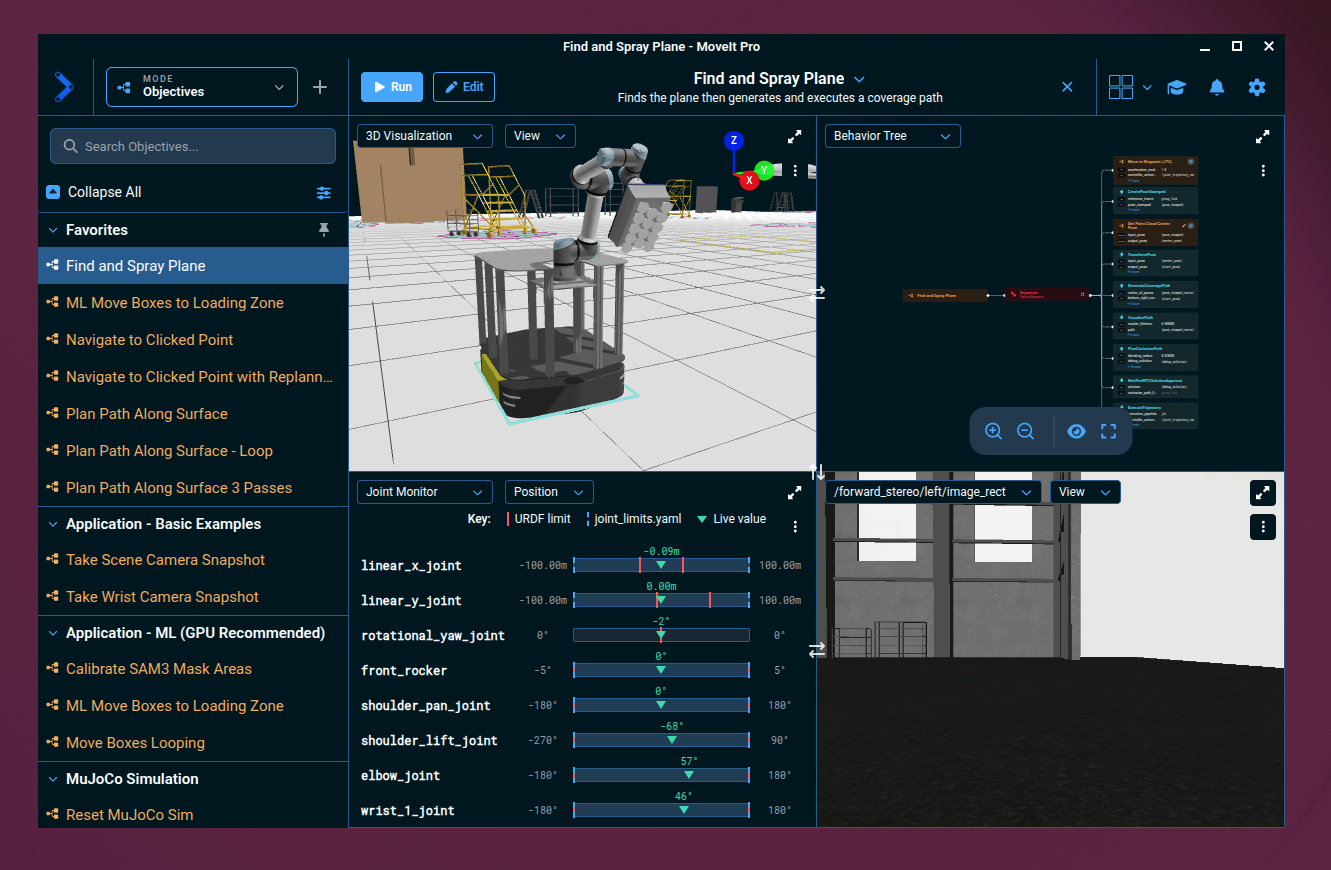
MoveIt Pro now ships as a signed desktop application for Linux, with macOS and Windows coming soon. A connection screen discovers Runtimes on your network and lets you save, edit, and switch between them, so moving between a simulation on your laptop and a robot on the bench is a simple click that drops you straight into the workspace shown above.
Runtime deployments no longer bundle or serve the web app, so the Desktop App is how you connect to a Runtime in 10.0.
VLAs: Run Learned Policies on Real Robots
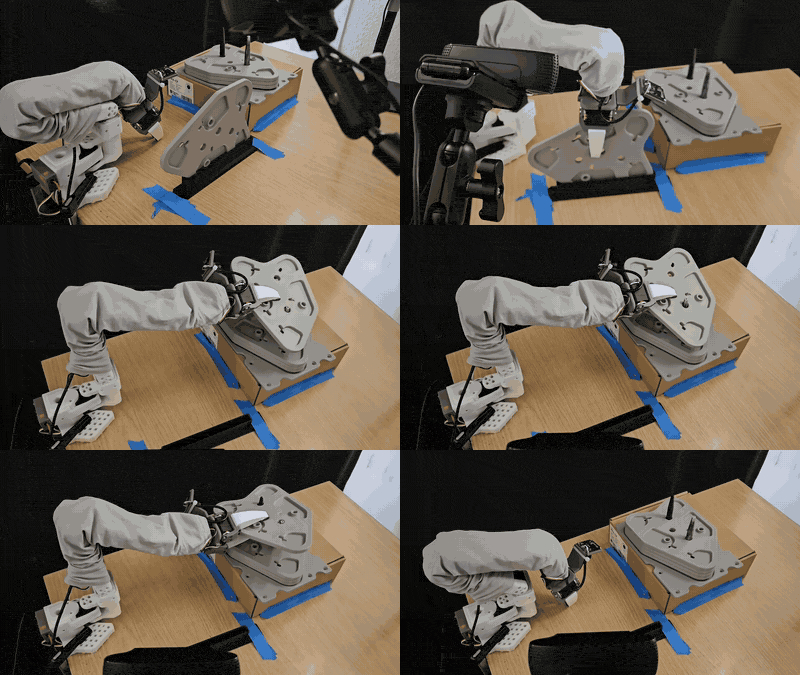
MoveIt Pro can now execute a learned policy as continuous, collision-checked robot motion, whether that policy is a vision-language-action model, a diffusion policy, or anything else served behind the policy interface. Motion stays smooth while the model thinks: each batch of predicted actions is blended onto the trajectory already running, so the arm never pauses between inference steps, and every action is checked against joint limits and self-collision before it reaches the controller.
Collect Sim and Real Data for Training
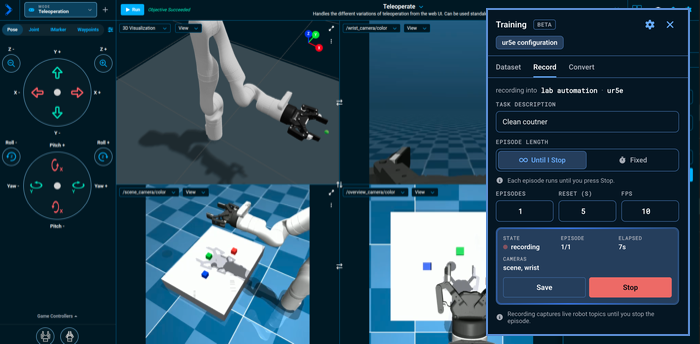
Teach a robot by demonstration without leaving MoveIt Pro. An Objective can now start a recording session, snapshot each episode as it is demonstrated, and convert the finished dataset to LeRobot format, ready to train a policy on. Recording from an Objective shares the sessions and defaults used by the Training panel, so scripted and hand-driven collection produce one consistent dataset.
Train Vision-Language-Action Models in the Cloud
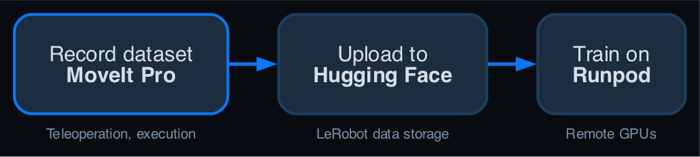
Fine-tune a pi0.5 or SmolVLA policy on your own LeRobot dataset without managing a local GPU. The new train-model skill checks the training setup, estimates the Runpod cost, launches and monitors the job in your account, and publishes a servable checkpoint to your Hugging Face Hub repository.
Meta Quest Controller Teleoperation
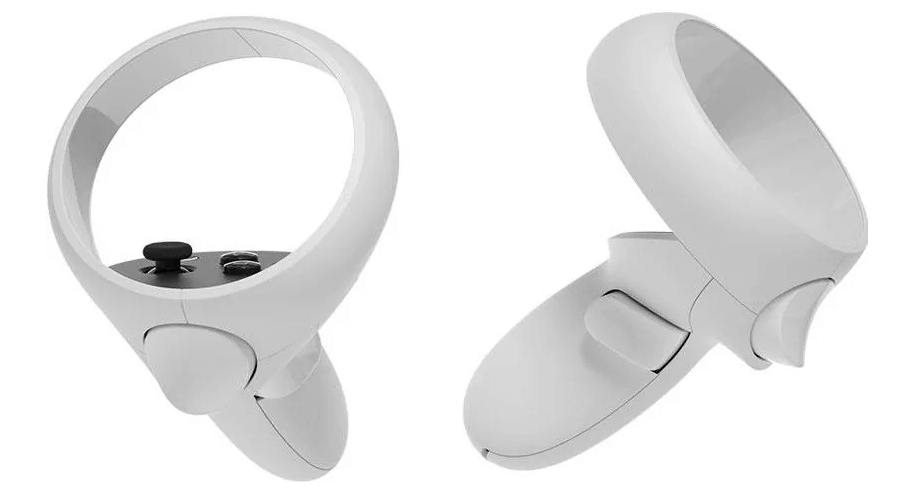
Drive the arm with a Meta Quest controller. Hold the clutch and the arm follows your hand along a collision-checked path, tuned for responsive motion, with the index trigger stepping the gripper open and closed.
Connect a Coding Agent with the MCP Server

MoveIt Pro now runs a Model Context Protocol (MCP) server, so a coding agent such as Claude Code or Codex can connect to your Runtime and inspect Objectives, Behaviors, Waypoints, robot state, and recent logs. Connect over local stdio, or over authenticated Streamable HTTP for an agent running elsewhere. The packaged MoveIt Pro skills that guide an agent through robot configuration, Objective and Behavior authoring, runtime workflows, and ROS 2 verification are now version-aware, so its advice matches the release you are running.
Selectable Fixed Frame in the 3D View for Navigation
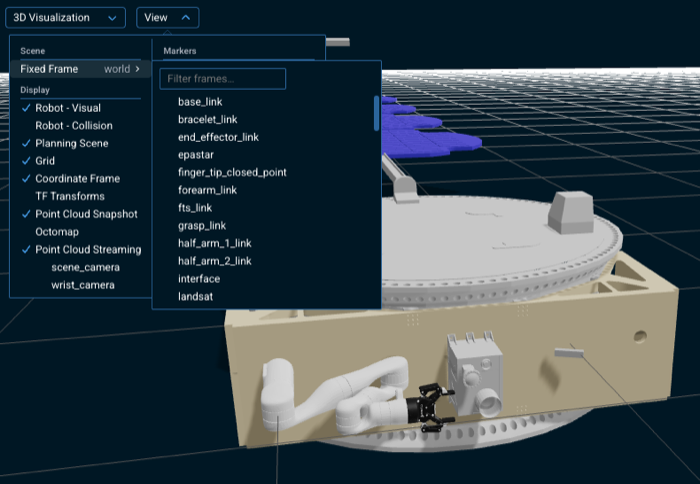
Until now the 3D view always drew the world from a fixed world origin, which is wrong for any robot that moves. You can now choose which transform frame the scene is drawn relative to. On a mobile robot this is the difference between being able to watch a navigation run and not: view from map or odom and the robot drives through its environment; view from base_link and the robot holds still while the world moves past it, which is what you want when inspecting an arm motion or a sensor reading.
Core Faster, More Predictable Motion Plans
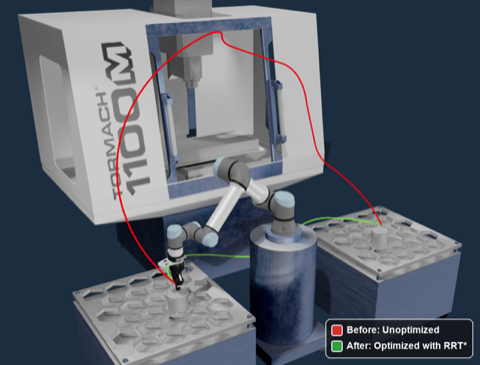
MoveIt Pro 10.0 improves motion planning in difficult kinematic workcells. MoveIt Task Constructor pipelines can generate a broad set of inverse-kinematics candidates, then use the spawn_top_k batch IK stage to send only the most promising candidates into the expensive path-planning stages. The Pose IK solver also keeps wide-range revolute-joint solutions at their nearest in-range equivalent instead of shifting them a full revolution away, preventing unnecessary winding on joints with ranges such as 720 degrees. Together, these changes reduce wasted planning work and produce more direct, predictable robot motion.
MoveIt Task Constructor Debugger
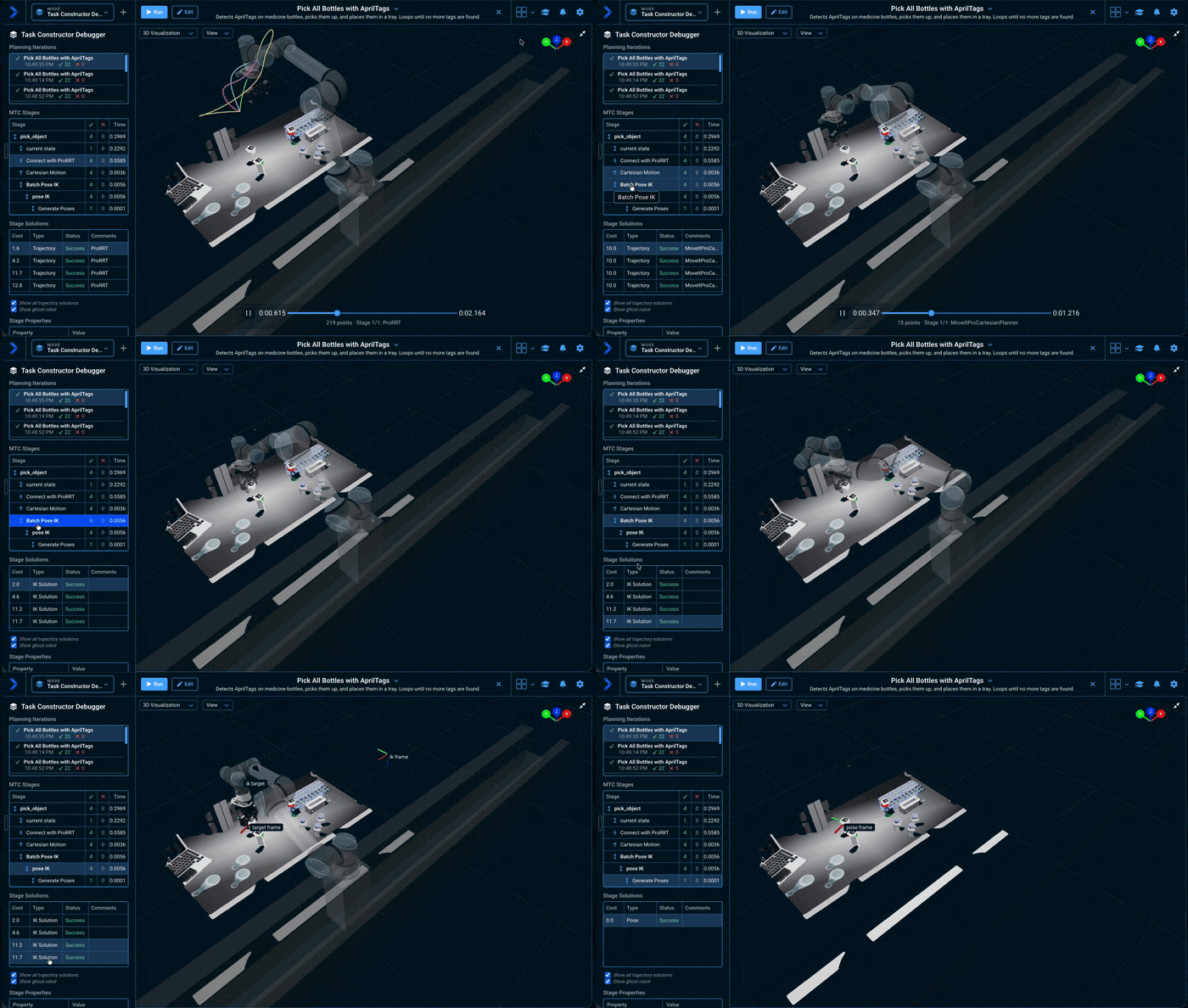
Understanding why a task failed to plan no longer means reading logs. The MoveIt Task Constructor debugger is now a dockable sidebar that keeps a history of planning iterations: pick any past planning call and inspect its stages, the solutions each one produced, and their properties, then preview a chosen solution's trajectory in the 3D Visualizer before running it.
Octomap in the 3D Viewer
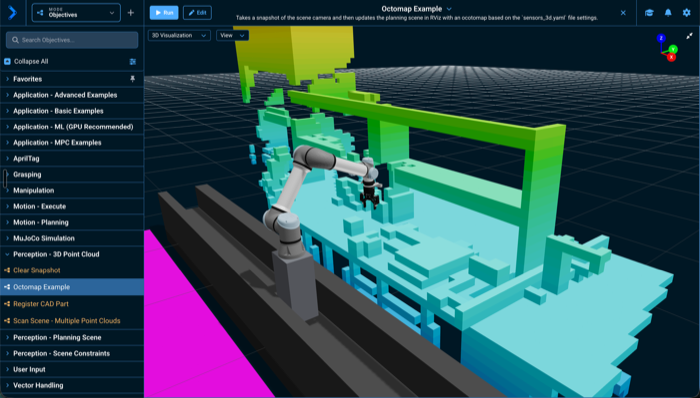
See what the robot thinks is occupied without opening RViz. Turn on Octomap in the View menu and the planning scene's occupied voxels stream live from the robot into the 3D view as height-colored boxes, alongside the robot model and point clouds.
Navigation Particle Filter in the 3D Viewer
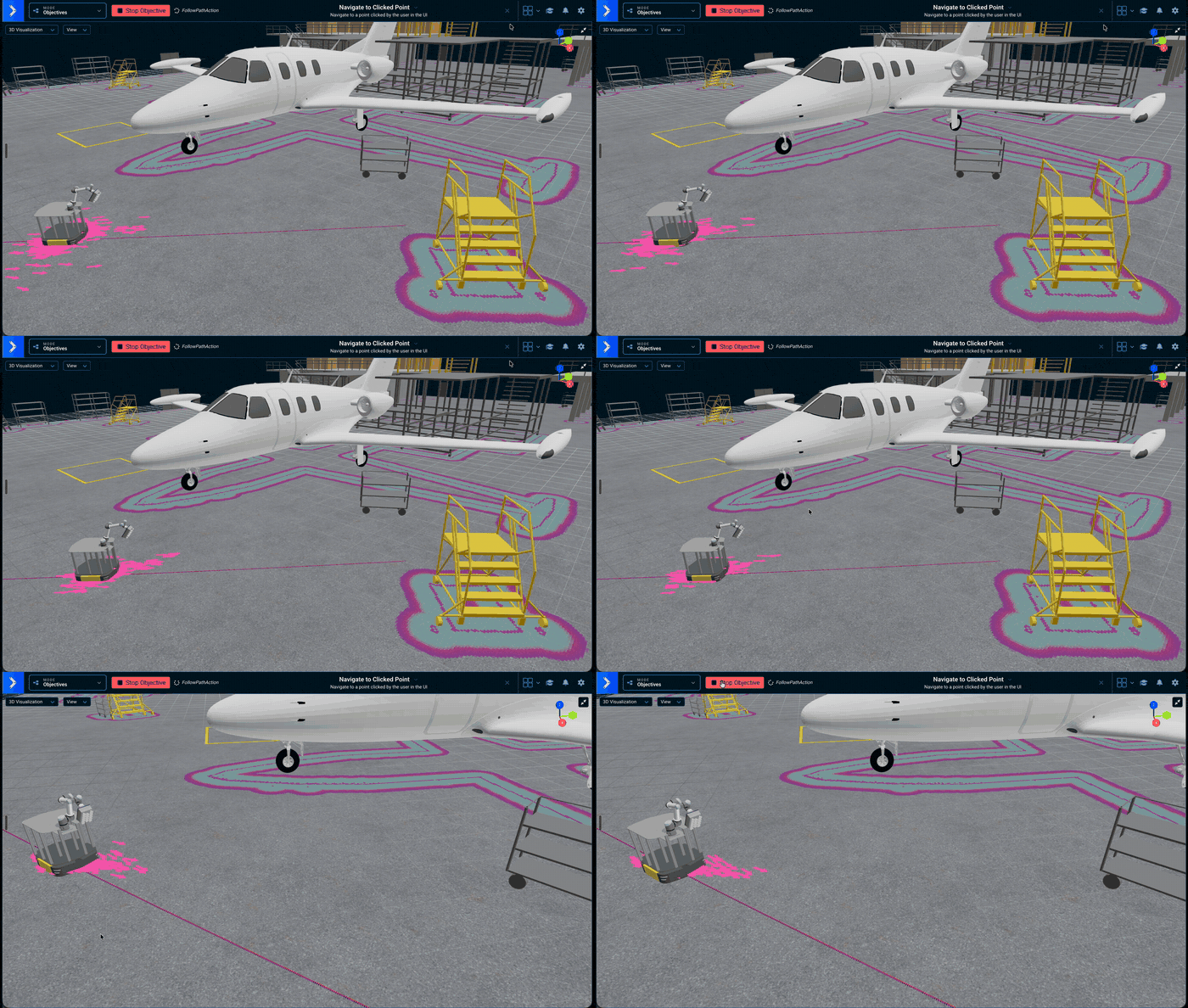
Watch a mobile robot localize itself. The 3D view can now overlay the navigation particle filter, drawing each AMCL (Adaptive Monte Carlo Localization) hypothesis as an arrow, so a robot that is confidently localized looks visibly different from one that is lost. Turn it on under Navigation in the View menu.
Mouse Control of Simulated Cameras
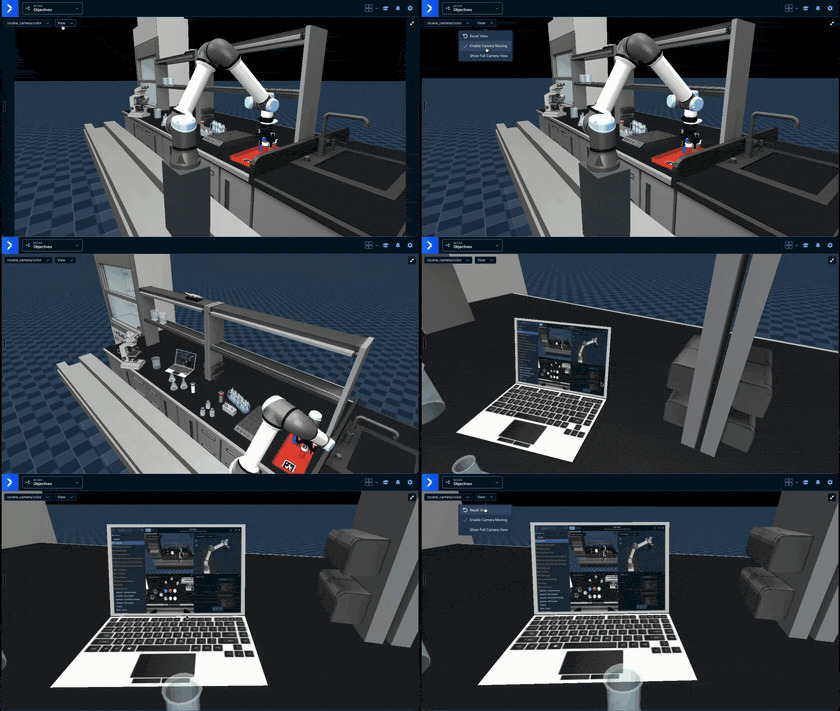
Orbit, pan, and zoom a MuJoCo simulation camera directly from its image stream, the same way the 3D Visualization pane already works. Reposition a simulated camera to frame what you need without editing the scene.
ROS 2 Jazzy on NVIDIA Jetson

MoveIt Pro runs on NVIDIA Jetson devices under ROS 2 Jazzy, bringing the current release line to Jetson hardware. Requires JetPack 7.2.
Measurement Tool in the 3D Viewer
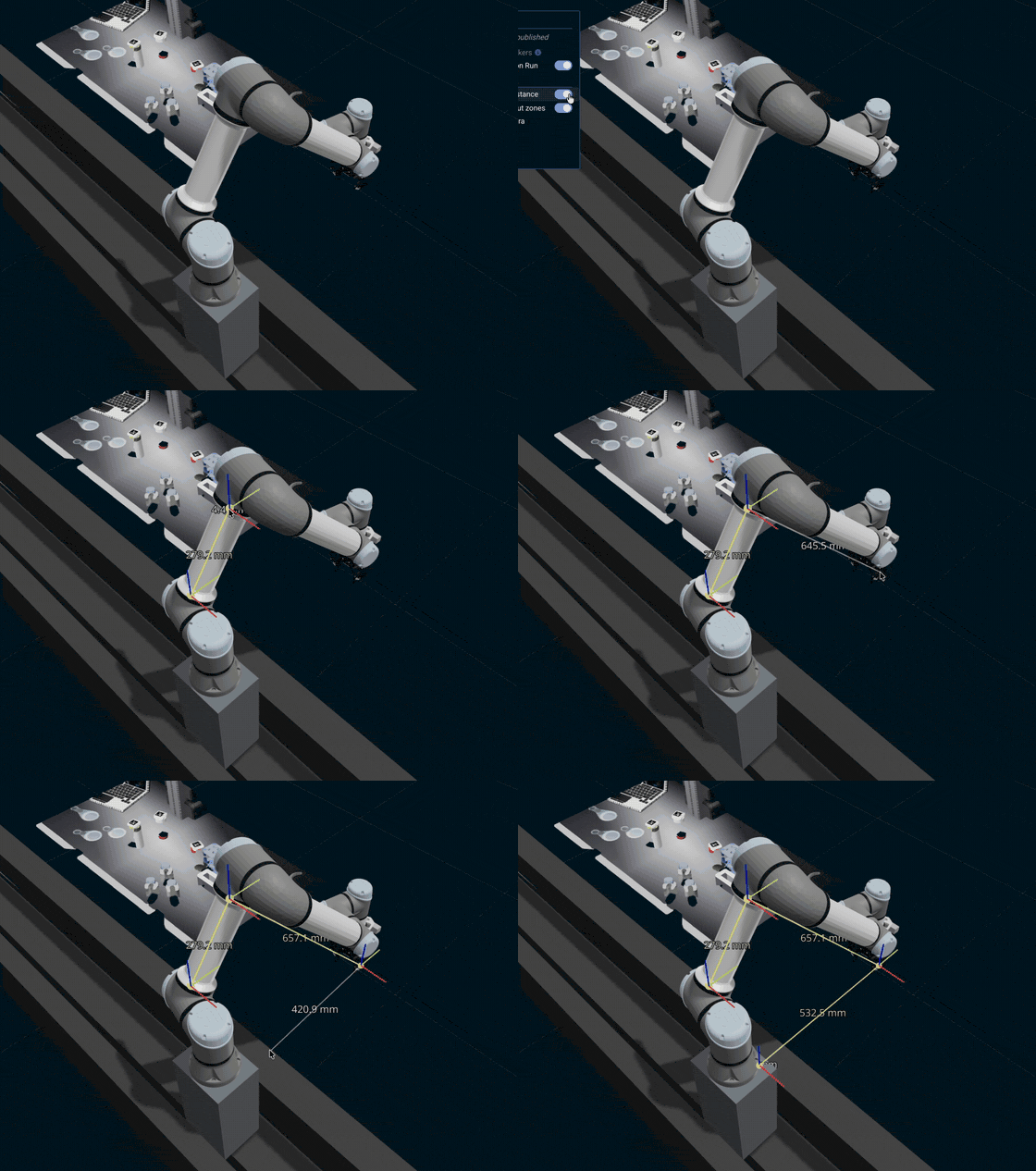
Measure distances directly in the 3D scene. Click points to build a polyline and each segment reports its length, with a running total and per-axis deltas, enough to check a fixture offset or a part's dimensions without leaving MoveIt Pro or moving the robot.
Tiling View Panes
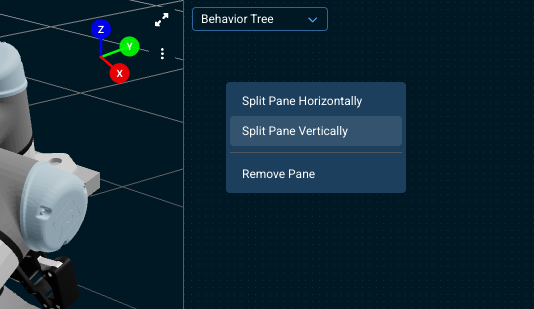
The canvas is now a tiling workspace. Right-click any pane to split it horizontally or vertically, then swap, resize, fullscreen, or reassign panes until the layout matches the task: a tall 3D view beside two camera feeds with a terminal underneath, for instance. Your arrangement is remembered per robot configuration package, and the layout presets remain as a one-click starting point.
Planning Scenario Capture for Debugging
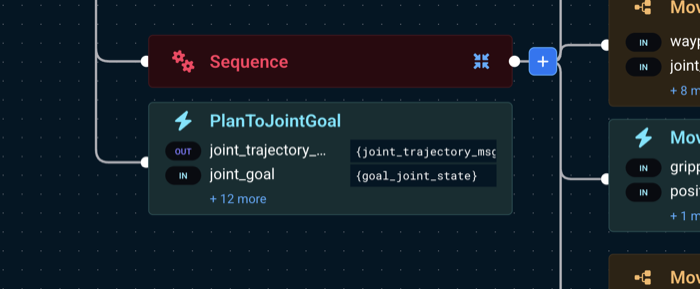
When a planning failure is hard to reproduce live, intermittent, or only seen in the field, MoveIt Pro can now record each PlanToJointGoal request to disk as a scenario: the robot model, planning scene, and full request, captured at the moment of planning. Attach it to a planning-failure report and PickNik can reproduce exactly what the planner saw.
Security: Web Endpoint Authentication
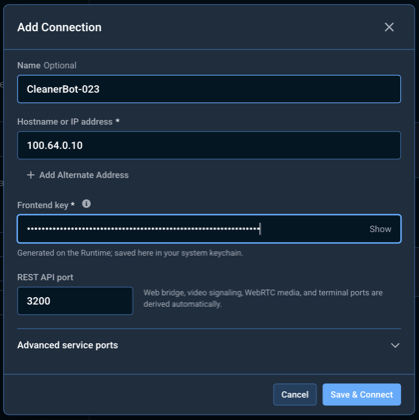
The MoveIt Pro web endpoints now require a shared frontend key on every connection, so a Runtime on a shared network is not open to anyone who can reach it. The CLI generates and stores the key automatically, and the Desktop App uses it to authenticate the Runtime's TLS certificate before sending credentials.
Enhancements
Integrated AI Models and GPU Acceleration
- Added a shared inference model pool that deduplicates model loads across Behaviors, reclaims GPU memory from idle models, and releases loaded models before driver shutdown for a clean exit on GPU hosts.
- Added the MIGraphX ONNX (Open Neural Network Exchange) Runtime execution provider so ONNX inference runs on AMD GPUs instead of falling back to CPU.
- MoveIt Pro now auto-selects the AMD ROCm container image and runtime when an AMD GPU is detected, matching how NVIDIA GPUs are already handled.
- Updated AMD GPU images to provide ROCm-accelerated native libtorch on x86-64 while ONNX models use CPU inference, with CPU-only native libtorch available in the ARM64 AMD image.
- Added text-encoder, geometry-encoder, and decode support to
SAM3Detect, so its inference pipeline matches the reference SAM3 implementation.
New Behaviors and Libraries
SetInitialPosere-seeds particle-filter localization at the robot's current pose.GetRegionFromUserpauses an Objective, switches the canvas to a named camera view, and asks the operator to drag a bounding box on the image. It returns the selection as ageometry_msgs/PolygonStampedin normalized image coordinates, validated on the Runtime rather than trusted from the Desktop App.GetMask2DFromRegionturns a region selected that way into a 2D segmentation mask, so an operator-drawn box can feed the same downstream vision Behaviors as an automatic detection.GenerateSurfaceCoveragePathlays out a raster path of tool poses over a rectangular region, with configurable standoff, margin, and spacing, ready forPlanCartesianPathto follow.
Behavior and Library Improvements
- Model Predictive Control (MPC) Behaviors now stop the robot at the end of a streamed trajectory if updates cease and fail with an error when the trajectory controller rejects a trajectory or is unavailable, instead of silently doing nothing.
PlanCartesianPathnow exposes atrajectory_timinginput port to choose how the planned Cartesian path is timed: the existing time-optimal parameterization, or a new constant-speed Cartesian trapezoidal velocity profile that holds the tool's Cartesian speed constant between acceleration and deceleration ramps. The previousvelocity_scale_factor,acceleration_scale_factor, andtrajectory_sampling_rateports are deprecated in favor of the new port./masks_visualizationnow draws thicker bounding-box outlines, so detections are easier to see.InitializeMTCTaskdeprecates itscontroller_namesport. It is no longer used to select controllers for execution, becauseExecuteMTCSolutionuses its owncontroller_action_nameport and an explicitSwitchControllerstep, and it will be removed in a future release.InitializeMTCTaskdeprecates itstrajectory_monitoringport. It is no longer used by MoveIt Task Constructor (MTC) execution and will be removed in a future release; to collision-check a planned trajectory against an updated planning scene, use theValidateTrajectoryBehavior at the Behavior Tree level.- Visualization, IK, and marker Behaviors now use the robot model's root frame instead of a hardcoded
worldframe, so they work on mobile robots whose model is rooted elsewhere. CreatePoseStamped,CreateStampedPose,CreateTransform,TransformPose, andOverridePoseOrientationnow use typedQuaternionorientation andVector3position ports instead ofvector<double>. Existing Objective XML keeps working; Behaviors that pass these values by blackboard reference must supply the matching message type. See the 10.0 migration guide.AveragePoseStampedandAveragePoseStampedVectorgain an optionalreference_frameport. If poses arrive in a moving frame, like a camera detecting an AR tag while the robot moves, averaging them in that frame gives a wrong result; setting this port to a fixed frame transforms each pose there before averaging.PlanCartesianPathandSetupMTCPathIKgain acartesian_constraintport to select whether the tool orientation is constrained while following a Cartesian path, editable through a new modal. Theposition_onlyport is now deprecated.- Core
ComputeInverseKinematicsandSetupMTCBatchPoseIKgain ajoint_costsport that weights how expensive each joint is to move, steering the solver toward solutions that favor the cheaper joints. Costs apply when the Behavior compares candidates, soComputeInverseKinematicsneedssolve_modeset tooptimize_distance; setting costs underfirst_foundfails with an error rather than being ignored. - The ProRRT planning Behaviors (
PlanToJointGoal,SetupMTCConnectWithProRRT,SetupMTCPlanToPose, andSetupMTCPlanToJointState) now take orientation constraints through a single typedorientation_constraintport, with a dialog for setting per-link angle tolerances and an editable dropdown of the robot's links. Thekeep_orientation,keep_orientation_tolerance, andkeep_orientation_link_namesports have been removed; see the 10.0 migration guide to migrate existing Objectives. - The
GetMasks2DFromExemplarBehavior now loads SAM3 from a single versioned model bundle manifest via themodel_bundle_manifestandruntime_idports, replacing the four per-model path ports, and warns in the UI when inference falls back to CPU. GetMasks2DFromPointQuerynow runs on the shared model pool and loads its SAM2 models from a versioned model bundle, replacing itsencoder_model_pathanddecoder_model_pathports with a singlemodel_bundle_manifestport plus an optionalruntime_id. Itsimageport now requires a 3-channel color encoding (rgb8,rgb16,bgr8, orbgr16).- The
GetMasks2DAutomaskBehavior now loads its SAM2 models from a single versioned model bundle through the shared model pool, using the newmodel_bundle_manifestandruntime_idports in place of the separateencoder_model_path,prompt_encoder_model_path, anddecoder_model_pathports. Models are shared with other Behaviors using the same bundle instead of being loaded once per Behavior, and a Behavior that falls back to CPU inference now says so in the UI.
Simulation Improvements
- MuJoCo simulation models, both MJCF (MuJoCo Modeling XML File) and raw URDF, can now reference mesh and asset files by ROS
package://URI (Uniform Resource Identifier), resolved automatically across packages without flattening assets into a single directory. - Added an optional
base_link_namehardware parameter to the MuJoCo simulation interface so mobile robots can name the base link explicitly, keeping simulated sensor transforms from conflicting with the robot's own transform tree. - Added
camera_shadowsandcamera_offsamplessimulation hardware parameters for opting into higher-fidelity offscreen sensor rendering. - MuJoCo's engine plugins (cable and shell elasticity, signed-distance-field collision, plugin actuators and sensors) are now available to simulation models. Declare the ones a model needs in its MJCF
<extension>block. Signed-distance-field collision and elasticity are considerably more expensive per simulation step than MuJoCo's native primitives; if a scene using them causes the simulation to fall behind real time, raise the model's timestep headroom or reduce contact density rather than loosening controller path tolerances. - The MuJoCo interactive viewer window now opens shortly after the simulation starts stepping, rather than during hardware initialization, and is skipped if the simulation is already shutting down. A viewer that fails to open no longer stops the simulation.
Discovery and Security
- Discover all running MoveIt Pro hosts advertised on the local network in the Desktop App.
- Run several isolated MoveIt Pro deployments side by side on one machine, each with its own containers, network namespace, ports, data, and logs, for comparing two robot configurations or testing an upgrade without disturbing a working setup.
- Added a per-host instance discovery service that lists a machine's MoveIt Pro deployments and their running state, started automatically by
moveit_pro runand managed withmoveit_pro discovery up|down|status. - Compacted the fixed ports to REST API
3200, Foxglove3201, video signaling3202, WebRTC media3203, instance discovery3204, and terminal3205. Port3203carries the WebRTC camera media and must be reachable from the machine running the Desktop App over both UDP and TCP, which may require a firewall change when upgrading. - Added API-key authentication and TLS support for MoveIt Pro Runtime web endpoints.
- Desktop connections authenticate the Runtime TLS (Transport Layer Security) certificate before sending deployment credentials.
- Added a signed Runtime identity endpoint and verifier so direct and operator-managed clients can authenticate a MoveIt Pro deployment before transmitting credentials.
- MoveIt Pro now automatically generates, securely stores, injects, displays, and rotates a deployment-specific Frontend Key through the command-line interface (CLI) without making it a startup prerequisite.
- Developers can let a trusted local host supply the frontend key without storing it in the browser.
- Isolated custom view panes from reusable Desktop App credentials and limited pane URLs and navigation to trusted Runtime origins.
- The Desktop App now verifies authentication and Desktop App/Runtime compatibility before starting ROS, requiring a matching release, protocol epoch, and capability set.
- Discovery now reports a yellow Not Ready status for Runtimes that answer but are not yet ready to accept Desktop App connections.
Misc User Interface Improvements
- Added a "Mark as favorite" option when creating a new Objective.
- The Objective editor now preserves the direction (input, output, or bidirectional) authored on each Subtree port, instead of displaying every Subtree port as bidirectional.
- You can now select a group of nodes in the Objective editor and wrap them in a new Sequence with
Ctrl+G/Cmd+Gor the Group Under Sequence button, making large Behavior Trees easier to organize. - The Favorites section of the Objectives sidebar can now be pinned so it stays visible while you scroll the rest of the list. Use the pin button in the section header; the choice is remembered per browser.
- The planning scene now opens locked by default, preventing accidental edits to keepout zones until you explicitly unlock it.
- The Alert Sidebar now compresses the view panes when opened, like the other sidebars, instead of overlaying them.
- The terminal view pane now has a
Skillsmenu that inserts a MoveIt Pro agent slash command at the prompt for the core workflows (create robot config, create Objective, create Behavior, debug Objective, run Objective). - Terminal view pane controls now sit in the pane's top bar alongside the view selector, on a blue strip matching the camera panes.
- The docked terminal can be moved back into a grid pane with a new pin control, mirroring the grid pane's pin-to-dock.
- View pane selector buttons now use a bordered style matching the docked terminal's shell selector.
- Edit, View, and Run Behavior Tree panes now share a single renderer with consistent visual chrome and node affordances.
- Behavior Tree zoom and location are now preserved when switching between Edit, View, and Run.
- After an Objective fails during a Run, switching to Edit now outlines the failed branch (parent nodes show a red border and the failed node pulses) and re-centers on it, so you can immediately see and fix what failed.
- Simplified Behavior Tree editing to a single snap-to-place mode. The "Classic line draw between nodes" connection-style setting has been removed; the tree re-lays out automatically as you drag Behaviors into place.
- Redesigned the app's dialogs with a cleaner, consistent look and full keyboard and screen-reader accessibility.
- Improved keyboard navigation in the web UI: interactive controls now show a consistent focus ring when focused from the keyboard, and multi-column menus support moving between columns with the left and right arrow keys.
- Behavior Trees now open and switch between View, Edit, and Run modes without loading spinners, staying laid out and visually continuous across transitions.
- View pane selectors, auxiliary pane menus, fullscreen controls, the pane split/remove menu, and the 3D Visualizer side buttons now auto-hide until the pane is hovered or focused. This is optional: turn off Auto-hide View Pane Controls in the Settings menu to keep them visible at all times.
- The Blackboard Viewer can now order its list of blackboards alphabetically (A-Z / Z-A) or chronologically (newest or oldest first) via a dropdown in the panel header, making it easier to find a specific blackboard instance when an Objective produces many.
- The "New Behavior" menu now points to the terminal
create-behaviorskill instead of the old in-app package generator. It explains the one-time skills setup and opens the AI Assistant terminal to scaffold a Behavior (header, source, registration, CMake, and tests) in one guided step. - The Logs / Notifications sidebar search bar now matches the consolidated search field used across the other sidebars.
- Moved the measurement, camera-reset, and keepout-zone-lock controls from the 3D visualization overlay into the
Viewmenu. - Remap Meta Quest face buttons to recording and waypoint actions from Cartesian Jog.
- Teleoperation now opens in Pose mode and orders its controls as Pose, Joint, IMarker, and Waypoints.
- The Alert Sidebar now stays open until the alert icon is clicked again.
- Training data collection now shows a one-time notice describing what recordings capture, where they are stored, and the operator's privacy responsibilities, and marks the feature as beta in the panel header.
- Trainer now records the frame rate each episode was configured for alongside the rate actually observed, and shows both, so a recording that ran slower than requested is visible before it reaches training.
- Settings now opens as a right-sidebar panel alongside the active mode, matching Training Data Collection, instead of a dropdown menu.
- The connection error screen now explains what went wrong and lists troubleshooting steps instead of showing a raw stack trace. Full diagnostics moved behind a collapsible "Advanced error details" section.
- Added a search field to the Blackboard Viewer for filtering blackboard scopes by name.
- Opening the alert history sidebar with a long history is now dramatically faster: rows are virtualized, cutting median time to first frame from 4,115 ms to 258 ms with 1,000 retained alerts.
- Menu hover and keyboard highlighting are now consistent across dropdowns, context menus, and selects.
- Added a tooltip to the "Subtree-only Objective" checkbox explaining that it hides the Objective from the runnable list while keeping it available as a Subtree in the Objective builder.
- Camera panes now stream over WebRTC instead of MJPEG (Motion JPEG). Latency and bandwidth both drop, the browser decodes in hardware, and one encode serves every viewer of a topic instead of one per viewer, so opening the same camera on three screens no longer costs three times the CPU.
- Objective, Waypoint, and Behavior creation are now available from the global Add menu in every mode.
Documentation Improvements
- Added a guide for connecting an AI assistant to MoveIt Pro through the MCP server.
- Corrected the Tutorial 2
/do_objectivecancellation note to state that an unknown Objective goal is accepted and then aborted, rather than rejected. - Added a guide for migrating from open-source MoveIt 2 to MoveIt Pro Core: Migrate from MoveIt 2 to MoveIt Pro Core.
- Clarified how Subtree blackboard values persist when a Subtree is reticked by loop decorators, and how to reset loop-local vector state explicitly.
- Tutorial 2 now demonstrates passing a runtime value into an Objective from an external application using parameter overrides.
- Added a how-to guide for running the VLA (vision-language-action) cube-stacking example in simulation, from Hugging Face setup to running the
Stack Cubes with the VLA PolicyObjective (Run the VLA Cube-Stacking Example). - Added a how-to guide for connecting vision-language-action policies to the
ExecutePolicyBehavior, covering theGetActionChunkservice contract, adapter construction, and tuning (Connect a VLA Policy). - Added setup and connection guidance for the MoveIt Pro Desktop App.
- Added a how-to guide for controlling end-effector speed.
- Added how-to guides for collecting VLA training data, both by hand with Trainer and automatically from an Objective, covering how to review episodes and convert a finished session to LeRobot format.
Other Improvements
- The MoveIt Pro Desktop App adds compatibility preflight, automatic Runtime recovery, persistent profile layouts, and cross-shell clipboard support.
- Added the
moveit_pro run --only-uiflag to run the web interface alone as an operator console that connects to MoveIt Pro deployments elsewhere on the network. - Robot configuration packages can explicitly configure and inherit their runtime launch file through
runtime_launch_file. - Added a
/healthreadiness endpoint and container healthchecks so deployments can sequence and monitor MoveIt Pro's containers; the drivers and agent containers now exit on failure instead of staying "up" while non-functional, so a supervisor can detect and restart them. - Added a "Robot Config Package" selector to the New Objective dialog so Objectives can be saved directly into a shared base configuration instead of only the running configuration.
- The API documentation now includes the template-instantiated Behaviors (such as
ResetPoseStampedVector,SavePoseToYaml, andLoadPoseStampedFromYaml), so the Behavior Hub links to them resolve. moveit_proCLI commands now load a.envfile from the user workspace root, making per-deployment environment variables (for example, per-station camera serials) available to Docker Compose. Variables already set in the environment take precedence, so the file cannot override MoveIt Pro's configured values.- Added
optimization_params,seed, andjoint_range_constraintinput ports toSetupMTCPlanToPose, matching the other ProRRT planning Behaviors, so free-space pose motions can use multi-seed planning and path refinement without hand-assembling the Connect and IK building blocks. - Run-mode Behavior Tree pane now renders commented-out nodes and dims skipif/disabled branches, matching the Edit and View panes.
- The
camera_topicsport onRecordEpisodeoffers a multi-select of live camera topics in the Objective editor. - The
zero_ftsservice of the velocity force and joint trajectory admittance controllers can now average multiple force/torque samples before applying the sensor offset, preventing a single noisy reading from causing drift in compliant motions. The number of samples is set with the newzero_fts_num_samplescontroller parameter (default 10). The sensor can now also be zeroed while the controller is idle, not only while a motion is executing. - The
~/zero_ftsforce/torque sensor zeroing service now replies only after the averaged tare has been applied, so a Behavior that zeroes the sensor and then commands motion waits for the tare instead of racing it. The sensor is only zeroed while the controller is idle: a trigger received during active force control is rejected with a failure response instead of being acknowledged immediately. - Camera encoding now runs only while a pane is open, and one encode is shared by every viewer of the same topic.
- Camera panes now show a connecting indicator while a stream starts, instead of a black pane; streams start faster and switching between cameras within 30 seconds reuses the running encoder instantly.
- The Velocity Force Controller and Joint Trajectory Admittance Controller can now publish the filtered force/torque wrench they act on (tare offset, low-pass filter, and deadband applied). Enable the new
publish_wrenchcontroller parameter to stop motions on a force threshold withForceExceedsThresholdusing the same wrench values the controller uses. - Removed the opt-in legacy rosbridge endpoint and its CLI flags; external clients must migrate to native ROS 2 or a supported web-bridge integration.
- Added
--with-inference-servertomoveit_pro runto start a workspace-defined model inference server together with the stack, including automatic GPU serving on NVIDIA machines. The first run builds the server image before the stack starts, and reports that it is doing so. - Added
--only-inference-servertomoveit_pro runto run the model inference server on its own, so the loaded model survives stack restarts; the terminal reports the server's loading and ready status. - Simplified the
config.yamlhardwaresection:additional_driver_launch_fileandadditional_agent_launch_file(both always included) replacesimulated,robot_driver_persist_launch_file,simulated_robot_driver_persist_launch_file, andsimulated_hardware_launch_file. A robot configuration package still using a removed key now fails to load with a message naming its replacement. See the config.yaml reference and the 10.0 migration guide for migration steps. - User-facing guidance in the Desktop App now uses Desktop App and Runtime terminology instead of browser, frontend, and backend, and points at Desktop App actions rather than refreshing the page.
- Clarified the wording of
CYCLONEDDS_URIerrors reported by the launcher script. - Added Ubuntu 26.04 to the validated host operating systems and removed Ubuntu 22.04. Ubuntu 24.04 remains the recommended host.
- Ubuntu source packages can now be retrieved from inside the MoveIt Pro container image with
apt-get update && apt-get source <package>. - The MoveIt Pro Desktop App installs a
moveit_pro_desktopcommand, matching themoveit_procommand that runs the Runtime. moveit_pro runnow prints the command that opens the MoveIt Pro Desktop App once the Runtime is up.- MoveIt Pro Desktop App installers now carry the release version in their filename and are published to a single download folder, for example
https://download.picknik.ai/desktop/moveit-pro-desktop-10.0.0-ubuntu-24.04-amd64.deb. - Added MoveIt Pro Desktop App download links for Ubuntu and Fedora to the installation guide, the quick start tutorial, and the Desktop App guide.
moveit_pro runnow prints the MoveIt Pro banner before any startup check, prompt, or warning, so every line of a launch appears under it.- Added the
moveit-pro-licensecommand-line tool, packaged for Debian-based (.deb) and Red Hat-based (.rpm) distributions, for provisioning licenses and performing offline activation. - The
moveit-pro-licensepackage is built and verified for Ubuntu 24.04 and 26.04, Debian Trixie, and Fedora 43 and 44. Debian Bookworm and Fedora 42 are not supported targets.
MoveIt Pro Core
The changes below ship to every MoveIt Pro customer. They are collected here because they also reach MoveIt Pro Core customers, who install the standalone Core archive rather than the full Application Platform, and so are the subset of this release that a Core-only deployment receives.
SetupMTCBatchPoseIKnow exposes aspawn_top_kport to propagate only the K IK (inverse kinematics) solutions closest to the seed (in joint-space) into the MTC pipeline, so an Objective can search the IK candidate space broadly without paying downstream planning time on far-from-seed branches.- The ProRRT planning Behaviors gain a
pad_self_collisionsoption in their C++ and Python APIs, so robot link padding can stay enabled for environment collisions while being disabled for self-collision checks. - The Third-party Notices document shipped with MoveIt Pro now includes the complete license texts and a source-code availability statement for all bundled open-source components.
- Objective start and cancel requests can now declare a caller identity (client type, name, and instance ID), and MoveIt Pro logs which caller started, preempted, or canceled each Objective.
- String-keyed containers across the C++ API now share a single transparent hasher,
moveit_pro_types::StringHash, replacing eleven near-identical per-package copies. Custom code that named a removed hasher (hash_utils::StringHashand its headercontrol_common/hash_utils.hpp,moveit_studio_plugins::StringHash, ormoveit_studio::waypoint_manager::StringHash) should switch to the shared one. Rebuild your user workspace against 10.0 rather than reusing a previous install space: a Behavior library built against 9.x that used the publisher-cache container will otherwise fail to load with an undefined symbol. - Added
PlanningScene::applyAttachedCollisionObjectMsg, which reports why an attach or detach cannot be applied. The bool-returningprocessAttachedCollisionObjectMsgis deprecated and will be removed in the next major release; migrate to the new method. In Python,PlanningScene.process_attached_collision_objectis replaced byapply_attached_collision_object_msg, which raisesValueErrorwith the reason when the operation cannot be applied. - Removed the deprecated
moveit_studio_commoncompatibility package; migrate dependencies, includes, namespaces, and CMake helpers tomoveit_pro_commonandmoveit_pro_package. - Removed the legacy MoveIt trajectory execution manager and the MoveIt controller-manager plugin layer from
move_group. Trajectory execution and controller switching now go through ros2_control controllers driven from the Behavior Tree. Robot configurations that referenced the MoveIt controller-manager plugin layer must migrate per the 10.0 user workspace migration guide. - Renamed the
cartesian_planningpackage topath_ikand moved it next topose_ik, since it implements path inverse kinematics rather than motion planning. Custom Behaviors and Python scripts need a matching update:package.xmlandfind_package()/link targets fromcartesian_planningtopath_ik, includes from<cartesian_planning/...>to<path_ik/...>, the C++ namespace fromcartesian_planning::topath_ik::, and Python imports frommoveit_pro.kinematics.cartesiantomoveit_pro.kinematics.path_ik. - Removed the unused STOMP (Stochastic Trajectory Optimization for Motion Planning) motion planner package. It had not been loadable since the planner-manager pipeline was removed; declaring a
stomp_planningpipeline inconfig.yamlwill now be an unknown key. - Removed unused legacy components, including the
moveit_pro_ros_robot_interactionpackage and several internalmoveit_pro_basesub-libraries that no longer had any consumers. - All C++ class members are now
publicorprivate: extension points (Behavior base class hooks, MoveIt Task Constructor stages, kinematics/collision plugin interfaces) are public, and internal members are private. See the migration guide for workspace impact. - Public C++ class members no longer use a trailing-underscore suffix. Members that were public with a trailing
_are renamed to drop it, or made private behind a public accessor (for examplegetRobotModel()). Custom kinematics plugins, joint models, or collision code that referenced these members by name need a mechanical rename; see the 10.0 workspace migration guide. - Motion-planning Behaviors now use the standard
moveit_msgs/RobotStatemessage type in place of the customRobotJointStatetype. This is a breaking change for10.0.0: theRobotJointStatemessage and theRetrieveJointStateservice are removed. Migration: custom Behaviors, Objectives, or scripts that referencemoveit_studio_agent_msgs/RobotJointStatemust switch tomoveit_msgs/RobotState, and callers of theRetrieveJointStateservice must useRetrieveRobotState(response fieldrobot_state). Previously saved joint-state YAML files continue to load. Behavior and port names are unchanged.
Bug Fixes
- Core Fixed license activation on machines whose primary network interface is not named
eth0, and in containers that do not use host networking. The license fingerprint now uses the machine's Trusted Platform Module (TPM) when available and its permanent hardware network address otherwise. - Fixed a flaky
test_joint_jogcommand-forwarding test by synchronizing command receipt between the ROS executor and test thread. - Fixed the "Point Cloud Not Visible" and "Octomap Warning" notifications repeating on every Objective run; each now appears at most once per session.
- Fixed the Alert Sidebar so it slides open and closed smoothly in step with the view panes, matching the left sidebar, instead of an empty gap appearing before the panel and the panel disappearing without animating on close.
- Fixed an issue where pressing Stop while
GetMasks2DFromTextQuerywas in CPU inference had no effect until the inference completed. - Fixed an issue where pressing Stop while
GetMasks2DAutomaskwas in CPU inference had no effect until the inference completed. - Fixed a crash that prevented the MoveIt Pro Runtime from starting when the default Objective library was an installed, read-only package.
- Fixed misleading guidance in the constant-speed Cartesian trapezoidal timing error from
PlanCartesianPath: when the motion is too fast for the robot's joint acceleration limits while moving at constant speed through a curve, it now advises lowering the Cartesian velocity or increasingblending_radiusrather than lowering the acceleration limits. - Fixed a Tutorial 2 step that wrongly described reordering
MyBehaviorto the top of the Sequence as optional. The demo Objective fails on the first tick unlessMyBehaviorruns before theMove to WaypointSubtrees that read its output. - Fixed
CYCLONEDDS_URIhandling so validfile://, comma-separated local file lists, inline XML, and remote HTTPS URI forms are no longer rejected or misinterpreted as Docker bind-mount paths. - Fixed a memory leak where viewing the 3D point cloud caused unbounded memory growth in the main robot process; point-cloud processing now runs in a separate, memory-bounded container.
- Fixed the streaming point cloud holding on to its raw data subscription when no client was watching it, wasting memory.
- Fixed the robot visibly lurching and recentering in the 3D view when the selected fixed frame is one of the robot's own frames.
- Fixed
CropPointsInSphereto keep only the points inside the spherical region of interest. It previously ignored the sphere centroid pose and ran a slow nearest-neighbor filter over the whole point cloud. The Behavior now also fails with a descriptive error whencrop_sphere_radiusis not a positive finite number. - Fixed the Third-party Notices dialog rendering too narrow (wrapping the notice text) and too short on large screens.
- Fixed poses provided through UI prompts resolving against the robot's position at execution time instead of at the moment the user placed them, when the pose is expressed in a moving frame.
- Fixed AMD GPU device access in containers on hosts where the
renderorvideogroup ID differs between the host and the container image. - Fixed the interactive-marker teleoperation approval prompt flickering and the trajectory preview disappearing after toggling Require Approval off then on and dragging the marker.
- Fixed streaming camera point clouds and the streaming octomap rendering in the wrong place after changing the 3D view's fixed frame (for example from
worldtobase_link). - Fixed the SAM2 clicked-points tutorial to explain how to prevent a live point cloud from obscuring the segmented result.
- Fixed inconsistent font size on the Behavior Tree editor toolbar buttons (
Run,Edit,Done) so they match the rest of the app's buttons. - Fixed the Add/Edit Custom View Panes modal so its
NameandURLinputs no longer overflow horizontally. - Fixed the 3D camera orbit target so it centers on the robot immediately after upgrading, without requiring a camera reset.
- Fixed the teleop sidebar showing a small loading spinner cropped against the top of the panel when entering teleop; it now shows a single centered loading indicator.
- Fixed the admittance control axis on/off toggles so they no longer produce invalid nested-button HTML, improving accessibility.
- Fixed the port-type tooltip in the Behavior Tree editor so it no longer flickers while hovering the type or its copy button.
- Fixed
ExecuteTrajectorysilently ignoring a force/torque threshold when no admittance parameters were set; it now returns an error instead of running with no force limit. - Fixed
AveragePoseStampedsilently averaging pose samples given in different frames; it now fails with an error that suggests setting thereference_frameport. - Fixed the orthographic overhead (top-down) 3D view rendering rotated instead of axis-aligned.
- Fixed inconsistent input sizing and focus rings in modal forms and the Training sidebar, and kept training configs saveable when the optional dataset namespace is empty.
- Fixed direct navigation to
/teleoperationnot starting teleoperation. - Fixed the Add menu to show actions for the current workspace even when teleoperation remains active.
- Fixed Teleoperation leaving its workspace without explaining why or offering a direct restart after its backing Objective stops.
- Fixed the Clear All toast control remaining visible after all toasts were dismissed.
- Fixed a rare issue where a controller could get stuck after stopping a fast motion, blocking trajectory cancellation and controller switching until a restart.
- Fixed OpenGL framebuffer configuration and shader cleanup in perception depth filtering.
- Fixed the view-pane controls hiding while a pane menu was open over the pane; they now stay visible for as long as the menu is open.
- Fixed a view-pane toolbar dropdown flickering open and shut when opened while another pane menu was already open.
- Fixed the missing divider between the left sidebar and the editor area; it is now shown consistently across the Behavior Tree editor, the view panes, and the bottom terminal, and lines up with the navbar divider above it.
- Fixed the Planning Scene Editor opening without a 3D visualization pane, which made adding a Keep-Out Zone appear to do nothing.
- Fixed inconsistent capitalization in the UI:
Objective,Behavior,Behavior Tree, andSubtreeare now capitalized in search fields, tooltips, dialogs, and notifications. - Fixed MPC (Model Predictive Control) initialization for robot models containing free joints and joints whose MuJoCo position and velocity addresses differ.
- Fixed the Objective search box clearing itself when an Objective started running, which discarded the filtered list on every run.
- Fixed intermittent MuJoCo point-cloud timeouts by reducing the default cost of offscreen sensor-camera rendering and avoiding redundant point-cloud reconstruction.
- Fixed the
moveit_pro_resetfree-disk check passing on hosts with far too little space, where the build then failed partway through with an unrelated-looking "no space left on device" error. - Fixed the error screen icon color and spacing.
- Fixed a segmentation fault when shutting down MoveIt Pro with Ctrl-C.
- Fixed the teleoperation bridge exiting with an error during shutdown, which made the launch system report a clean shutdown as a crash.
- Fixed the web server having to be force-killed at shutdown when browser connections were still open.
- Fixed the "Clear All" alert button lingering over the Alert History sidebar when it is open, with no toasts to clear.
- Fixed long Objective category names word-wrapping onto multiple lines in the left sidebar; they now truncate with an ellipsis on a single line.
- Fixed the navbar mode switcher truncating the active mode name to an unreadable stub when the toolbar is narrow; it now tightens its layout first and then shows just "MODE" once too small to fit the name.
- Fixed a crash while loading Behaviors caused by
CreateJointStatedeclaring vector defaults on its ports. - Fixed a single broken or missing collision mesh blanking the entire 3D robot view; collision-mesh load failures are now non-fatal.
- Fixed the 3D camera orbiting around the scene origin instead of the robot when the selected fixed frame places the robot away from it, and restored the on-canvas reset control.
- Fixed misaligned value inputs on ports carrying the pencil edit icon (quaternion, orientation, and typed-editor ports) in the Behavior Tree view.
- Fixed the pane options menu covering pane-specific controls; it now sits directly below the expand button.
- Fixed the orientation gizmo overlapping the pane controls in the 3D view.
- Fixed Joint Monitor and Controller Monitor content colliding with the overlaid pane selector and expand controls.
- Fixed info tooltips not appearing when opened inside a dialog.
- Fixed Fit to View leaving the runtime Behavior Tree pane in manual zoom, so later pane resizes keep the tree framed.
- Fixed hover feedback on auto-hiding pane controls and Objective actions, and closed Objective hover cards when a dialog opens.
- Fixed danger-outline buttons showing a blue hover background instead of a red tint.
- Fixed teleoperation showing a Run action while it was still starting, and fixed an expected teleoperation stop being reported as an error.
- Fixed unsafe filename handling for planning-scene save/load and generated Behavior packages, and removed a vulnerable runtime dependency from the release container.
- Core Fixed attached collision objects intermittently flashing or staying the default red color instead of keeping their assigned color.
- Core Fixed a linker error when building a user-workspace package against the licensing library from the installed MoveIt Pro Core Debian packages.
- Core Fixed a memory leak where each MoveIt Task Constructor task permanently retained a full planning scene, a major contributor to Objective server out-of-memory crashes on robots with large collision meshes.
- Core Fixed exception handling and synchronization in legacy visualization job processing while preserving queue and callback semantics.
- Core Fixed invalid collision and distance-field results for null geometry, non-finite inputs, and degenerate sampling conditions.
- Core Fixed waiting for a complete robot state incorrectly reporting success when the requested joint group was undefined or when joints in that group had never been received. The wait now fails and logs which joints are missing.
- Core Fixed
GenerateRandomPosesamplers sharing distribution parameters. Previously a single distribution object was shared by everyGenerateRandomPosein the process, so the first registered sampler's range or standard deviation was silently reused by all later samplers of the same distribution type. Configurations using more than one sampler of a given type will now sample the ranges they actually requested. - Core Fixed interactive-marker teleoperation executing motions without the approve/deny prompt when the web UI predates the approval field; the approval gate now stays on (fails closed) for any client that omits it.
- Core Fixed
RobotStatetransform lookups silently returning stale or default poses when forward kinematics had not been refreshed; reads now return an up-to-date value or fail with a clear error instead of quietly using outdated data. This is transparent to standard Objectives and Behaviors, but customers reading transforms from aconst RobotStatein custom C++ Behaviors, or against MoveIt Pro Core C++ APIs, should refresh forward kinematics on the state (or use a non-constRobotState) before those reads. - Core Fixed an off-by-one limit that rejected robots configured with exactly four admittance tip links, the supported maximum; configurations beyond the capacity limits now stop the motion with a clear error.
- Core Fixed navigation failing on mobile platforms in simulation and hardware, caused by nav2's navigator crashing at startup on a library conflict with MoveIt Pro's Behavior Tree runtime. The two now ship as separate libraries and navigation Objectives such as
Navigate to Clicked Pointwork on ROS 2 Jazzy. - Core Fixed
PoseIKinverse kinematics occasionally reporting success for a joint configuration whose pose error exceeded the requestedtarget_tolerance; this could occur when the seed-distance optimization was weighted heavily (largeoptimization_distance_gain). - Core Fixed MTC attach and detach Behaviors (
SetupMTCAttachObjectByID,SetupMTCDetachObjectByID) reporting success when the operation could not be applied. Planning now fails when the object is missing from the scene, attached to a different link, or has an empty id, and succeeds without changes when the requested state already holds. - Core Fixed distance-field gradients and occupied-octree sampling at fractional resolutions.
- Core Fixed invisible distance-field visualization markers, and invalid colors when their normalization distance is zero.
- Fixed missing robot links in the 3D Visualizer when URDF joint axes contain extra whitespace.
- Fixed the Teleoperation mode being unavailable while an Objective is running. Selecting it now stops the running Objective and hands control to the operator, as it did in 9.4.
- Fixed simulated sensor frames inheriting localization error on mobile robots, which made point clouds land away from the robot. Sensor frames declared as MuJoCo sites are now published relative to the robot link that carries them, so resolving one requires the robot's transforms to be available.
- Fixed
Send Point Cloud To UIreporting NaN removal as the cause when the point cloud it received was already empty. - Fixed silent motion corruption when an Objective started a second MPC Behavior while one was already running. The second Behavior now fails with a message explaining that only one can run at a time.
- Fixed the canvas layout presets and the teleoperation gripper buttons having no accessible name, so screen readers can identify them and hovering shows what each control does.
- Core Fixed the third-party notices shown in the About dialog, which incorrectly stated that the AprilTag detection method is patented.
- Fixed intermittent left-sidebar animation stalls, canvas resizing jumps, viewport gaps, and top-bar boundary lag during Objective execution and warning activity.
- Fixed
apt remove moveit-proand package upgrades silently leaving MoveIt Pro Docker images on disk. Removing or upgrading the package now stops and deletes the previous version's containers so their images are reclaimed rather than only untagged, and an upgrade re-pulls the images for the new version. - Fixed the crash report from
moveit_pro runshowing another service's logs instead of the one that failed. It now names the failed service, says whether it was terminated by a signal or killed by the kernel's out-of-memory killer, gives the time of death, and shows that service's own log output. - Core Fixed planning-scene stages silently continuing after a rejected world-object, attach, or detach operation, while preserving absent-object removal as a no-op.
- Core Fixed multi-degree-of-freedom (multi-DOF) trajectory messages emitting unavailable or joint-misaligned derivative data.
- Fixed the documented commands for scaffolding a new Behavior or robot configuration package, which used a
cookiecutterexecutable that is not installed in MoveIt Pro containers. Usepython3 -m cookiecutterinstead. - Fixed duplicated Objectives not appearing in the Objectives sidebar immediately after creation.
- Fixed simulated cameras becoming unavailable when the MuJoCo interactive viewer is enabled in a scene that contains cameras.
- Fixed MuJoCo camera rendering giving up when the first graphics device it tried failed partway through setup. It now tries the machine's other graphics devices, preferring a GPU over software rendering, and reports which one it used.
- Fixed repeated
moveit_pro runfailures after a service container exited. Containers are now replaced only for services that are not running, leaving other running services untouched. - Core Fixed MoveIt Pro C++ packages to consistently exclude Eigen's optional LGPL-licensed modules, and propagated that restriction to packages that link MoveIt Pro C++ targets. With Eigen 3.4 this excludes only
Eigen::constrained_cgandEigen::IterationControllerfromunsupported/Eigen/IterativeSolvers. - Fixed teleoperation joint sliders, Interactive Marker moves, and waypoint buttons failing to execute until the teleoperation mode was changed.
- Fixed the collision-checking toggle being ignored during Pose Jog.
- Fixed teleoperation and other publishing staying silently dead after a lost connection to the MoveIt Pro Runtime, until the app was reloaded.
- Fixed a spurious
MOVEIT_LICENSE_KEY is not seterror printed on startup before MoveIt Pro prompts for the license key. - Core Fixed full (non-diff) planning scene updates needing to be applied twice to take effect while planning scene publishing is active, and link padding changes being silently reverted by the scene publisher.
- Fixed upgrades on Red Hat-based distributions leaving Docker images from the previously installed MoveIt Pro version on disk.
- Fixed Behavior boxes in the Behavior Tree view clipping their contents when more ports were shown.
- Fixed MoveIt Pro re-running its startup checks, and re-showing the prompts attached to them, several times during a single command.
- Core Fixed the MoveIt Pro Runtime reporting a successful start when its license could not be activated.
moveit_pro runnow fails with the license error and the container exits non-zero, instead of leaving a Runtime that cannot plan or execute. - Fixed Joint Jog's controls doing nothing after the
TeleoperateObjective was stopped. Jogging now starts it again, and releasing a control no longer restarts it. - Fixed joint-slider motions after the first command stopping before the robot moved, because an earlier command's completion event was replayed and consumed as though it belonged to the new command.
- Fixed release candidate packages sorting above the release they precede, which made installing a release over a release candidate of the same version fail as a downgrade.
- Core Fixed the MoveIt Pro Core archive failing to install because
ros-jazzy-scenario-loggingrequired a package the archive did not contain. - Core Fixed the public MoveIt Pro SDK package metadata to consistently declare its BSD-3-Clause license.
- Fixed invalid material colors in the 3D Visualizer when URDF
rgbavalues contain extra whitespace. - Fixed the
Segment Image from PointObjective returning a mask of the wrong object. Point prompts are now positioned correctly for any camera resolution. - Fixed navigation costmaps showing stale occupancy data after returning to the 3D Visualizer pane.
- Fixed simulated mobile bases not reaching their configured maximum velocity during navigation.
- Fixed unintended dragging of the 3D Visualizer view selector and orientation gizmo, while preserving camera rotation and axis selection on the gizmo.
- Fixed compiler and CMake deprecation warnings about the
tl_expectedpackage when building custom Behavior packages against MoveIt Pro. Custom Behavior packages that includetl_expected/expected.hppthemselves can switch totl/expected.hppto silence the same notes in their own code. - Fixed copying text out of the built-in terminal. Text selected with the mouse can be copied with Cmd+C (Ctrl+C on Linux and Windows), and a coding agent's own copy now reaches the system clipboard. While an agent is using the mouse, hold Option on macOS (Shift on Linux and Windows) before starting to drag to select by hand.
- Fixed
moveit_pro run --config-package <name>being ignored during first-run setup, which made the command prompt for a robot configuration on a freshly installed system.
Breaking Changes
- Removed the deprecated
ExecuteMTCTaskBehavior. Use theExecute MTC SolutionSubtree (or theExecuteMTCSolutionBehavior) to execute MoveIt Task Constructor solutions directly through the robot controllers. See the 10.0 user workspace migration guide for how to update existing Objectives. - Removed the legacy
GraspableObject-based collision Behaviors that were deprecated in MoveIt Pro 9.4:ModifyObjectInPlanningScene,AddVirtualObjectToPlanningScene,CreateCollisionObjectFromSolidPrimitive,CreateSolidPrimitiveBox,RemoveCollisionObjectFromPlanningScene,SetupMTCUpdateObjectCollisionRule,SetupMTCUpdateGroupCollisionRule,SetupMTCIgnoreCollisionsBetweenObjects,SetupMTCAttachObject, andSetupMTCDetachObject. Objectives that still use them will fail to load; the migration guide covers the replacements. - Removed the deprecated
controller_namesandtrajectory_monitoringports from theInitializeMTCTaskBehavior, and removed the legacy/execute_task_solutionmove_group execution capability they fed. Migration: delete anycontroller_namesortrajectory_monitoringattributes fromInitializeMTCTaskin your MTC Objectives; an Objective still wiring them will fail to load. Controllers are activated with an explicitSwitchControllerstep,ExecuteMTCSolutionselects its controller via its owncontroller_action_nameport, and to collision-check a planned trajectory against an updated planning scene use theValidateTrajectoryBehavior. - Removed the superseded CLIPSeg text-query segmentation Behavior and model implementation; use SAM3 text-prompt segmentation instead.
- Removed the deprecated
ExecuteFollowJointTrajectoryandExecuteTrajectoryWithAdmittanceBehaviors. UseExecuteTrajectorywithexecution_pipeline="jtc"or"jtac"instead. SetAdmittanceParametersno longer supports the deprecatedros2_controllayered admittance controller and now only produces admittance parameters for use withExecuteTrajectory. Thecontroller_nameandbase_frameconfiguration fields have been removed.- Removed the deprecated
CreateStampedPose,CreateStampedTwist, andCreateStampedWrenchBehaviors. UseCreatePoseStamped,CreateTwistStamped, andCreateWrenchStampedinstead; the 9.x to 10.0 migration guide shows the port mapping. - Renamed seven joint-state planning Behaviors so each name states the robot-state type it carries:
GetRobotJointState→GetJointState,CreateJointState→CreateRobotState,GetTrajectoryStateAtTime→GetRobotStateFromTrajectory,RetrieveJointStateParameter→RetrieveRobotStateParameter, and theSetupMTC…ToJointStateplanning setups toSetupMTC…ToRobotState. The old names still work as deprecation aliases and will be removed in a future major release. - Removed the
DiffusionPolicyBehavior and its end-to-end training guide. UseExecutePolicyto run a learned policy, including a diffusion policy, by serving it behind theGetActionChunkservice. - Removed the deprecated legacy ONNX types and the model-loading path they belonged to. Custom Behaviors that still construct
ONNXImage,PointPrompt,BoxXYWH, orBoxCXCYWH, or that load models directly, must move to the typed tensor family and the shared model pool; see the pooled pipeline examples undersrc/ml. - Renamed MoveIt Pro Docker image repositories from
moveit-studiotomoveit-profor the 10.0 release. - Renamed the
agent_bridgeDocker Compose service (and itsmoveit-pro-agent-bridgeimage) toruntime/moveit-pro-runtimeto match the product terminology. User workspaces must rename the service, their config'sagent_bridge.launch.xmltoruntime.launch.xml, and rebuild the renamed image. See the 10.0 user-workspace migration guide. - Renamed the browser-facing endpoint credential from
MOVEIT_API_KEYtoMOVEIT_FRONTEND_KEYand labeled it as the frontend key. - Removed the
GetGraspPoseFromPointCloudL2G (Learning to Grasp) Behavior and its ONNX inference integration. There is no equivalent learned point-cloud-to-grasp replacement. cartesian_constraintandposition_onlyare mutually exclusive: an Objective that sets both will now fail. Removeposition_onlyand usecartesian_constraint(POSITION_ONLYreproduces the oldposition_only: true;POSITION_AND_ORIENTATIONreproducesposition_only: false). Objectives that set neither are unaffected.- Camera streaming now uses the VP8 codec, removing all H.264 encoding from MoveIt Pro. Custom WebRTC-HTTP Egress Protocol (WHEP) clients that assumed H.264 should be checked before upgrading.
- The MoveIt Pro Runtime image ships no FFmpeg, no OpenH264, no High Efficiency Video Coding (HEVC) decoder, and no
usb_camdriver, and OpenCV video I/O now uses its GStreamer backend. Workspaces that compiled against FFmpeg headers or launched ausb_camnode must declare those dependencies themselves; installing FFmpeg's development packages replaces MoveIt Pro's placeholder package automatically. See the 10.0 user workspace migration guide for migration steps.
For step-by-step upgrade instructions, see the 10.0 user workspace migration guide.