Train a VLA Policy on Your Own Runpod
The bundled MoveIt Pro train-model skill fine-tunes a pi0.5 or SmolVLA policy on a LeRobot dataset using a GPU pod you rent on Runpod, and hands you back a checkpoint on your own Hugging Face Hub account. There is no local GPU requirement and no PickNik-hosted training service. You bring a Runpod account and a Hugging Face account, and the skill drives both from a conversation with your coding agent.
The skill supports two policies:
- pi0.5 (
lerobot/pi05_base) is Physical Intelligence's vision-language-action model, built on a PaliGemma backbone and trained for open-world generalization across robots and environments. See Physical Intelligence's pi0.5 announcement and the accompanying paper. - SmolVLA (
lerobot/smolvla_base) is Hugging Face's compact, 450-million-parameter vision-language-action model, trained on community-collected LeRobot datasets and designed to run affordably on consumer-grade hardware. See the SmolVLA announcement.
This page walks through invoking the skill end to end. For the full script reference, parameter list, and every gotcha, open SKILL.md and REFERENCE.md in the installed skill directory. MoveIt Pro installs that directory at ~/moveit_pro/.claude/skills/train-model/ for Claude Code and ~/moveit_pro/.agents/skills/train-model/ for Codex and other compatible agents.
What This Costs You
This flow runs on compute and storage you pay for directly, in accounts you own:
- Runpod GPU time, billed per hour for as long as the pod runs. Expect roughly a dollar an hour for the default L40S and A100 shortlist, for however many hours a 50,000-step pi0.5 LoRA run takes. LoRA (low-rank adaptation) trains a small set of added weights rather than the whole model, which is what keeps a run this size affordable.
preflight.shprices your shortlist and estimates the run before you launch anything. - Runpod network volume storage, billed per GB-month for as long as the volume exists. It defaults to 100 GB and keeps billing after every pod is deleted, since it holds the cached model weights and training environment for your next run.
- Hugging Face Hub storage for the dataset and output model repos, under your account's own plan.
Prerequisites
-
A Runpod account with billing set up, and its API key from the Runpod console. Export it so preflight can use it without prompting. Read it in rather than typing it after the command, which would leave it in your shell history and in the process arguments any local user can read:
read -rsp 'Runpod API key: ' RUNPOD_API_KEY && echoexport RUNPOD_API_KEY -
A Hugging Face account and an access token of type Write, created at huggingface.co/settings/tokens.
-
A CLI coding agent, such as Claude Code or Codex, launched from the
~/moveit_proworkspace. MoveIt Pro workspace setup installs the bundled skills where compatible agents discover them. -
A LeRobot v3 dataset to train on: your own, converted and uploaded from the Prepare tab in Collect Training Data with Trainer, one collected with Collect Training Data with Behaviors, or a public LeRobot dataset already on Hugging Face Hub, such as the cube-stacking dataset PickNik publishes for this page (see Train on the PickNik Example Dataset below). Trainer adds the quantile statistics before uploading. A third-party Hub dataset must already carry the selected policy's required statistics for
observation.stateandaction:q01/q99for pi0.5, ormean/stdfor SmolVLA. Thetrain-modelskill inspectsmeta/stats.jsonand stops before launching a paid pod when the required statistics are missing; runningpreflight.shdirectly neither checks for nor backfills them. For pi0.5, if you can't confirm the quantiles are there, pull the dataset down and run the skill'sbackfill_stats.pyover it first, from the installedtrain-modelskill directory:python scripts/backfill_stats.py <dataset-dir>hf upload <hf-dataset-repo-id> <dataset-dir> --repo-type datasetPass
<hf-dataset-repo-id>to the training skill so the run uses the prepared copy instead of the original dataset.What Are Quantile Statistics?Quantile statistics are per-dimension percentiles (
q01,q10,q50,q90,q99) of a dataset'sobservation.stateandactionvalues, computed once from the recorded episodes. pi0.5 normalizes both by these quantiles (q01/q99) instead of by mean and standard deviation, and will not train without them. The MoveIt Pro converter writes only min/max/mean/std/count on its own, sobackfill_stats.pycomputes the full set during local dataset preparation. -
runpodctl, thehfCLI,jq,curl, andbash4 or newer on the machine running the skill. Installrunpodctlper Runpod's CLI instructions. -
A local Python 3.12 or newer environment with
lerobotinstalled when asking the skill to prepare a local dataset that was not uploaded from Trainer or to backfill a downloaded Hub dataset for pi0.5. Training from a Hub dataset that already carries the selected policy's required statistics skips this step. Preparation is CPU only; no GPU is needed.Install both Python packages into a virtual environment, and run the skill from a shell with it activated so its scripts can import them. Once it is active your prompt shows
(train-model), and it stays active only in that terminal:On Debian or Ubuntu, install the venv module for whichever Python 3 is default; on another platform, any Python 3.12 that can create a virtual environment works.
sudo apt install python3-venvpython3 -m venv ~/.venvs/train-modelsource ~/.venvs/train-model/bin/activatepip install 'huggingface_hub[cli]' 'lerobot[pi,peft,training]==0.6.0'Then export the Write token from above, so the skill can push on your behalf. Preflight reads
HF_TOKENdirectly; it falls back to a storedhf auth loginsession, but the browser sign-in produces a token whose scope it cannot verify:read -rsp 'Hugging Face write token: ' HF_TOKEN && echoexport HF_TOKEN -
Know which of your dataset's cameras is the base view and which is the wrist view; you confirm this mapping during preflight. Train on the PickNik Example Dataset gives the mapping for the example dataset.
Nothing here needs a robot. Training runs on a rented GPU against a dataset you already recorded, so the MoveIt Pro Runtime and MoveIt Pro Desktop App can stay shut down until you connect the finished checkpoint in the next guide.
Know the base model's license before you start. The default lerobot/pi05_base checkpoint carries the Gemma Terms of Use, which attach conditions to distributing or hosting anything fine-tuned from it.
Train on the PickNik Example Dataset
If you don't have your own recordings yet, train on ours. PickNikRobotics/kinova_gen3_cube_stack_sim is the public, Apache-2.0 LeRobot v3 dataset behind the checkpoint that Run the VLA Cube-Stacking Example serves: 360 demonstrations of a Kinova Gen3 stacking colored cubes, generated in MuJoCo by a scripted inverse-kinematics oracle, 59,312 frames at 10 Hz, three camera views, and an 8-dimensional state and action covering the seven arm joints and the gripper.
It already carries the q01/q99 quantile statistics pi0.5 normalizes by, so it needs no local preparation: no lerobot install, no backfill_stats.py, no dataset push. Name the Hub repo id and training reads straight from it.
Use the train-model skill to fine-tune pi0.5 on the public Hub dataset PickNikRobotics/kinova_gen3_cube_stack_sim, pushing the checkpoint to my-hf-username/cube-stack-policy.
Set This Dataset's Camera Mapping by Hand
Don't take preflight's candidate RENAME_MAP here. Preflight reads camera keys in sorted order, which puts the top-down overview view first, so what it proposes for this dataset is:
{"observation.images.overview": "observation.images.base_0_rgb",
 "observation.images.scene": "observation.images.left_wrist_0_rgb",
 "observation.images.wrist": "observation.images.right_wrist_0_rgb"}
That puts a fixed overhead view in the base slot and the fixed workspace view in a wrist slot. scene is the workspace view and wrist is the wrist-mounted camera, so pass the mapping explicitly instead, which is also the confirmation preflight requires:
--rename-map '{"observation.images.scene": "observation.images.base_0_rgb", "observation.images.wrist": "observation.images.left_wrist_0_rgb", "observation.images.overview": "observation.images.right_wrist_0_rgb"}'
Export a pi0.5 Model Bundle
The supported export path is the export-model agent skill, installed beside train-model in ~/moveit_pro/.claude/skills/ and ~/moveit_pro/.agents/skills/. Ask your agent to export the dense merged/ checkpoint at its published revision for either LibTorch or ONNX Runtime. The skill includes the exporter, its locked Python environment, and instructions for gated PaliGemma tokenizer and model access. It runs on your Linux x86_64 export host and verifies artifact parity and bundle contents before producing the bundle.
Choose one runtime per export and check the installed skill's qualified-target reference against the consuming Runtime. Verification of a bundle does not qualify an unsupported Runtime image. The service-based workflow below remains available for serving checkpoints directly.
Serve What You Trained
The skill uploads the servable dense checkpoint under merged/ in the output Hub repo, but the vla_sim inference server cannot select a Hub subfolder. Either publish the contents of merged/ at the root of a separate model repo, or download the folder and serve it locally. Run the local option from the root of the example workspace:
(
  set -e
  staging_dir=$(mktemp -d src/vla_sim/models/.cube-stack-checkpoint.XXXXXX)
  trap 'rm -rf "$staging_dir"' EXIT
  hf download my-hf-username/cube-stack-policy --include 'merged/*' --local-dir "$staging_dir"
  test -f "$staging_dir/merged/config.json"
  rm -rf src/vla_sim/models/cube-stack-checkpoint
  mv "$staging_dir/merged" src/vla_sim/models/cube-stack-checkpoint
)
Set checkpoint: /models/cube-stack-checkpoint for the local option, or set it to the separate repo ID. The saved preprocessor keeps the dataset-native camera names and their mapping to the policy slots. For this dataset, the inference server therefore requests scene, wrist, and overview, which already matches the Stack Cubes with the VLA Policy Objective. Confirm the names from the server's request names: [...] log when loading your checkpoint; change image_names and its index-aligned image_topics only if that log differs. Leave fps at 10 and the Objective's dt at 0.1. Swap in a Different Checkpoint covers the rest of that edit.
Comparing against the reference policy means requesting access to PickNikRobotics/pi05_kinova_gen3_cube_stack_sim, which is a gated repo. The dataset's meta/eval_layouts.jsonl records the 150 held-out cube layouts that checkpoint was evaluated on, as a record of how it was scored; nothing in the workspace loads them into the scene for you.
Run the Skill
Start your coding agent from ~/moveit_pro, in the shell where you activated the virtual environment, and ask it to train a policy:
Use the train-model skill to fine-tune pi0.5 on my dataset lab_sim_bottle_picks,
pushing the checkpoint to my-hf-username/bottle-picks-policy.
The dataset and repo names there are invented for the example; no earlier guide creates them. Substitute the dataset you converted and a repo id under your own Hugging Face account.
This page uses pi0.5 as its worked example. To fine-tune SmolVLA instead, pass --policy-type smolvla to preflight.sh; that is the POLICY_TYPE parameter documented in the installed skill's SKILL.md. The overall flow is the same, but the pi0.5-specific details on this page do not all carry over: the quantile statistics, the lerobot/pi05_base default and its Gemma terms, and the cost estimate below are tied to pi0.5. Check SKILL.md for the SmolVLA equivalents before relying on them.
The skill runs the workflow from its installed SKILL.md, pausing where it needs your input:
- Resolves a training dataset. A dataset already uploaded from Trainer is ready for preflight. Otherwise, when you prepare your own local dataset, the skill backfills the quantile statistics pi0.5 needs by rewriting
meta/stats.jsonin your local dataset, merges multiple recorded prompts into one dataset if you have more than one, and pushes the result to Hugging Face Hub. Training from an existing public Hub dataset also skips local preparation, which is why such a dataset has to arrive with those statistics already in place. - Runs preflight. Validates your Runpod and Hugging Face credentials, inspects the dataset's camera keys, and resolves or creates a Runpod network volume and pod template. It prints a cost estimate for a shortlist of GPUs before anything is created.
- Launches the pod and provisions credentials. Your Hugging Face token (and, with
--wandb, your Weights & Biases key) is pushed to the pod over SSH stdin and written as a locked-down file on the network volume, never into the pod's environment variables or console. Your Runpod API key never leaves your machine; it stays inrunpodctl's own config and is never pushed to the pod or the volume. - Bootstraps and starts training, detached on the pod so a dropped connection or a sleeping laptop doesn't kill the run.
- Monitors to completion, tailing the pod's training log for live progress and watching Hugging Face Hub for the end-of-training push. LeRobot pushes to the Hub only once, at the end of a run, so the pod log is the only live signal. On completion, those added weights — the LoRA adapter — are merged back into the base model to produce a single dense checkpoint that can be served directly, which is uploaded.
- Tears down the pod.
Preflight Checks
Before any billing starts, preflight validates:
- The required tools and credentials are present, and that your Hugging Face token can write the output repo.
- The dataset exists on Hugging Face Hub and its camera keys map onto the policy's fixed
base_0_rgb,left_wrist_0_rgb, andright_wrist_0_rgbslots. A wrong base/wrist mapping only shows up after a full paid run trains a policy watching the wrong camera, so preflight requires an explicit confirmation of the mapping before training; it never accepts its own guess silently. - A Runpod network volume and pod template exist in a datacenter that actually offers network volumes, creating them on first use.
- Pricing for your GPU shortlist, so you see a cost estimate before committing.
What the Conversation Looks Like
Expect the skill to stop and ask you things along the way. These are based on an actual run, lightly edited for space: the first is what the assistant says before touching anything, and the second is preflight's own credential prompt, captured with a placeholder value instead of a real key:
> Use the train-model skill to fine-tune pi0.5 on my dataset lab_sim_bottle_picks,
> pushing the checkpoint to my-hf-username/bottle-picks-policy.

Before I run anything, I need: the local dataset path, the HF dataset repo id to push
the prepared data to, and, once preflight prints its candidate, which camera key is
the base view and which is the wrist view. This also spends real money once a pod
launches, so confirm your Runpod and HF credentials are ready first.
== 2/5: credentials ==
No Runpod API key configured.
Paste your Runpod API key (from https://www.runpod.io/console/user/settings): [hidden]
That prompt is what an interactive terminal shows, and nothing is sent until you paste a key; decline with Ctrl-C to back out. An agent driving preflight.sh through a Bash tool is not interactive, so it never sees the prompt: preflight exits instead, telling you to export RUNPOD_API_KEY or store the key with runpodctl config. Storing the key as in the prerequisites above avoids the stop either way. Once credentials check out, preflight confirms the camera mapping and shows a cost estimate before anything is created:
== 3/5: dataset check (my-hf-username/lab-sim-bottle-picks) ==
detected camera keys:
  observation.images.scene_cam
  observation.images.wrist_cam
candidate RENAME_MAP (detection order -> base_0_rgb, left_wrist_0_rgb, right_wrist_0_rgb):
  {"observation.images.scene_cam": "observation.images.base_0_rgb", "observation.images.wrist_cam": "observation.images.left_wrist_0_rgb"}
Use this RENAME_MAP? [Y/n, or paste a replacement JSON object]:

== 5/5: cost estimate ==
GPU preference order (indicative pricing; check the Runpod console for live rates):
  NVIDIA L40S: $0.79/hr, ~8.3hr for 50000 steps -> ~$6.56
  NVIDIA A100 80GB PCIe: $1.19/hr, ~8.3hr for 50000 steps -> ~$9.88
The rates in that estimate illustrate the format preflight prints rather than the price you will pay. Read the figures from your own run, and check the Runpod console for live rates.
The credential prompts are skipped when RUNPOD_API_KEY and HF_TOKEN are already exported. The camera mapping always requires an explicit confirmation, and passing --rename-map is itself that confirmation. Without that flag, the two paths differ. An interactive terminal session gets the [Y/n] prompt shown above. A non-interactive run, such as an agent driving preflight.sh through a Bash tool, instead prints the candidate mapping and exits non-zero. That non-zero exit is the expected first pass of a deliberate two-pass flow, not a failure: read the candidate, correct it if the base and wrist views are reversed, then re-run preflight passing it back through --rename-map. The typed volume-id confirmation at teardown has no such flag and stays unconditional; the skill refuses to delete the volume without the typed ID. Both mistakes are otherwise invisible until you have already paid for a full run.
Monitor the Run
In this workflow, --save_checkpoint_to_hub is not enabled, so SAVE_FREQ checkpoints remain pod-local. The configured Hugging Face Hub push happens once, at the end of the run, so nothing appears on the Hub while training is in progress. There are two live signals:
- Weights & Biases, if you pass
--wandbwhen provisioning credentials. The trainer logs loss, learning rate, gradient norm, and throughput as the run progresses. - The pod's training log, which the skill tails over SSH. Without
--wandb, this is your only live signal, and the panels below do not exist for your run.
Expect a quiet stretch first. The pod pulls its image and downloads the base checkpoint before the first step is logged, which on a cold volume takes longer than a short run's training does. No step output during that window is normal, not a stall.
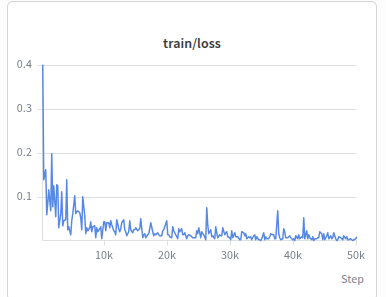
Read the shape of train/loss rather than its absolute value. A healthy fine-tune drops steeply over the first few thousand steps and then flattens. A curve that is flat from the start may indicate an ineffective learning rate, frozen parameters, zero gradients, or an input or normalization problem. Before stopping, check train/lr, gradient norm, and the trainable parameter count against the selected TRAIN_MODE. A spike to NaN also requires checking the input and optimization state before stopping. train/lr plots the configured schedule, so it confirms the scheduler ran rather than offering something to change mid-run. The remaining panels report throughput and step timing, which tell you whether the pod performs as priced.
This run trains against your demonstrations with no held-out validation split and no rollouts in the loop, so it has no evaluation metric. Low loss means the model reproduces the demonstrations it was shown. It does not mean the policy completes the task, and because nothing is held out, overfitting does not show up in the curve. The only test is loading the checkpoint into ExecutePolicy and counting how often the policy actually completes the task on the robot.
Reading a VLA training run beyond this is an active research area rather than something this page can keep current. For deeper guidance, see the pi0.5 paper and the LeRobot training documentation.
What You Can Tune
The training wrapper defaults to a 50,000-step pi0.5 LoRA run, which is what the cost estimate above prices. Preflight accepts the run-shaping values as CLI flags and writes them to .train-model.env. Values without a preflight flag can be added to that file after preflight and before launch.
| Parameter | What It Controls |
|---|---|
STEPS | Number of training steps. Drives both the cost of the run and the length of the learning rate schedule. Pass it as --steps. |
BATCH_SIZE | Samples per step. Raise it only as far as the GPU's memory allows. Pass it as --batch-size. |
LR | Peak learning rate. |
SCHED_DECAY_STEPS | Length of the cosine decay. Defaults to STEPS, so the schedule spans the whole run. |
POLICY_TYPE | pi05 or smolvla. Pass it as --policy-type. |
TRAIN_MODE | Which parameters train: lora_backbone, lora, or frozen. |
SAVE_FREQ | How often an intermediate checkpoint is written to the network volume. Pass it as --save-freq. |
USE_IMAGENET_STATS | Whether image normalization uses ImageNet statistics. |
RENAME_MAP | The camera key mapping preflight confirms with you. Pass it as --rename-map. |
GPU_LIST | The GPU shortlist preflight prices and launches from. Pass it as --gpu-list. |
The wrapper sets STEPS=50000, LR=2.5e-5, and SCHED_DECAY_STEPS=$STEPS, then passes them to LeRobot 0.6.0 as CLI overrides; they are not defaults from configuration_pi05.py. Most variables in the table are translated into LeRobot CLI arguments, while GPU_LIST only selects Runpod hardware. LeRobot supplies defaults for settings the wrapper does not override. For what a parameter does to training, read configuration_pi05.py in LeRobot and the pi0.5 paper. This page deliberately does not recommend values.
Which values suit your run depends on your task, your dataset, and your hardware budget, and the published guidance moves quickly. The one thing worth stating plainly is that the loss curve does not validate a setting. Save intermediate adapters with SAVE_FREQ, merge selected adapters into dense checkpoints with merge_lora_checkpoint.py, and compare how often each completes your task on the robot. See the installed skill's REFERENCE.md for the merge and serving steps.
Where the Checkpoint Lands
The output model repo contains the raw LoRA adapter at its root and the dense checkpoint under merged/. The vla_sim inference server cannot select that Hub subfolder, so copy it locally or publish its contents at another repo's root before serving it. See Connect a VLA Policy to the ExecutePolicy Behavior for how to wire the resulting checkpoint into an Objective.
Teardown and Cost Hygiene
Pods do not stop themselves. Runpod's --terminate-after flag doesn't reliably fire, so the skill always issues an explicit delete and verifies the pod is actually gone. If a run is interrupted (a crash, a closed terminal, Ctrl-C), tear the pod down by hand rather than leaving it running. Run the command below from the installed train-model skill directory, where its scripts/ live and where preflight wrote .train-model.env:
./scripts/teardown.sh --pod-id <pod-id> --purge-secrets
Pass --purge-secrets on the same run that deletes the pod, as above. It wipes the Hugging Face token (and any Weights & Biases key) off the network volume over SSH through the still-running pod, which is the volume's only access path. Once the pod is gone, revoking the token at huggingface.co/settings/tokens is the only remaining option.
Teardown deletes the pod and nothing else. The network volume's storage charge continues indefinitely, on purpose, because its cached weights and environment make your next run cheap. Add --purge-volume once you're done training against this dataset to delete it (this also deletes anything cached on it, so your next run pays a cold start). That flag reads the volume ID from .train-model.env, so it fails with a missing-RUNPOD_VOLUME_ID error if you run teardown from a directory without that file. Pass --env-file <path> to point it at one.
Troubleshooting
- Preflight can't validate the dataset. Confirm the repo id and that
meta/info.jsonexists under the dataset'smetatree on Hugging Face Hub; private repos need your Hugging Face token set. - Pod creation fails with "no instances available." The GPU class is out of stock in that datacenter. Re-run pod creation with the next GPU in your shortlist. Moving to another datacenter is not a quick alternative: network volumes are datacenter-pinned, so a pod must run alongside its volume, and switching means creating a fresh volume there and paying a cold start, and usually deleting the old one to stop double-paying for storage.
- The pod exits instantly with no logs. The training image failed to pull, which is the common failure mode for a private, auto-created image mirror. Confirm the training image is public or that the pod has registry credentials configured.
- Monitoring exits with
error: no new commit appeared on <model-name>. There are no mid-run pushes to Hugging Face, so this means the run didn't finish inside the budgeted wall-clock time, not that it never checkpointed. Check the pod's training log: a traceback means it crashed; steady progress lines mean the run needs a larger time budget. - The checkpoint merge fails with a base-model mismatch. The adapter was trained against a different base model than the one the skill assumes by default; pass the base model explicitly to the merge step.
- A pod is orphaned after a crash. List and delete it by hand with
runpodctl; the skill prints a recovery step on abnormal exit. The monitor script prints a recovery command, which you run as./scripts/teardown.sh --pod-id <pod-id>from the same skill directory as the teardown command above, and a teardown that cannot verify the pod is gone points you at the Runpod console to delete it manually.
See REFERENCE.md in the installed skill directory for the full gotcha list, including SSH proxy quirks and pricing details.
Next Steps
Once a checkpoint lands on Hugging Face Hub, connect it to your robot: Connect a VLA Policy to the ExecutePolicy Behavior. Then measure how often it gets the task done: Evaluate a VLA Policy.