Debug Task Constructor Planning Pipelines
MoveIt Task Constructor (MTC) planning pipelines perform a large-scale search for feasible solutions across numerous candidates. Some candidates are expected to fail (e.g., due to unreachable targets), while others may succeed. MTC systematically explores all options to determine a sequence of feasible steps needed to complete the task.
When MTC fails to find a solution —or even when it succeeds— introspecting intermediate solutions and identifying points of failure is often essential.
MTC pipelines are planned with the PlanMTCTask Behavior (see the Pick and Place tutorial using MTC for details).
Once that Behavior is executed, the details of the candidates that MTC evaluated are available for introspection.
MoveIt Pro includes a Task Constructor Debugger that works in both the desktop app and MoveIt Pro Cloud (which is simulation only and cannot be connected to robot hardware).
After running an Objective that uses PlanMTCTask, open it by selecting Task Constructor Debugger from the Mode menu in the top left, by clicking the debugger icon on a PlanMTCTask Behavior in the Behavior Tree view pane, or — when planning has just failed — with the Inspect failed plan in Task Constructor Debugger link on the error alert itself.
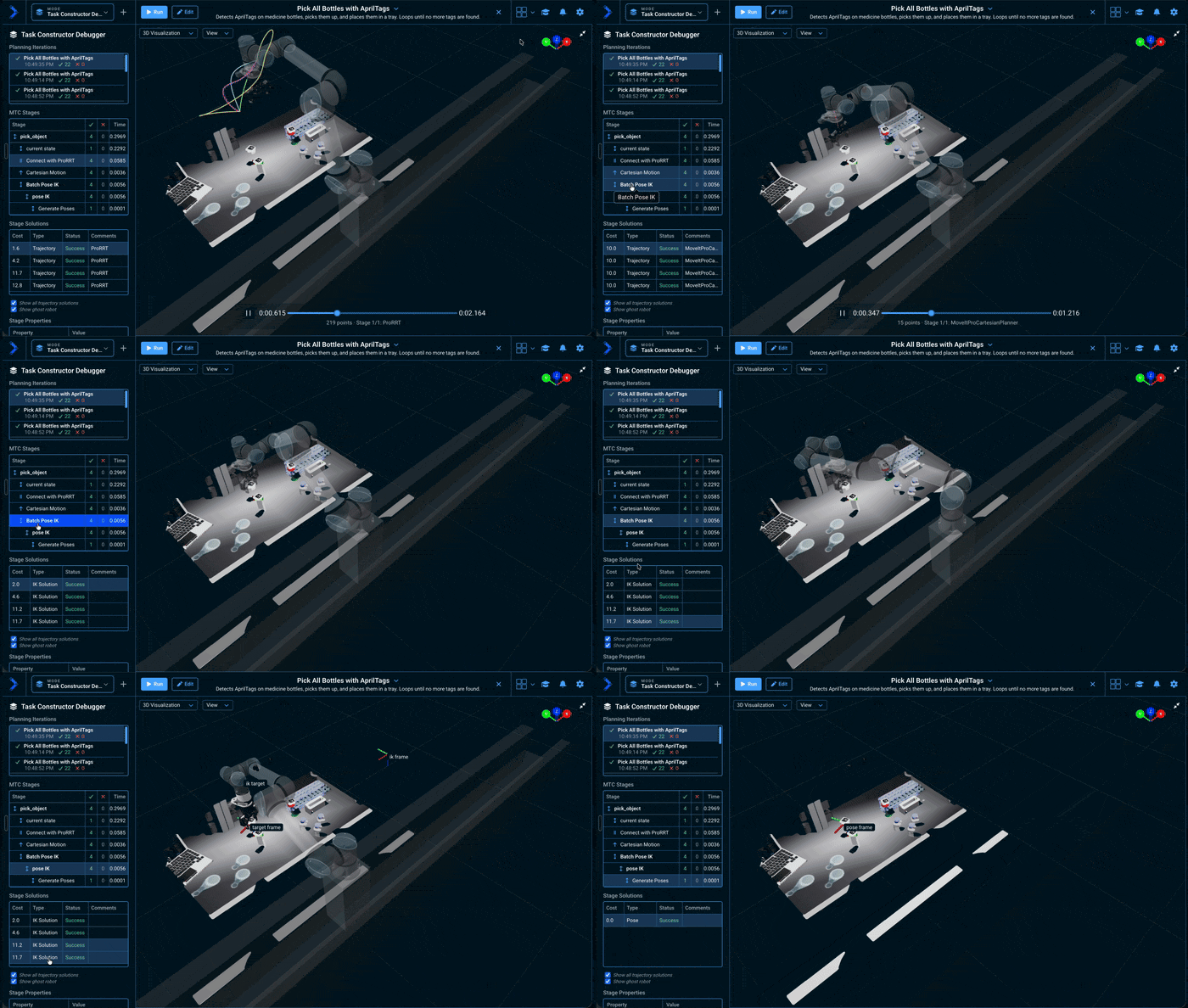
The debugger opens as a left sidebar listing the session's planning iterations; selecting one shows its stage tree with each stage's success and failure counts and compute time, the solutions for the selected stage with their cost and comments explaining why individual candidates failed, and the selected stage's properties.
It opens on the stage where planning ran out of solutions, rather than on the first stage, so a failed plan lands on the stage that caused it.
Select a solution to preview its trajectory in the 3D Visualizer.
Import a saved inspection
Connect the Desktop App to a Runtime and open Task Constructor Debugger from the Mode menu. Select Import JSON and choose a local JSON file written by SaveMTCTaskInspection. The file appears as an Imported entry in Planning Iterations, alongside live planning calls. Select its stages to inspect their counts, properties, failure explanations, and solution costs and comments.
Imported files stay in the Desktop App for the current session; they are not uploaded to the Runtime. Importing does not execute robot motion. For 3D previews, use the robot configuration package that produced the file. Files saved without scenes still show inspection details, but cannot display 3D previews; files saved without trajectories cannot play back motion. Enable include_scenes and include_trajectories on SaveMTCTaskInspection when you need those previews.
Files must be at most 50 MiB. The session retains up to five imported files within its planning history; import a file again after refreshing the app or after it has been evicted from history.
Disabling introspection to reduce memory
The debugging described above relies on MTC introspection, which is enabled by default. With introspection on, each MTC task retains everything it evaluated (every successful and failed candidate, and the planning scene captured at each one). Each use of an MTC planning Subtree in an Objective holds its own task, and on versions before 10.2 that data is kept until the next Objective is loaded, not just until the run ends — so an Objective with many planning Subtrees, or a single task over a large planning scene, could consume a large amount of memory, in extreme cases exhausting it.
From MoveIt Pro 10.2, this retention is bounded by default: only the most recently planned MTC tasks (10 unless configured otherwise) keep their introspection data, and older tasks release theirs automatically as newer tasks are planned. Memory no longer grows with the number of planning Subtrees in an Objective. Released tasks behave like tasks planned with introspection disabled: SaveMTCTaskInspection skips them with a warning, so place it right after the PlanMTCTask it should capture rather than at the end of a long Objective.
The limit is configurable per robot configuration package with the mtc_introspection_retained_tasks key in the objectives section of config.yaml (see the config.yaml reference). Raise it to keep more planning iterations inspectable, lower it (down to 0, which releases each task's data as soon as planning completes) to reduce memory further:
objectives:
  mtc_introspection_retained_tasks: 10
The InitializeMTCTask Behavior also exposes an enable_introspection input port (default true). Set it to false on a task to free its stored planning scenes and solutions as soon as planning completes (whether it succeeds or fails), without waiting for newer tasks to push it out of retention.
Disabling introspection turns off MTC debugging for that task: it still appears in the Task Constructor Debugger's Planning Iterations list, but selecting it reports a load failure instead of the plan, and SaveMTCTaskInspection will skip it. It also makes a failed plan's alert less detailed: you still see which stage failed and its attempt counts, but not the specific per-stage reason (for example the collision or IK message). Leave introspection enabled while you develop an Objective, disable it on tasks you no longer need to inspect once they are stable, and re-enable it for a single Subtree when you need to debug that task again.
For more ways to keep an Objective's memory bounded, see Keep Memory Bounded in Large Objectives.