9.4.0
Major Features
Joint Range Constraints for Motion Planning
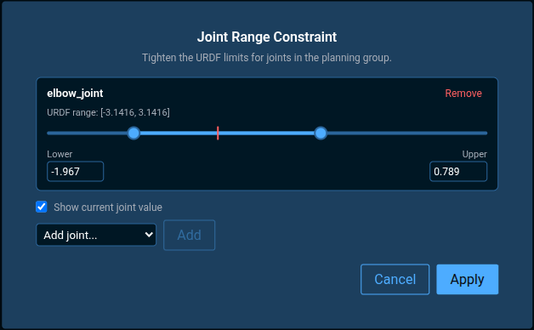
MoveIt Pro's motion planners can now tighten a robot's joint limits for a single plan, without editing the robot model. Constrain just the joints you care about to a narrower range and leave the rest free — handy for keeping a gantry or 7th axis inside a known-safe span, fencing off a singular configuration, or carving out a workspace region. The constraint is a new input on planning Behaviors such as PlanToJointGoal.
Set it up visually with a new in-Editor tool that opens right from the planning Behavior: pick a joint, drag a dual-knob slider against its full range, and optionally show a live marker that tracks the joint's current position. Objectives can still be edited by hand for those who prefer it.
Smoother and More Optimal Motion Plans
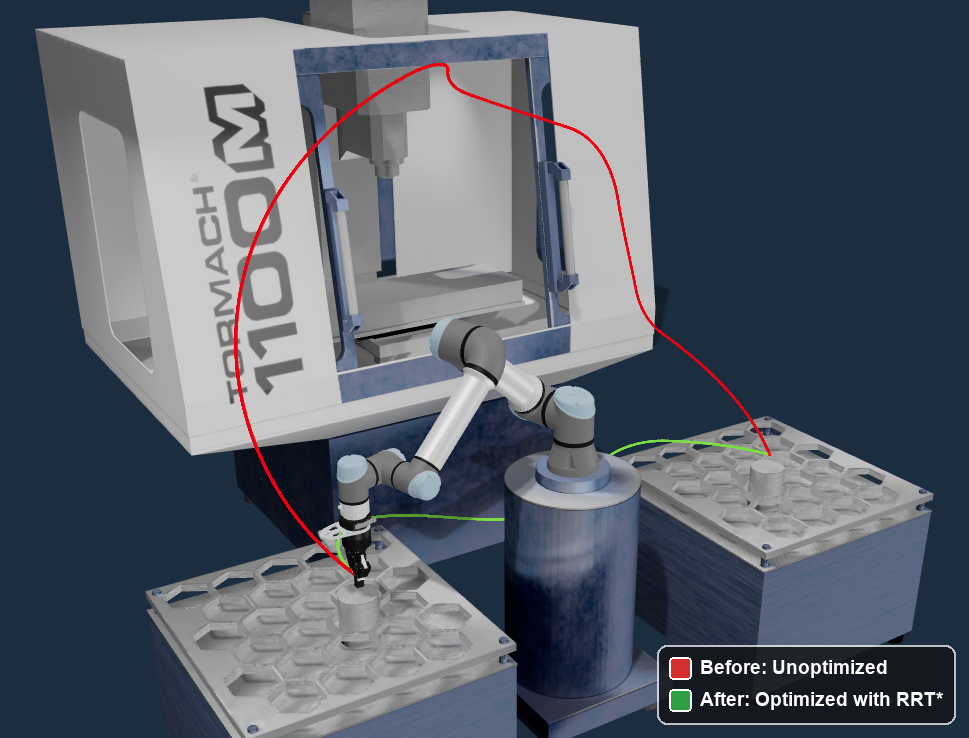
PlanToJointGoal now accepts an optimization_params port that enables optimize_path support: Informed RRT* (Rapidly-exploring Random Tree) path optimization for joint-space planning. After finding an initial path with RRT-Connect, the planner refines it into shorter, smoother joint-space trajectories.
Obstacle-Aware Cartesian Motion
Cartesian motions — the straight-line tool moves used for tasks like insertion, dispensing, scanning, and surface following — normally track a fixed end-effector path with no freedom to dodge obstacles, so a cluttered cell often means hand-tuning waypoints or aborting on collision. PathIK can now steer the rest of the arm clear of obstacles automatically while still holding the tool exactly on its commanded Cartesian path, by adding an SDF (Signed Distance Field)-driven repulsion task to its nullspace. Pass an SdfControlPoint describing a sphere proxy on the arm and a distance field built by ComputeSignedDistanceField, and the solver pushes that sphere away from nearby obstacles as it tracks the path — fewer collisions and less manual waypoint tuning in tight workspaces. For now this is available only through the C++ Kinematics API; it is not yet exposed through a Behavior or the Objective editor.
Collision Object Improvements
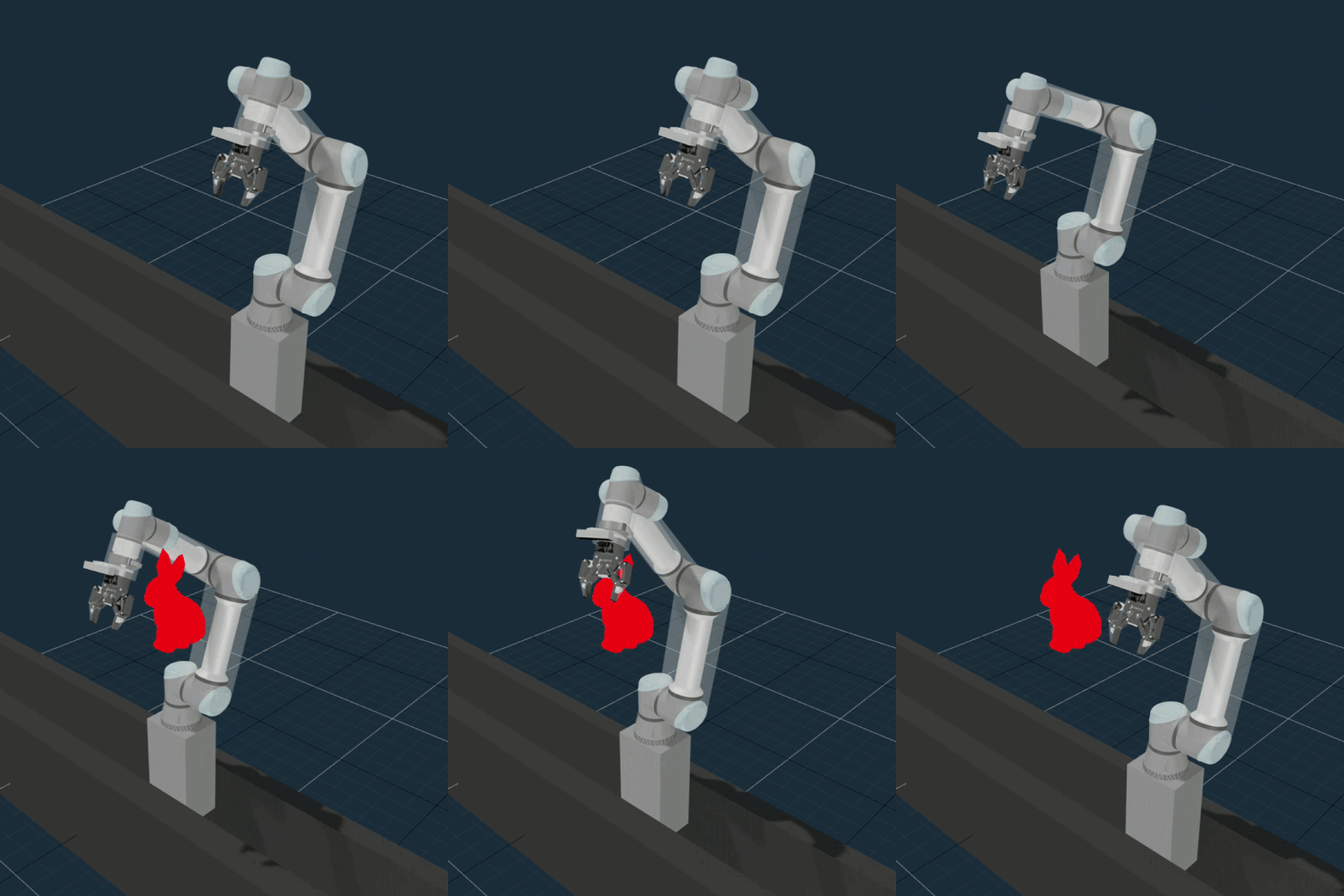
MoveIt Pro makes collision objects easier to add, inspect, and maintain in the planning scene: new Behaviors add primitives and full collision objects directly, planner failures now name the bodies in collision, and attaching a URDF preserves the collision rules set on it. A new guide covers adding, moving, removing, attaching, and setting collision rules on the live planning scene and during MoveIt Task Constructor planning — see Interacting with the Planning Scene.
Live Point Cloud Streaming
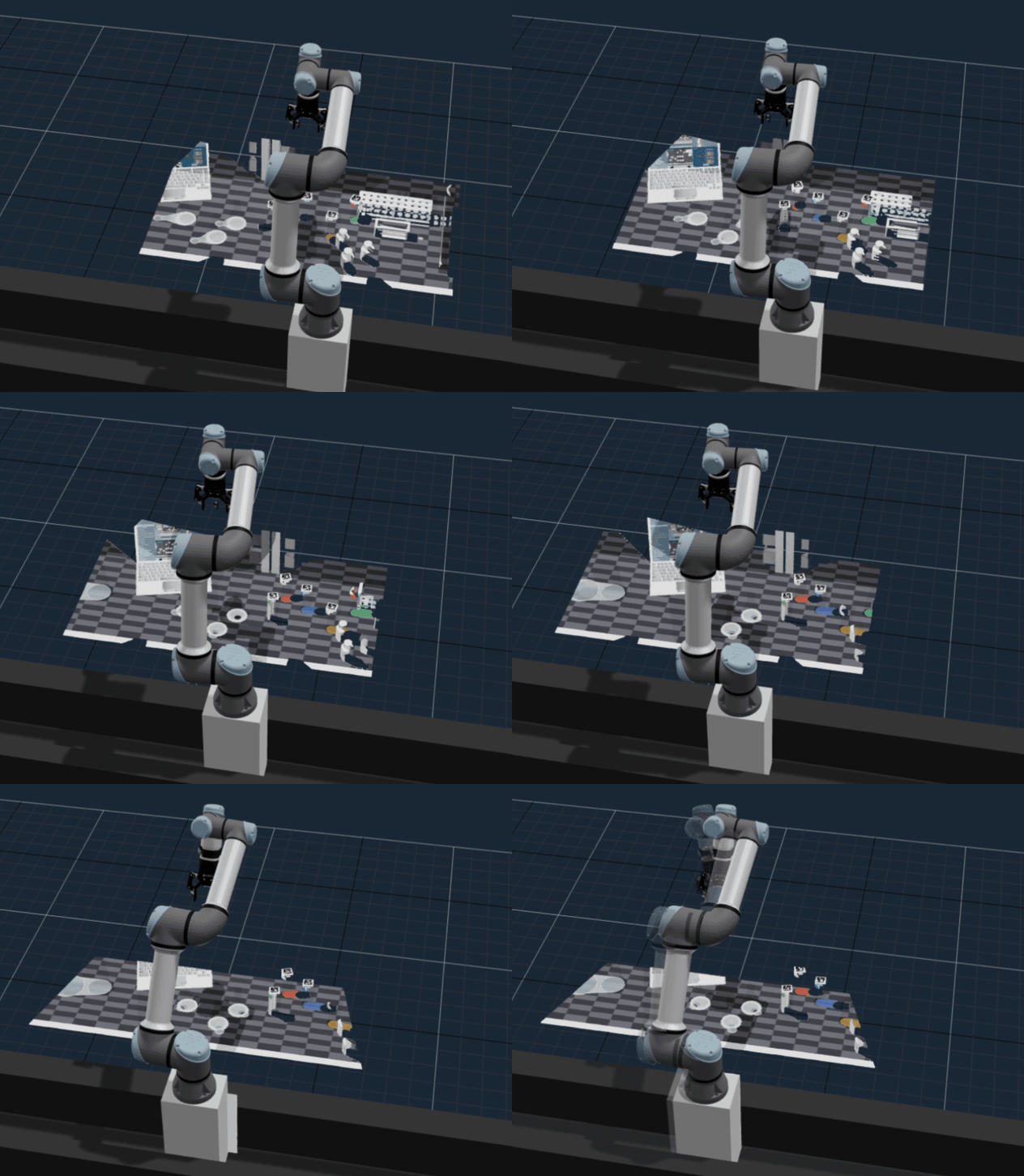
The 3D Visualizer can now stream live point clouds from the robot's cameras. With the Point Clouds layer enabled in the View menu, every detected sensor cloud streams in real time at full density, and each camera gets its own visibility toggle in the per-source list.
Improved Visualization Graphics
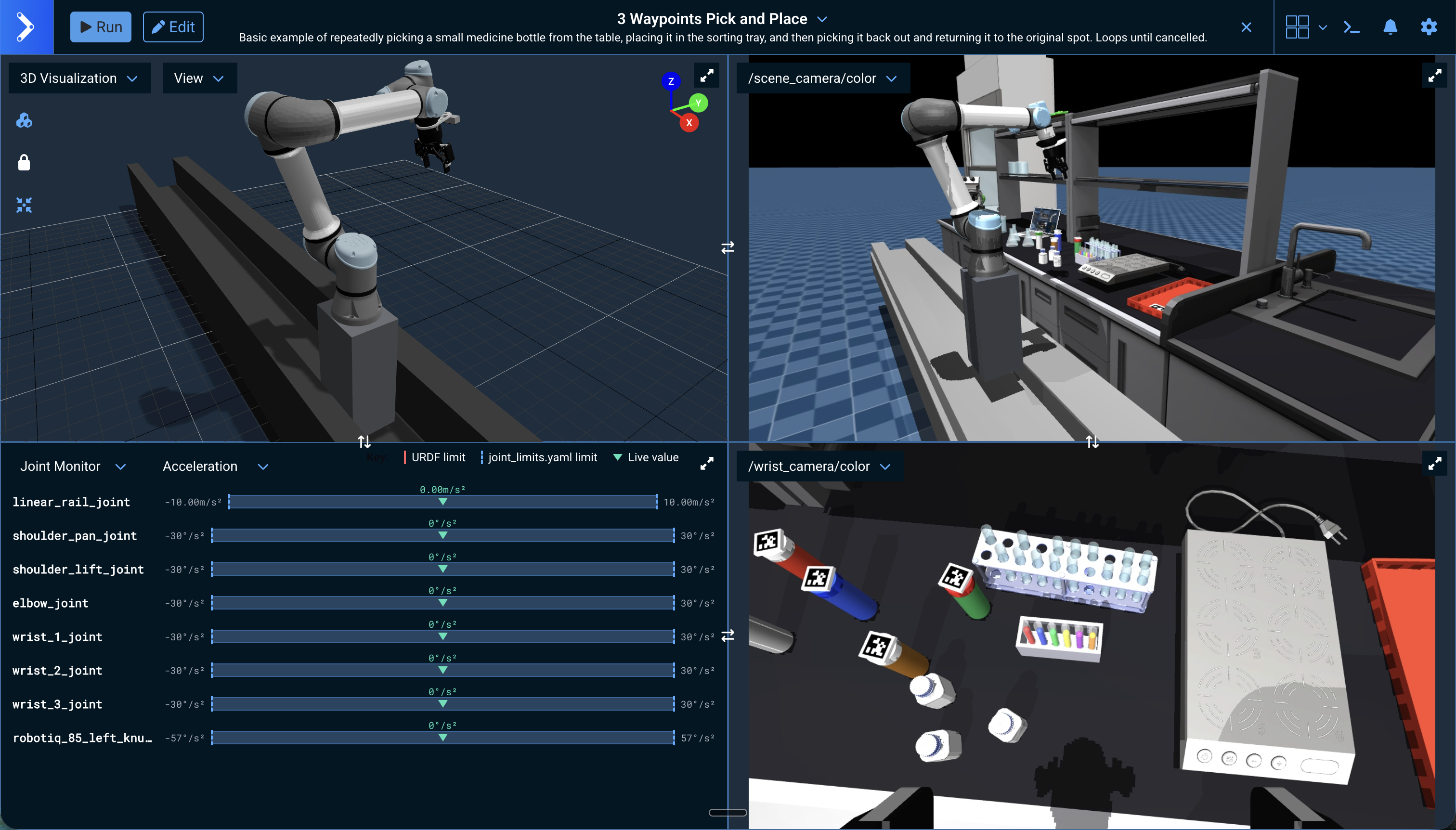
Several changes make scenes look better across MoveIt Pro. The 3D Visualizer now renders with hemisphere lighting and soft ground shadows for clearer depth perception, scene render quality in lab_sim has been improved, and simulated camera resolution has been doubled to 1280x720 across all example robot configurations (lab_sim, hangar_sim, and the others) for sharper, more detailed camera views.
Visualize the Robot's Collision Geometry
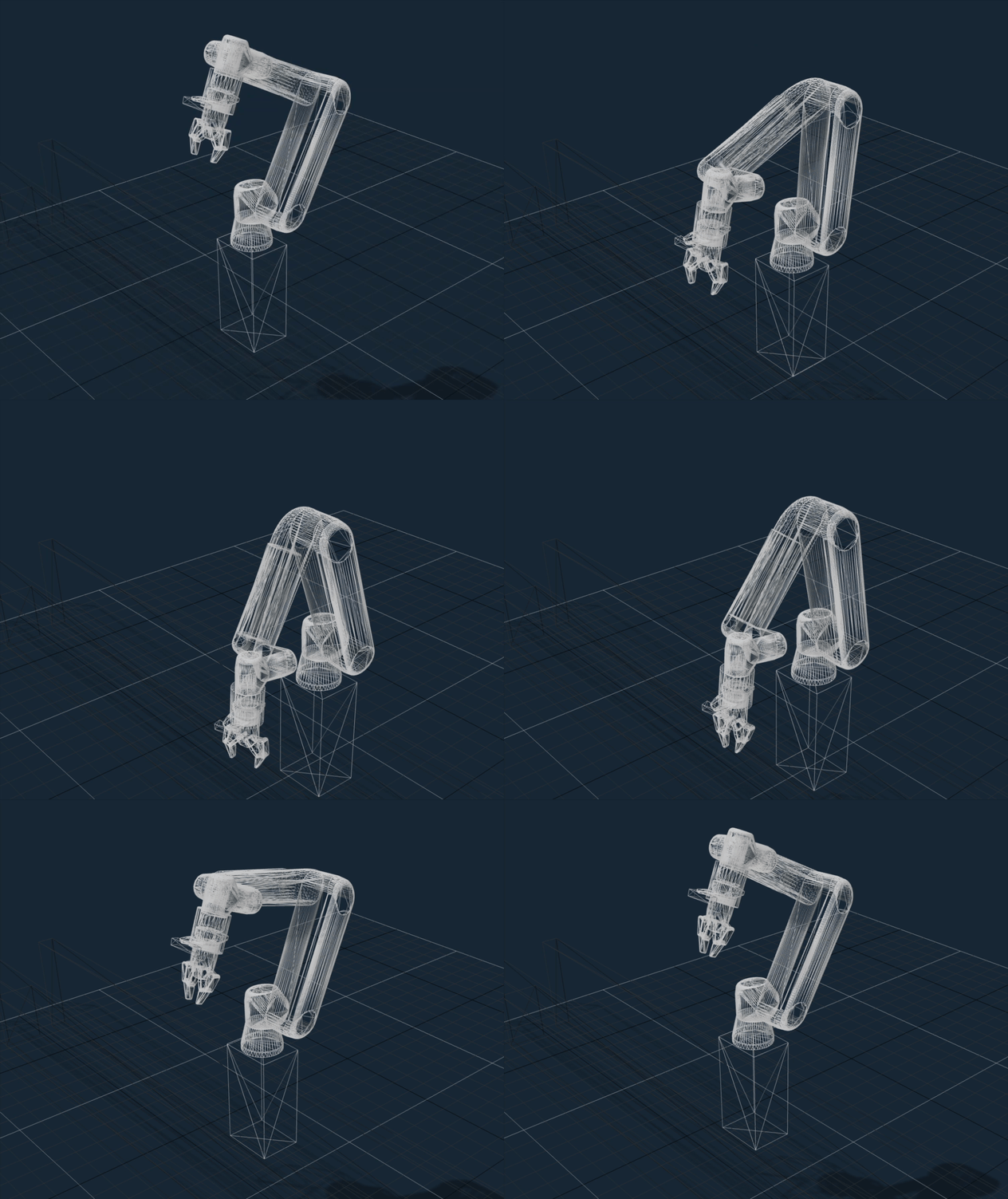
The 3D Visualizer can now show each robot link's collision geometry, not just its visual mesh. A new Robot - Collision toggle in the Visualization View menu (next to the Robot - Visual toggle) overlays the colliders — translucent over the visual mesh when both are shown, or as a wireframe when you hide the visual mesh to inspect colliders on their own. The setting defaults to off and persists per browser. It helps debug robot models whose collision and visual shapes diverge, and reveals collision-only links like sensor housings, doors, and environment containers.
TF Transforms
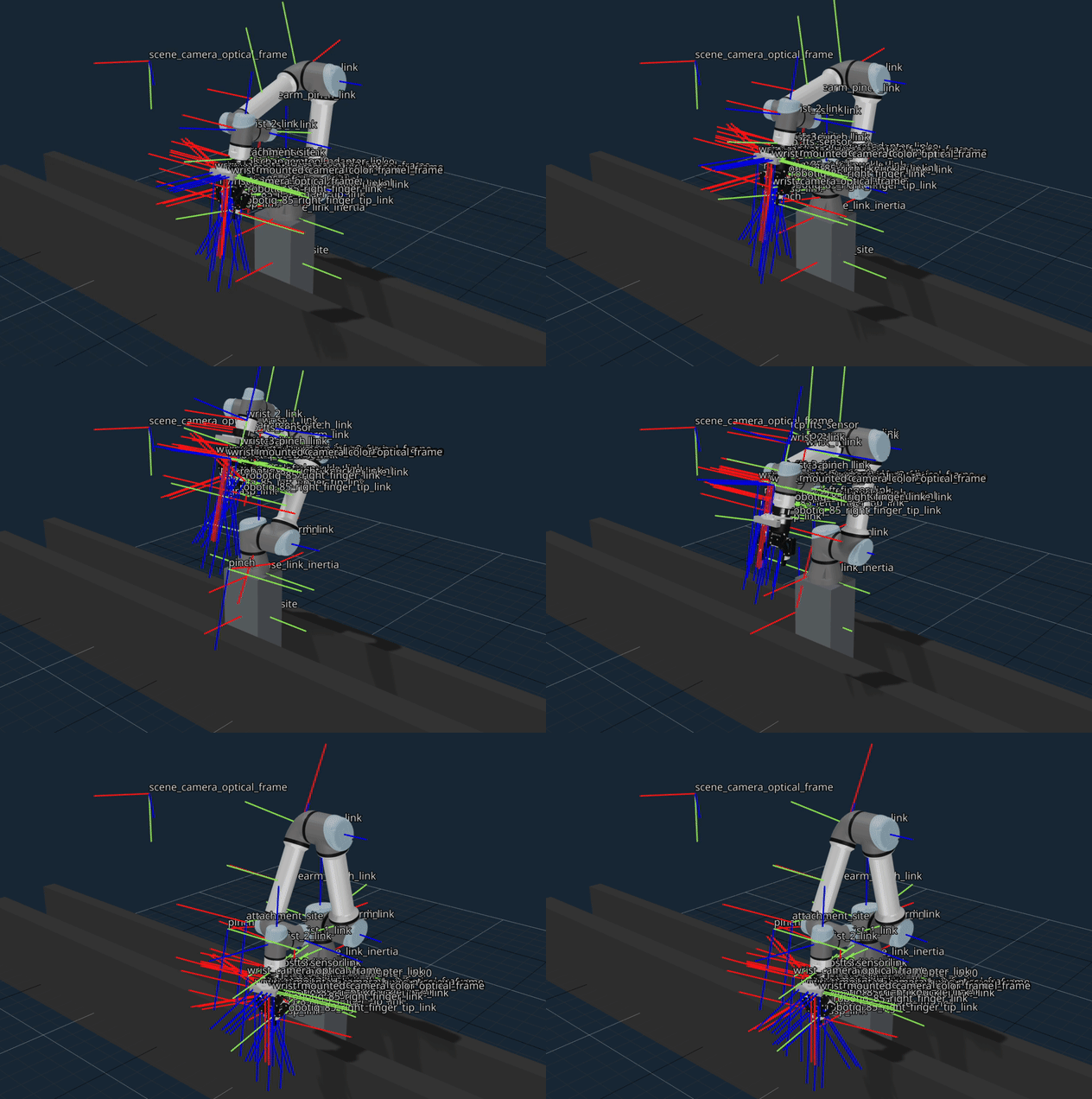
The 3D Visualizer can now display TF (Transform) coordinate frames live, RViz-style. Enable TF Transforms from the View menu to toggle frames individually, filter by name, adjust axis size, and show frame-name labels — making it easy to see how links, sensors, and tools relate in space while building or debugging an Objective. See Visualize TF Frames.
For publishing transforms from a Behavior Tree, the new PublishTF Behavior publishes a dynamic transform on /tf at a configured rate for as long as it runs. PublishStaticFrame is now deprecated and forwards to PublishTF — despite its name, it never published on /tf_static; a future PublishStaticTF Behavior will cover the truly-static-transform case.
Joint Monitor View Pane
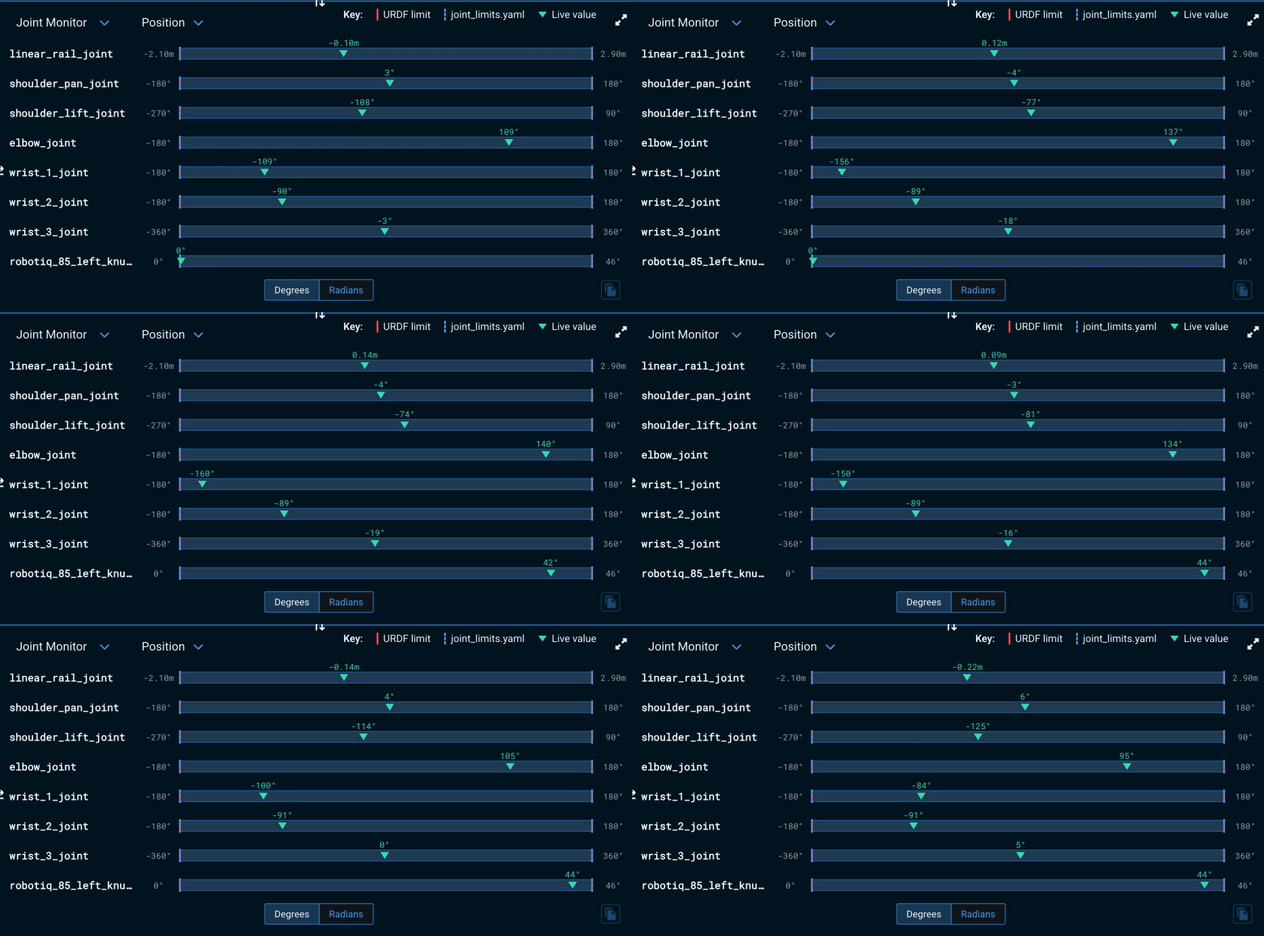
A new Joint Monitor view pane shows each joint's live value against its URDF (Unified Robot Description Format) and joint_limits.yaml limits, so you can watch in real time how close the robot is to a limit. An in-pane dropdown switches between position, velocity, and acceleration. See About the User Interface.
New MoveIt Pro Settings Window
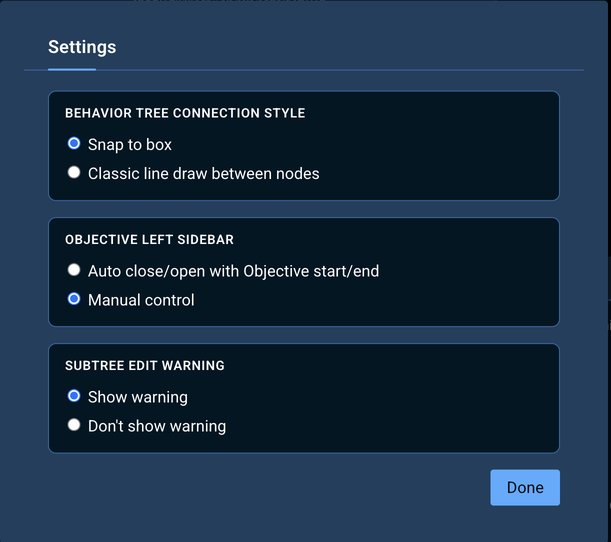
A new Settings modal, opened from the gear menu, gathers UI preferences into one place, all persisted in browser local storage. It exposes a Behavior Tree Connection Style radio group (Snap to box or Classic line draw between nodes) — replacing the previous "Snap to Box (beta)" checkbox in the gear menu — and a new Objective Left Sidebar radio group (Auto close/open with Objective start/end or Manual control). The previous navbar pin button is removed; to keep the sidebar in place during execution, select Manual control. A Subtree Edit Warning toggle re-enables the "Subtree is used in other Objectives" popup after it has been dismissed via its Do not show this warning again checkbox. The modal closes on Escape.
Major Performance Improvements for Web UI
MoveIt Pro's web UI now talks to the backend over a new, faster WebSocket bridge. Under typical UI load it roughly halves publish latency and uses far less memory and CPU than before, so the interface stays responsive even with many live streams open.
This changes the default WebSocket protocol, so external tools built on rosbridge (roslibpy, roslibjs, and similar) need a small migration: either move to the native ROS 2 Client Library API, or opt back into a rosbridge-compatible endpoint by launching with moveit_pro run --enable-rosbridge. The MoveIt Pro UI and any tools already using native ROS 2 clients need no changes.
Agentic AI Coding Harnesses (beta)
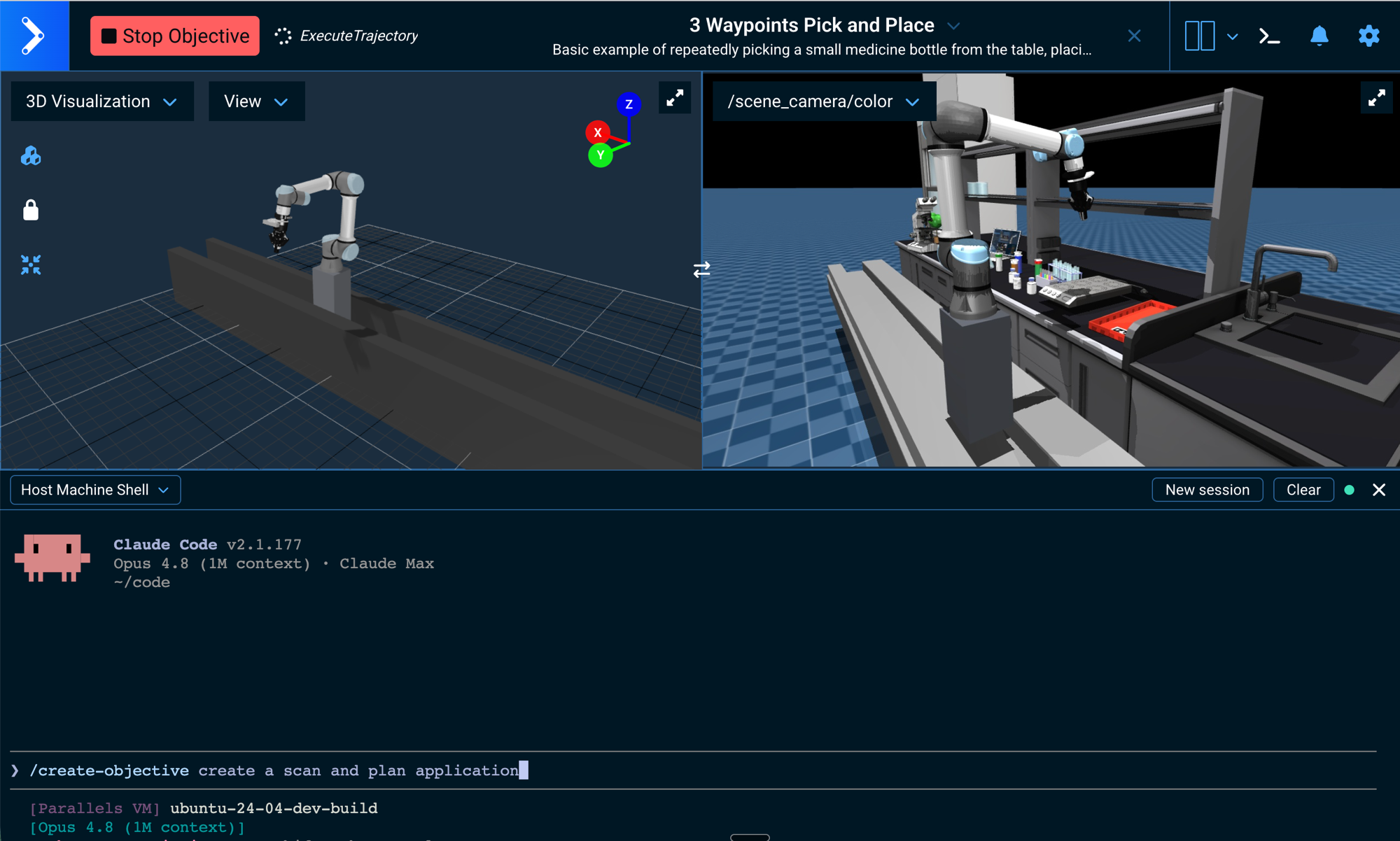
MoveIt Pro now works with agentic AI coding harnesses — Claude Code, Codex, and other CLI coding agents — letting you build Behaviors, Objectives, and robot configurations with AI assistance directly against your workspace.
A new built-in Terminal brings shell access into the UI to run these agents. It is available as a Terminal view pane (from the view dropdown) and as a dockable, full-width, resizable terminal at the bottom of the workspace — opened from a terminal button in the top bar in both run and edit views, or by pinning a terminal pane. A Container/Host selector chooses the target: Container opens a shell inside the running MoveIt Pro container (always available), and Host opens a shell on the host machine (enabled by launching with moveit_pro run --allow-host-shell). A Reset sessions control recovers the terminal when the concurrent-session limit is reached. See About the User Interface.
The install also ships MoveIt Pro's CLI agent skills, and workspace setup copies them into ~/moveit_pro so those agents pick up MoveIt Pro and ROS 2 guidance automatically with no manual setup. This replaces the experimental LLM-powered Behavior Tree Builder (the in-editor AI Assistant), which has been removed along with its API key settings.
Enhancements
New Behaviors and Libraries
- Added the
SuppressChildErrorsdecorator, which drops the log messages produced while ticking its child Behavior at the severities you choose (suppress_error,suppress_warn,suppress_info). Use it inFallbackpatterns where the first branch is expected to fail as part of normal decision logic, so operators no longer see alarming red ERROR toasts for those expected failures. Suppressed messages are removed entirely rather than downgraded. The child'sBT::NodeStatusis passed through unchanged; compose withForceSuccessto also swallow the failure status. - Added the
SaveMTCTaskInspectionBehavior, which captures the full state of an MTCTask— stage tree, statistics, every solution and failure, interface states, and per-stage failure explanations — to a JSON file on disk. Drop it under aFallbackbelowPlanMTCTaskto log only failed plans, or place it between Plan and Execute to log every plan. The output directory accepts absolute paths, paths relative to the configured Objectives directory, and~/$HOMEexpansion. Customers can attach the resulting file to a support ticket so failures can be triaged offline rather than over a live RViz session at the moment of failure. - Added a joint-space path interpolation helper that densifies a path by linear interpolation, bounded by a maximum per-joint step — useful for finer collision checking or visualization of sparse RRT-style paths. Available as
interpolate_joint_pathin the MoveIt Pro Python planning API. - Python collision-checking results now expose readable contact entries — colliding body names, body types, contact position, penetration depth, and interpolation percentage — making collision results inspectable from the Python API.
Behavior and Library Improvements
- The user-interaction prompt Behaviors (
GetTextFromUser,GetPoseFromUser,GetPointsFromUser,AdjustPoseWithIMarker, andWaitForUserPathApproval) now communicate with the UI over a shared topic-based request/response protocol on/moveit_pro_ui/<prompt>/{request,response,cancel}instead of per-Behavior ROS services. Existing Objectives continue to work unchanged. The new protocol routes each prompt to the focused browser session via a heartbeat-tracked session lease, rejects concurrent prompts with a clear error, and is observable from external tooling that subscribes to the topics. - The
DoTeleoperateActionBehavior now drives teleop through a backend bridge node and a topic-based protocol on/moveit_pro_ui/do_teleoperate/{goal,feedback,result,cancel}instead of an action server hosted in the browser. Existing Objectives continue to work unchanged. The bridge periodically re-broadcasts the active goal, so opening teleop in a second browser window now mirrors the active session, and refreshing a teleop tab now re-attaches to the in-flight teleop instead of orphaning it. PublishVelocityForceCommandnow accepts unstampedtwistandwrenchinput ports, matching the wire message it sends to the velocity force controller. The previoustwist_stamped/wrench_stampedports remain accepted for backwards compatibility but are deprecated and log a one-time warning naming the droppedheader.frame_id; the controller has always interpreted the command in its configuredee_frameand ignored the stamped frame. Migrate by insertingUnpackTwistStampedMessage/UnpackWrenchStampedMessagebetween your stamped source andPublishVelocityForceCommand. Note: the deprecated stamped ports no longer carry the implicit{desired_twist}/{desired_wrench}blackboard defaults; Objectives that relied on the implicit wiring must spell out the remap explicitly (twist_stamped="{desired_twist}") or migrate to the new ports.- The existing
task_idport onInitializeMTCTasknow sets the display name shown for the MTC Task in the MTC inspector and on theTaskDescriptiontopic. Useful for Objectives that build several MTC tasks (e.g., upright / flipped place attempts) and need to tell them apart; when left empty, the existing default (task pipeline) is used. - The Velocity Force Controller can now interpret velocity and force references in any robot-model frame — for example the world or base link — via the new
control_frame_idfield on thePublishVelocityForceCommandBehavior, instead of only the end-effector frame. See Streaming Velocities & Force. - Deprecated the
AddPoseStampedToVectorandAddPointCloudToVectorBehaviors and theAddToVectorObjective in favor ofPushBackVector. - Deprecated the legacy
GraspableObject-based collision and planning-scene Behaviors (ModifyObjectInPlanningScene,AddVirtualObjectToPlanningScene,CreateCollisionObjectFromSolidPrimitive,RemoveCollisionObjectFromPlanningScene,SetupMTCAttachObject, and related stages) in favor of the newmoveit_msgs-based collision Behaviors (AddCollisionBox,AddCollisionObject,MoveCollisionObject,RemoveCollisionObject,AttachObject,DetachObject,SetCollisionRule, and theirSetupMTCequivalents). The deprecated Behaviors still work but will be removed in a future major version; see the collision objects migration guide. - Added an
optimization_paramsport to theSetupMTCPlanToJointStateandSetupMTCConnectWithProRRTBehaviors, so MTC freespace plans can use multiple RRT-Connect seed attempts and Informed RRT* refinement. - Live point cloud streams in the 3D Visualizer now update at up to 30 Hz (previously 10 Hz), so the cloud tracks robot motion more closely.
- Improved Cartesian trajectory construction performance for long waypoint paths by caching time-optimal trajectory path-segment lookups during sampling.
Misc User Interface Improvements
- Breakpoint popups now play a short audible beep when they appear so users running long Objectives in the background aren't likely to miss them.
- The default number of ports shown on each Behavior Tree node (in both view and edit modes) is now 2 instead of 5, producing more compact trees by default. Users can still change the setting to No ports, 1–5 ports, or All ports via the existing port-visibility dropdown, and the choice persists in browser local storage.
- The "unconnected nodes will be discarded" warning shown when leaving the Behavior Tree editor now lists each orphan node by name (up to 5, with a
…and N moresummary for any additional nodes), so operators can see exactly which work will be discarded before confirming. - The navbar's Objective dropdown now shows the robot configuration package inheritance chain as a breadcrumb (e.g.,
moveit_pro_base_config › ur_base_config › my_robot_config) so operators can see at a glance which base packages the loaded robot configuration package extends from. The chain wraps to additional lines for long hierarchies; a robot configuration package with nobased_on_packageancestor renders as a single name without separators. - Added an Override entry to the Objective dropdown menu for built-in (read-only) Objectives. Selecting it creates an editable copy of the Objective in the user workspace with the same ID, shadowing the built-in version via the existing symlink chain. Removing the override restores the built-in Objective.
- Disable Node in the Behavior Tree editor now restores the original
_skipIfexpression on Re-enable, even after saving and reopening the Objective. - The Behavior Tree editor's right sidebar now shows the source file path for a selected Objective or Subtree node, with a copy-to-clipboard button. This makes it easy to tell whether a Behavior comes from a core MoveIt Pro package or from a custom robot configuration package.
- Pose Jog can now command motion in the planning group's base frame as well as the end-effector frame, via a Control Frame selector in the Pose teleop tab. See UI-Based Teleoperation.
- Duplicating a Sequence (or any control/decorator node) in the Behavior Tree editor now also duplicates its children.
- The Follow active node toggle in the runtime Behavior Tree view is now on by default; users who previously set it keep their stored preference.
- New installs now open with a four-pane layout (3D Visualization, Behavior Tree, Joint Monitor, and the first camera feed), a 3D view from a raised side angle with brighter lighting and a ground grid that fades into the background, point cloud sources hidden by default, and a narrower left sidebar.
- The 3D Visualizer View menu now has separate Point Cloud Snapshot and Point Cloud Streaming toggles, so captured clouds and live camera streams can be shown independently, with live stream sources listed individually under Point Cloud Streaming. The TF Transforms Show all and Hide all controls now show a brief confirmation checkmark when clicked.
- Collision objects without an explicit color now render in MoveIt 2's planning-scene green in the 3D Visualizer instead of red, and objects attached to the robot render orange to distinguish them from free-standing world objects. An explicit
ObjectColorstill takes precedence. - Removed a stray horizontal scrollbar that appeared in the view-pane selector menus when a row contained a very long label.
Reference Application Changes
- Added a
Pick 1 Pill Bottle with SAM3Objective tolab_simand removed the deprecated CLIPSeg pick Objective. - Migrated
lab_simandhangar_simObjectives off the deprecatedAddToVectorand collision Behaviors toPushBackVectorand the current collision Behaviors. - Added fuselage surface-coverage Objectives to
hangar_sim. - Enabled
velocity_decayinhangar_simto stop base drift after Nav2 stops, and fixedslam_toolboxmap generation.
Documentation Improvements
- Added guidance on waiting for the Objective server to be ready before running an Objective from an external client, so clients can wait for
/do_objectiveor/execute_objectiveand call immediately instead of using a fixed delay. See Run an Objective. - Added a concept page describing how MoveIt Pro uses ros2_control and the runtime safety semantics of its controllers. See ros2_control in MoveIt Pro.
- Added a Technical Specifications page covering computer, software, and robot hardware requirements and a summary of available features.
- Added a MoveIt Pro Core download links page with download links for the MoveIt Pro Core archives.
- Added a collision objects migration guide for moving from the legacy
GraspableObject-based collision Behaviors to the newmoveit_msgs-based ones. - Added a CI/CD guide covering validating Objectives in CI and deploying MoveIt Pro to fleet hardware.
Other Improvements
- The
iframeViewportsarray infrontend_settings.yamlnow accepts optionalenable_web_bridge(defaultfalse) andweb_bridge_urlfields, so a YAML-declared Custom View Pane can fully describe a pane that talks to ROS without manual modal edits per machine. Whenenable_web_bridgeistrueandweb_bridge_urlis omitted, the pane falls back to MoveIt Pro's own WebSocket bridge (the same endpoint the rest of the frontend connects to). Migration impact: the previous key namesenable_ros_bridge/rosbridge_urlare no longer recognized — existingfrontend_settings.yamlfiles using the old keys must be updated. The Custom View Panes list (YAML-declared and manually-added entries alike) is now stored per robot configuration package: switching robot configuration packages swaps to that package's own pane list, and switching back restores it. Clicking Done in the Custom View Panes modal also persists the current pane list (including bridge fields) back to~/.config/moveit_pro/<active_config>/frontend_settings.yaml, so manually-added panes survive relaunches without hand-editing YAML. See Configure Frontend Settings. rosapi_node, the move-joint and move-end-effector resamplers, and theros2 controlcontroller spawner now log to both the terminal and the ROS log file. These processes were previously routed to only one or the other, making their messages easy to miss when troubleshooting.- Tolerance violation errors from the
joint_trajectory_admittance_controllernow name the offending joint(s) and include both the measured deviation and the configured tolerance — e.g.,Path tolerance violated on shoulder_lift_joint (deviation 0.1574 > tolerance 0.1000). When multiple joints violate simultaneously, all are listed comma-separated. Previously these errors said onlyPath tolerance violated.and required reading the controller log to identify which joint failed and by how much. Applies to path tolerance, goal tolerance, and trajectory-start tolerance checks. - The MuJoCo simulator now reports its overrun rate periodically instead of warning on every overrun event. Every 60 seconds (after a 10-second warm-up) the backend log shows what percent of sim iterations missed their timestep budget over the run so far, with guidance on whether the rate is normal (below 1% is expected on a non-realtime system) or means the model timestep should be raised (consistently above 1%).
- Shortened the backend console log format for easier reading and grepping. Each line now reads
[<node>-<N>] [SEVERITY] [<timestamp>] message— the redundant logger-name field is dropped (it duplicates the<node>token already prefixed by the launch system), and severity labels are uppercase consistently across all backend nodes. - MoveIt Pro motion controllers now reject non-finite (NaN/Inf) values from commands, force/torque sensor readings, and generated setpoints instead of forwarding them to the hardware interface. On detection the controller stops the robot and reports a diagnostic identifying the offending value.
- Added the
CYCLONEDDS_MAX_AUTO_PARTICIPANT_INDEXenvironment variable to set the maximum number of DDS (Data Distribution Service) participants discovered on a host, defaulting to 120, so external clients on a busy host can reliably discover a running MoveIt Pro Runtime. moveit_pro configurenow detects NVIDIA, AMD, and Intel GPUs and prints a color-codedGPU Docker Validationchecklist reporting the detected model, container toolkit status, and whether the GPU is accessible from inside a Docker container. Pass--skip-gpu-check(or setMOVEIT_PRO_SKIP_GPU_CHECK=1) to skip the Docker access test on offline hosts.- Backend console logs now show a human-readable timestamp (
YYYY-MM-DD HH:MM:SS.mmm) instead of a raw Unix epoch. - Added a
/healthreadiness endpoint and container healthchecks so deployments can sequence and monitor MoveIt Pro's containers. The drivers and agent containers now exit on failure instead of staying up while non-functional, so a supervisor can detect and restart them. - The
/behavior_tree_statustopic now publishes a full tree once and then compact per-node status diffs — re-baselining periodically and skipping publishes when nothing changed — greatly reducing bridge and UI traffic for large running Objectives. The re-baseline interval is configurable via thebehavior_status_full_baseline_periodparameter. - The web bridge now advertises hidden ROS topics and services, letting web and SDK clients drive ROS 2 action servers — such as Objective execution — over the bridge.
- MuJoCo simulations now broadcast every free-floating scene object as a TF frame (named after its body, under
mj_world) so tools and tests can read ground-truth object poses; disable with the newpublish_object_tfhardware parameter.
Bug Fixes
- Fixed the camera view showing the browser's default broken-image icon when a stream fails to load (backend down, topic missing,
web_video_servernot yet up); it now shows the existing "Stream unavailable" placeholder with the topic name instead. - Fixed UI slowdowns and connection errors caused by continuously publishing large blackboard contents when no blackboard viewer was subscribed, and prevented large blackboards from delaying Objective heartbeat updates.
- Fixed
SaveImageToFilethrowing on single-channel and non-8-bit image streams (e.g., ZED X confidence maps, depth images, and other grayscale or float topics). Mono, 16-bit, and float images are now normalized and written as 8-bit PNGs instead of being rejected at conversion.rgb16andrgba16color sources are also now byte-swapped to BGR/BGRA before writing so they no longer save with red and blue channels reversed. - Fixed the
SaveImageToFileBehavior triggering a multi-terabyte allocation request on images with corrupted metadata (empty or unknown encoding, inconsistent row stride, mismatched data buffer size); it now rejects them before handing them to OpenCV and returns a clear failure. Failure messages now include the image's width, height, step, encoding, and data buffer size to make stuck camera streams diagnosable from logs. - Fixed the Custom View Pane showing the browser's chromeless "refused to connect" page when its URL is unreachable (host down, wrong port, DNS failure); it now shows an in-app error screen with the URL and a Retry button.
- Fixed a race where calling
/execute_objectiveright after it became available could fail withNo objective action server running.The service is now advertised only once the Objective server is ready, so an external client can wait for it and call immediately without a fixed delay. - Fixed a crash in
ros2_control_nodewhenpublish_odomwas set tofalsein a robot configuration package. - Fixed a data race in the planning scene monitor's joint-state callback list that could corrupt the callback vector when Behaviors registered or cleared callbacks while joint states were being dispatched.
- Fixed a crash when cancelling and immediately restarting the Teleoperate Objective with the
JogPoseorJogJointsBehaviors, where the planning scene callback could outlive its monitor and abortobjective_server_node. - Fixed a segmentation fault when cancelling the Teleoperate Objective with the
JogPoseorJogJointsBehaviors while a planning-scene update was in flight, where the subscription callback could dereference a destroyed planning scene monitor. - Fixed the web bridge flooding the console with per-topic subscribe/unsubscribe
INFOmessages on every client reconnect; routine subscription activity is now quiet while warnings and errors still appear. - Fixed an issue where MuJoCo camera streams and point clouds intermittently failed to publish on first read because the simulator skipped rendering until a subscriber latched, leaving downstream Behaviors with empty data.
- Fixed point clouds not displaying in the UI after the switch to the MoveIt Pro web bridge.
- Fixed off-center play, edit, and menu icons on hovered rows in the Behaviors and Objectives sidebar.
- Fixed the UI hard-landing on an error screen during backend startup when the planning groups service was not yet available.
- Fixed a crash and hang in MuJoCo simulation when repeatedly resetting to a keyframe (for example, a keyframe reset inside a looping Objective) while controllers were running.
- Fixed the Pose IK (Inverse Kinematics) solver adding an unnecessary full-revolution wraparound for joints whose range is wider than one full turn, so solutions now stay near the requested angle.
- Fixed ONNX (Open Neural Network Exchange) inference silently falling back to CPU on GPU container images (CUDA and ROCm), restoring hardware acceleration for ML Behaviors.
- Fixed teleoperation and UI slowdowns caused by live point cloud streams being subscribed by default; point cloud sources in the 3D Visualizer now start hidden and can be enabled per source from the View settings.
- Fixed
parameter_overridesrejecting a vector port (e.g., a vector of poses) whose only consumer is aForEachloop. The override now resolves against the Objective's declared<input_port type>and is written so bothForEachand typed consumers can read it. - Fixed a crash in the joint trajectory admittance controller that aborted the realtime control node when a path or goal tolerance violation triggered the error-message formatter.
- Fixed the out-of-box Fast DDS configuration communicating over network multicast. MoveIt Pro no longer ships a default Fast DDS configuration — see the Breaking Changes entry below for the migration.
- Fixed a race in the
JointJogandPoseJogBehaviors where a runtime change to the controller name or planning group could be ignored for an unbounded number of ticks before the Behavior reported failure. - Fixed an intermittent crash in the planning scene monitor when its initial full-scene publish raced concurrent scene updates.
- Fixed the URDF load-error screen showing the same "reduce mesh size" advice for missing mesh files; a missing file is now reported as missing with a rebuild recommendation, while oversize or invalid meshes keep the decimation guidance.
- Fixed web-bridge-enabled Custom View Panes silently dropping all ROS messages when served from a different origin than the MoveIt Pro frontend (for example, a sidecar HTTP server on a different port).
- Fixed Collada (
.dae) meshes rendering without their materials in the 3D Visualizer. - Fixed objects attached to the robot sometimes rendering invisible in the 3D Visualizer after the web app connected.
- Fixed the 3D Visualizer robot model staying stale after switching robot configuration packages without refreshing the browser.
- Fixed point clouds disappearing from the 3D Visualizer when a browser window was refreshed; a reloaded window now re-fetches and renders the current point cloud.
- Fixed a memory leak that could crash the 3D Visualizer after extended point-cloud capture loops.
- Fixed
Reset MuJoCo Simdriving the robot back toward its previous pose before settling instead of holding the reset keyframe. - Fixed all-black simulation camera feeds in MuJoCo on Parallels VMs running on Apple Silicon.
- Fixed UI prompt Behaviors (such as the one behind Navigate to Clicked Point) failing on the first run after loading an Objective, and prompts being lost when the browser reconnected.
- Fixed the trajectory approval prompt (
WaitForMTCSolutionApproval) intermittently rendering an empty overlay and hanging the Objective, and the trajectory preview line disappearing after a page reload; the prompt and preview now reliably appear and survive a reload. - Fixed the Behavior Tree status pane re-rendering unnecessarily during Objective execution and briefly blanking when one Objective hands off to the next.
- Fixed Subtree ports displaying as
input/outputin the Behavior Tree editor; Subtree ports are always bidirectional, so they now always show as in/out regardless of how the Objective XML was authored. - Fixed Behavior Tree editor port fields dropping characters or clearing while being edited, and the port dropdown arrow overlapping the input field border in the editor sidebar.
- Fixed the missing add (+) button on an Objective's root node, so a node can be added after the top-level Sequence is deleted.
- Fixed direct Objective execution so default values declared on runnable Subtree input ports are used when no runtime override is provided.
- Fixed the pane-layout selector icon changing in other open browser windows when the layout was changed in one window, leaving the icon out of sync with the panes actually shown.
- Fixed root-relative Custom View Pane URLs (for example,
/api/packages/<package>/<path>) being silently dropped fromfrontend_settings.yamlon reload, and stopped a single invalid viewport entry from discarding the entire pane list. - Fixed toast error messages displaying literal
<code>tags instead of formatting file paths as inline code. - Fixed warning toasts with embedded links so they use the standard bold-title layout and keep the link readable in both unvisited and visited states.
- Fixed
BlendJointTrajectoriesso ablending_radiusof 0 concatenates trajectories that already meet with matching position, velocity, and acceleration instead of always inserting a blend that could fail validation. - Fixed offline licensing intermittently invalidating after a container purge; offline activation now derives a reproducible hardware fingerprint from stable host information, so it survives container recreation. It also now succeeds when the container username differs from the host login user.
- Fixed repeated startup warnings from the web bridge when
/tfadvertises a larger QoS history depth. - Fixed log noise from time-optimal trajectory generation: the message about a single
path_toleranceapplied to groups with mixed revolute and prismatic joints is now logged at debug level instead of warning. - Fixed MoveIt Pro Core Debian package metadata so packages built against
geometric_shapesrequire the exact upstream Debian version they were built with.
Breaking Changes
Default Fast DDS Configuration Removed
MoveIt Pro no longer ships a default Fast DDS configuration, which previously caused out-of-box discovery to communicate over network multicast. Deployments that relied on the bundled profile now fall back to ROS 2 defaults. To keep using Fast DDS, set RMW_IMPLEMENTATION=rmw_fastrtps_cpp and supply your own profile via FASTRTPS_DEFAULT_PROFILES_FILE, with MoveIt Pro not managing DDS. See Configure ROS 2 DDS.
Dockerfile Build Arg CUDA_SUFFIX Renamed to GPU_SUFFIX
The Dockerfile build argument that selects the GPU stack is now GPU_SUFFIX, generalized to cover AMD GPUs alongside NVIDIA. Valid values are "" (CPU-only), -cuda12.6-cudnn9 (NVIDIA/Jetson), and the new -rocm7.2.2 (AMD ROCm on amd64, Mesa VA-API on arm64). The bundled docker-compose.yaml is updated automatically; out-of-tree build scripts or compose overrides that pass --build-arg CUDA_SUFFIX=... must be renamed to --build-arg GPU_SUFFIX=.... The accepted values for the NVIDIA path are unchanged.
Jazzy GPU Images Now Use CUDA 13.2
Ubuntu 24.04 / ROS 2 Jazzy GPU containers now use CUDA 13.2.1, cuDNN 9.20.0, and TensorRT 10.16. From 9.4.0 onward, Ubuntu 24.04 / ROS 2 Jazzy GPU images are published only with the -cuda13.2-cudnn9 suffix; the -cuda12.6-cudnn9 Jazzy image is no longer built. Pin Jazzy deployments to -cuda13.2-cudnn9 (Ubuntu 22.04 / Humble images continue to use -cuda12.6-cudnn9).