9.3.0
This is a big release of improvements, cleanup, and bug fixes!
Major Features
VLM Integration - Gemini Robotics ER
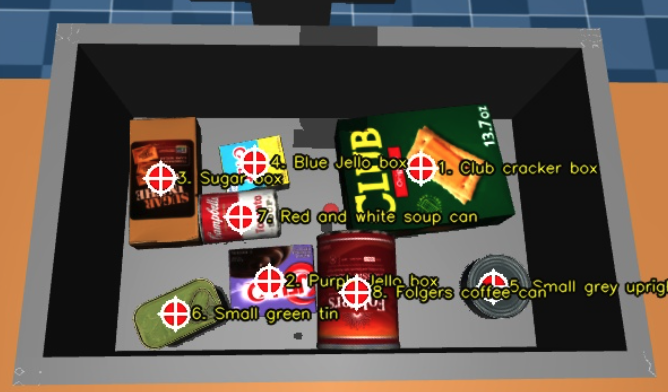
MoveIt Pro now integrates with Google Gemini, bringing high-level visual reasoning into Behavior Trees through Google DeepMind's new Gemini Robotics-ER 1.6 embodied-reasoning model (gemini-robotics-er-1.6-preview). The new GetPoints2DFromGeminiQuery Behavior sends a text prompt and an optional image to Gemini's multimodal API and returns 2D image points plus per-point labels — handy for open-vocabulary localization tasks like "find every loose bolt on the panel" that are too open-ended for classical perception. Users can also build their own Gemini-backed Behaviors on top of the new moveit_pro::behaviors::gemini C++ utilities. See the Integrate with Gemini VLM how-to guide for setup and prompt-writing tips.
Mobile-Base Navigation with Continuous Replanning
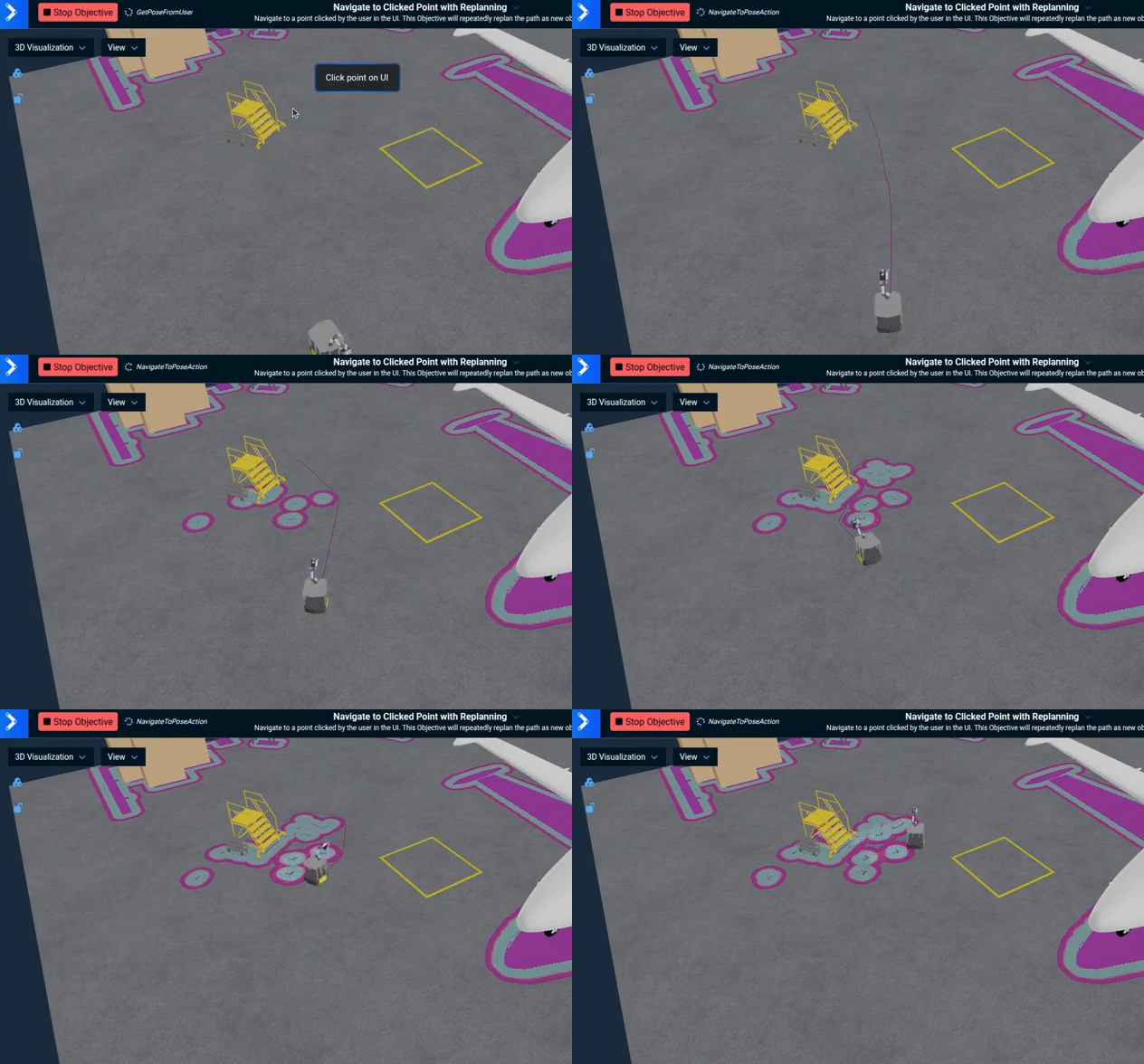
The hangar_sim robot configuration now ships with a Navigate to Clicked Point with Replanning Objective and a dual-LiDAR Nav2 integration, demonstrating multi-sensor costmap observation buffers and continuous goal replanning during mobile-base navigation. The Objective serves as a working template for arm-on-mobile-base applications where the navigation goal can shift mid-traverse and the robot needs to react without restarting the run.
Simulation Improvements
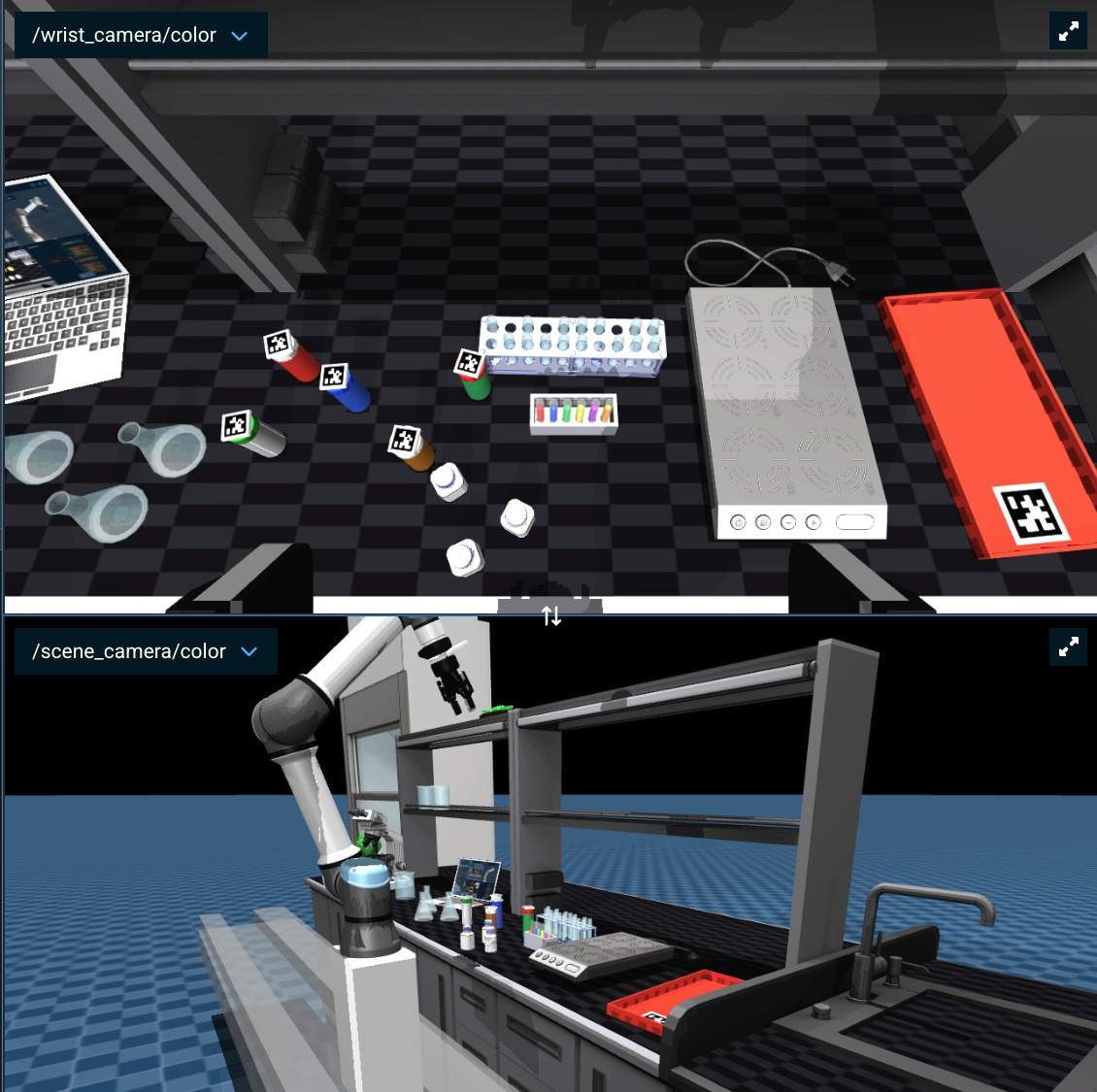
Better Performance. MoveIt Pro's underlying MuJoCo hardware interface now uses a smarter threading model. The result: Mujoco model timestep not running in realtime warnings are dramatically reduced and most users should be able to stream 1080p simulated cameras at full rate. See the new Adjusting the Simulated Camera Resolution how-to guide.
Hardware-matching sensor topics. The simulator now supports per-sensor ROS topic overrides for both cameras and LiDARs. Perception pipelines built against real cameras — for example, the image_pipeline layout produced by RealSense and Astra drivers — drop into simulation without rewiring topic names. Multi-LiDAR scenes can give each LiDAR its own topic (e.g. /scan_front, /scan_rear), which is required for Nav2 costmaps with multiple observation buffers. See the Simulated Depth Camera Sensor and Simulated Lidar Sensor sections of the MuJoCo guide for configuration.
MuJoCo 3.6.0 performance upgrade. Updated the bundled MuJoCo physics engine from 3.2.7 to 3.6.0 for better speedups. See the Breaking Changes section below for model-tuning implications.
Follow Active Node in the Runtime Behavior Tree
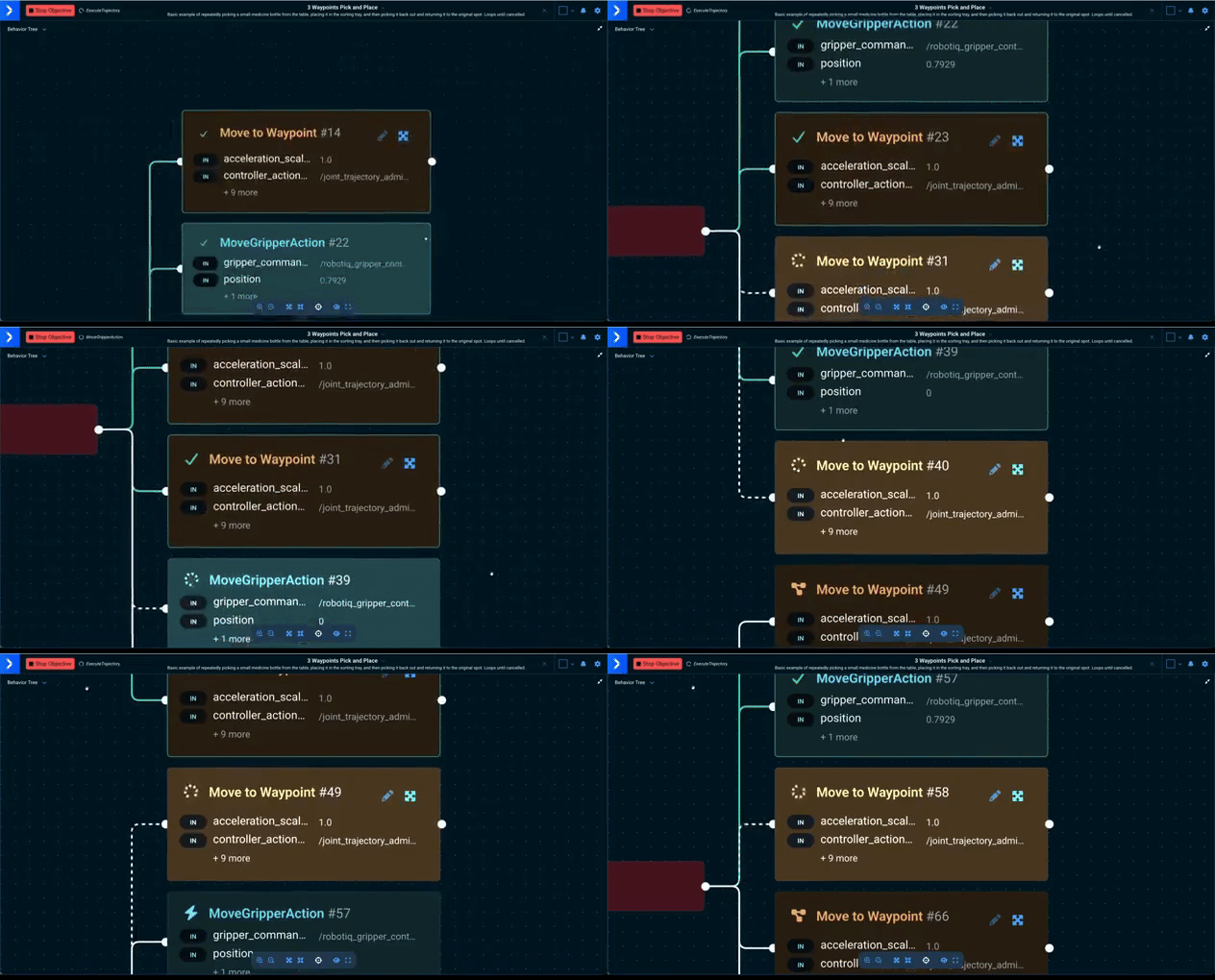
A new Follow active node toggle in the runtime Behavior Tree view pans the viewport to keep the currently ticking node visible as execution moves through the tree, switching to a tighter Fit to View framing so the active region stays prominent. When a run finishes successfully (or the toggle is turned off) the view restores to the full tree; when a run ends in failure the camera stays on the failed node so the operator can see what went wrong.
Gamepad Control in Interactive Marker Mode
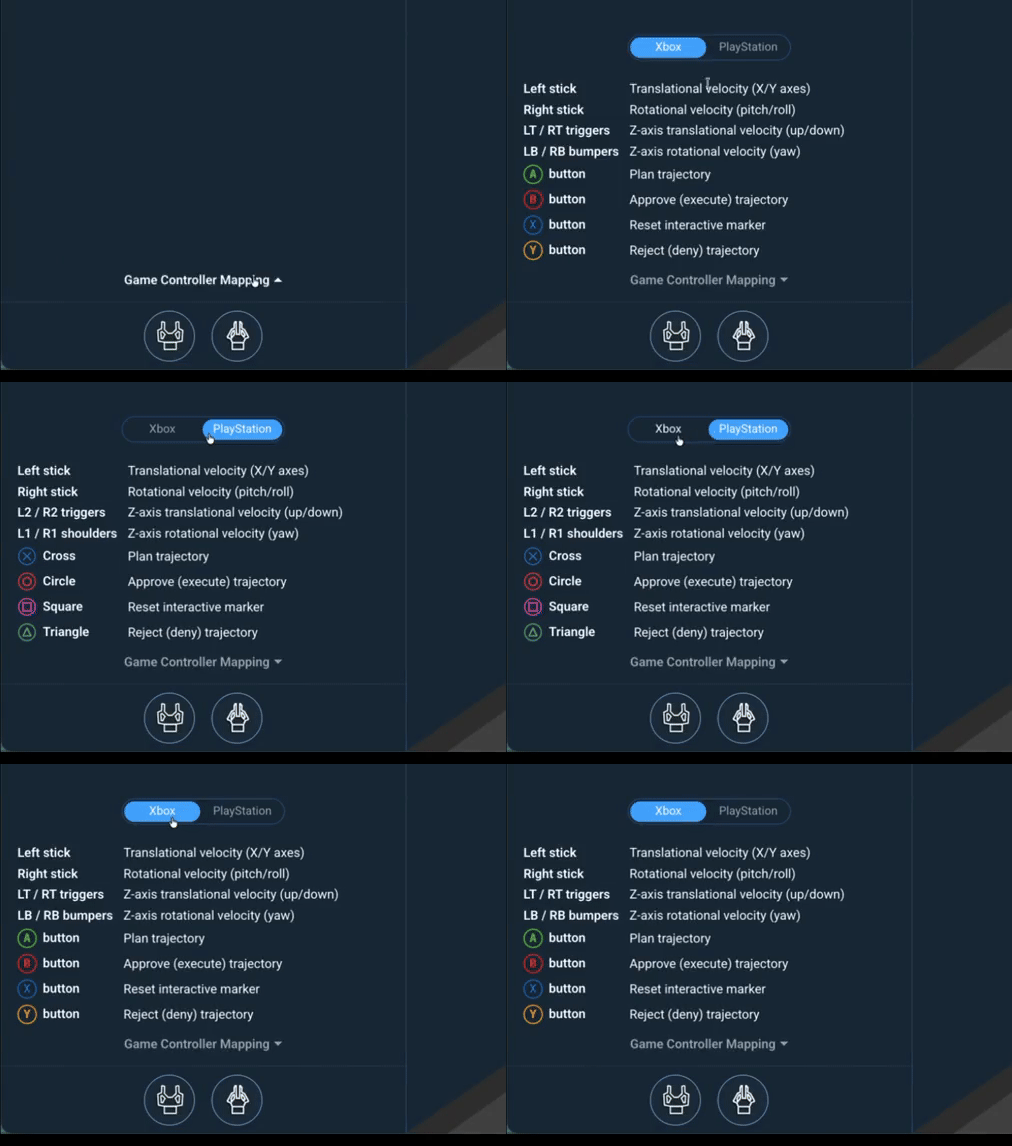
Gamepad controllers now work in Interactive Marker mode, letting operators position the iMarker with analog sticks and triggers instead of mouse dragging. The same gamepad mapping used elsewhere in the teleop UI applies here, so muscle memory carries over between joint jogging, Cartesian jogging, and iMarker positioning. An in-UI button mapping also makes understanding usage easier.
Per-Mode Teleop Speed Slider
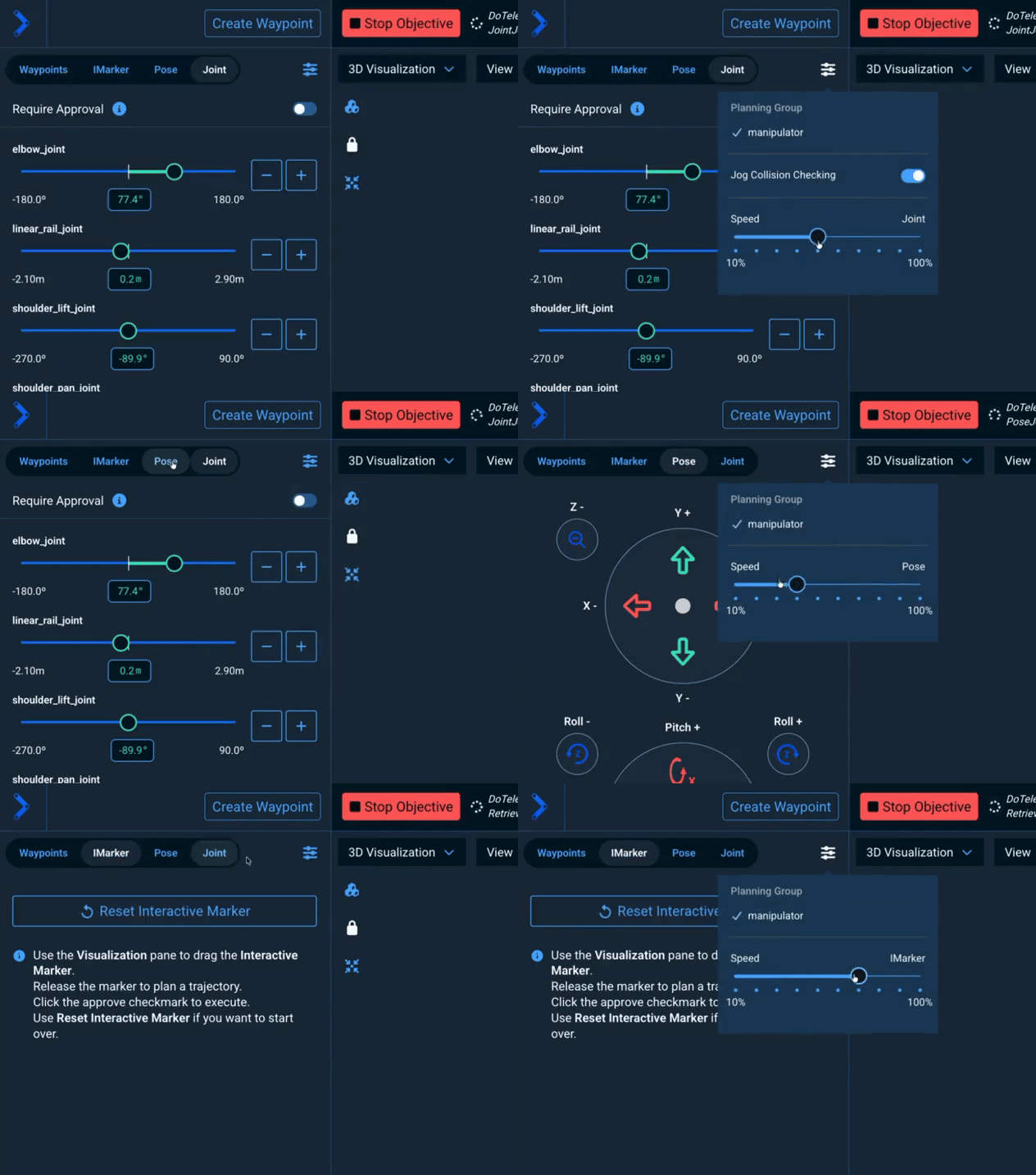
Each teleop mode (Jog, Waypoints, IMarker) now has its own speed slider, replacing the previous Jog-only slider. Each mode keeps its own value, so an operator can pre-set a careful IMarker approach at low speed while keeping joint jogs at full speed. The Request Teleoperation Objective passes the active mode's velocity_scale_factor through to the Move to Pose (IMarker) and Move to Joint State (Waypoint) Subtrees, so the slider value is honored without switching tabs.
Operator-Facing Breakpoint Messages
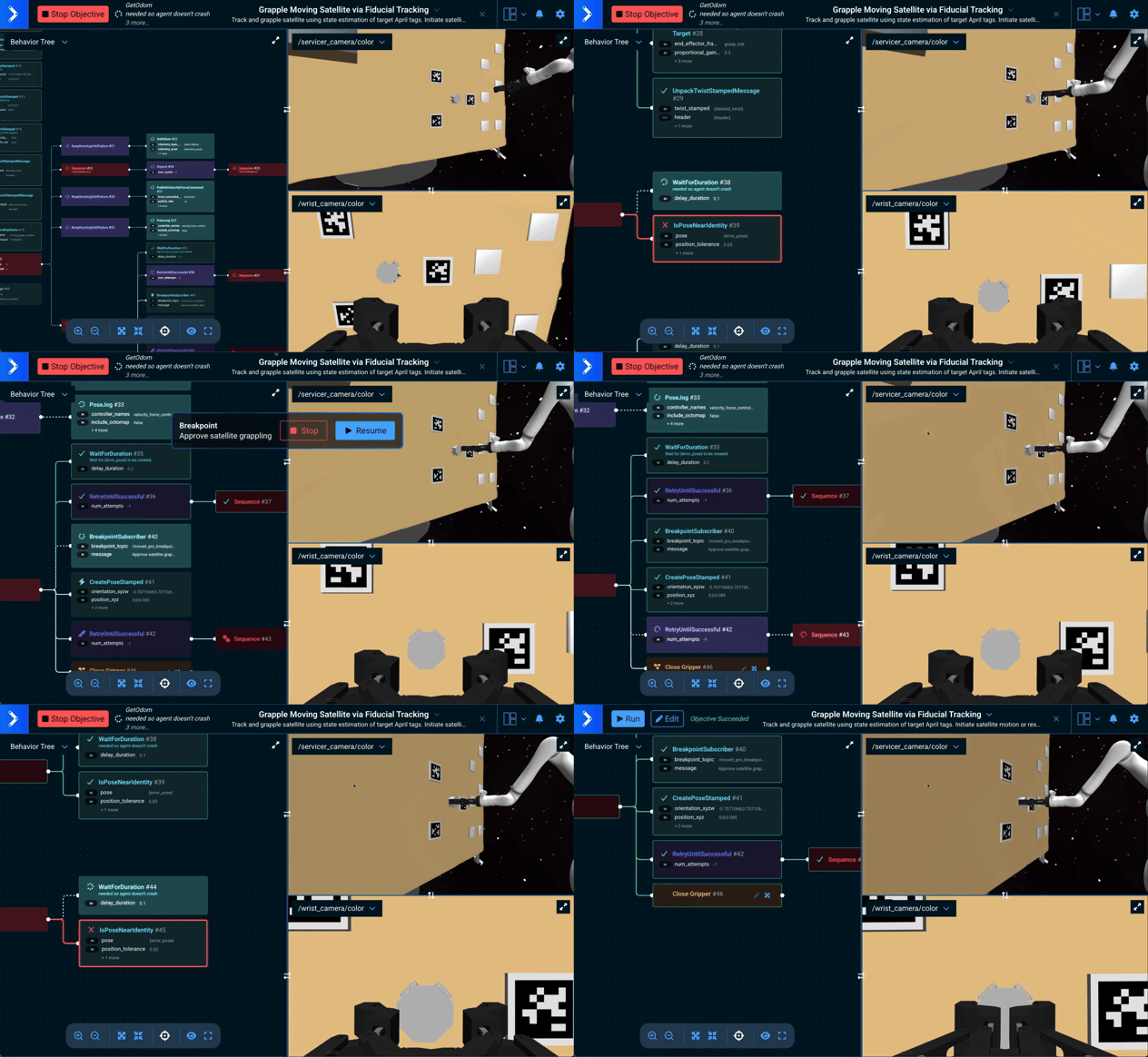
The BreakpointSubscriber Behavior now accepts an optional message input port. When set, the message is rendered in the UI under a bold Breakpoint title, giving the operator a human-readable hint about why the Objective is paused — for example, "Confirm part orientation before pick" or "Waiting for human inspection of weld seam". Existing Behavior Trees that only set breakpoint_topic continue to work unchanged. See the Breaking Changes section for the related wire-format change on /breakpoint_encountered and /breakpoint_resumed.
Expanded Trajectory Approval
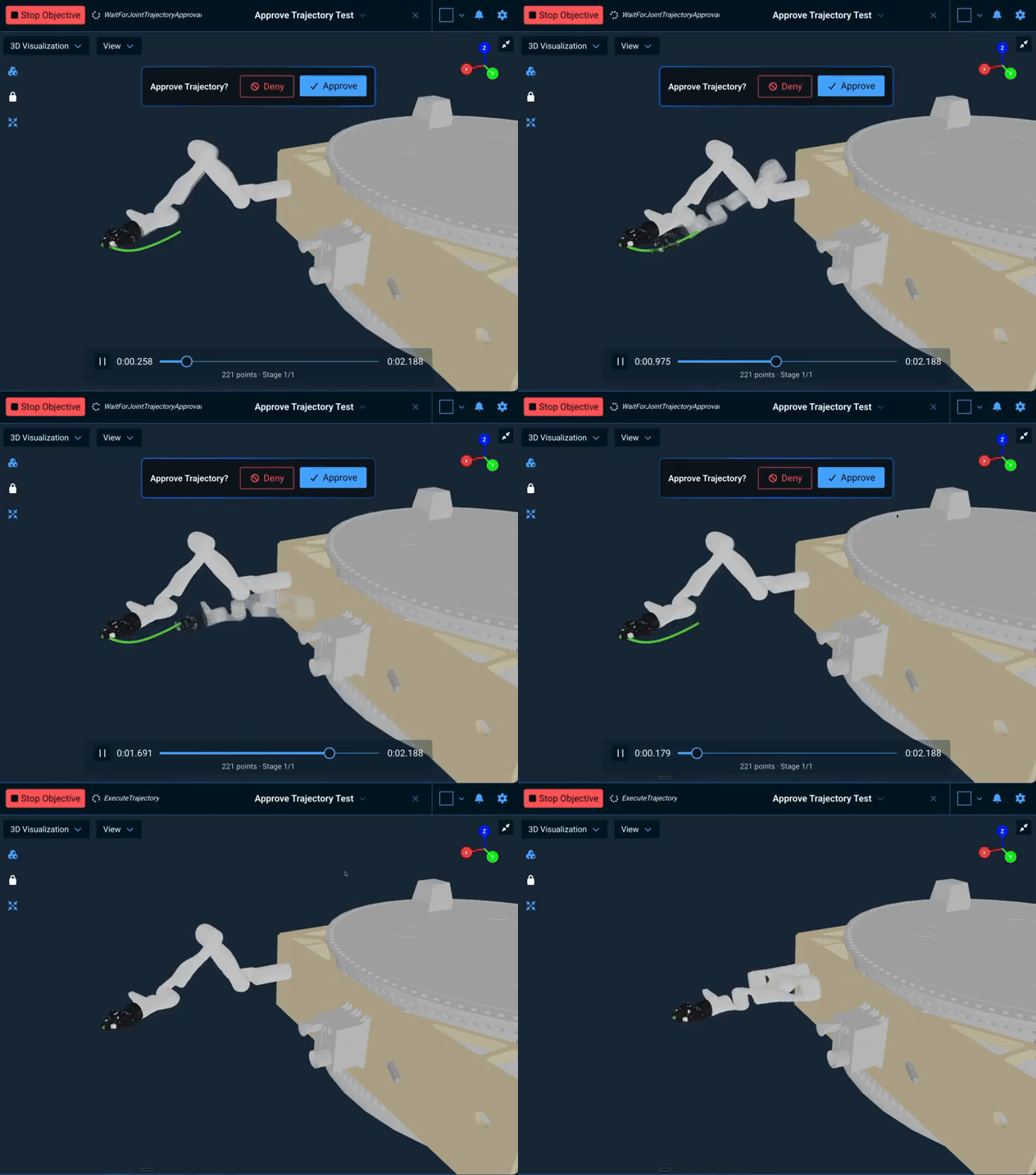
Operators can now pause an Objective to preview and approve any joint trajectory before it executes, not just MTC solutions. The new WaitForJointTrajectoryApproval Behavior renders the trajectory in the 3D Visualizer and waits for approval; a companion Wait for Joint Trajectory Approval Subtree fetches the planning scene first so joints outside the trajectory (mobile bases, secondary arms) keep their current values in the preview. For MTC plans, the existing flow is replaced by the new WaitForMTCSolutionApproval Behavior — see the deprecation of WaitForUserTrajectoryApproval below.
Runtime Parameter Overrides for Objectives
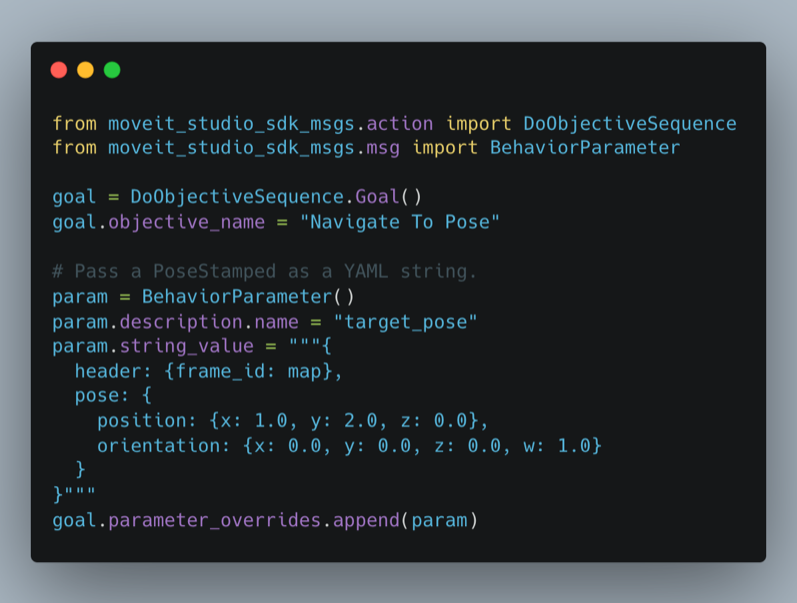
External callers — Python scripts, REST clients, fleet managers — can now inject runtime values directly into a Behavior Tree's blackboard when starting an Objective via DoObjectiveSequence or ExecuteObjective, without editing the Objective XML. Built-in support covers primitives, common geometry types (poses, points, transforms, twists, wrenches), joint states, and trajectories. Each override is parsed as YAML before the tree runs; unknown ports, unregistered types, and malformed values abort the Objective with a clear, parameter-specific error message instead of silently storing a string. Custom message types can be registered in one line from a Behavior loader plugin. See Passing Parameters to Objectives at Runtime.
Graceful Backend Reconnection
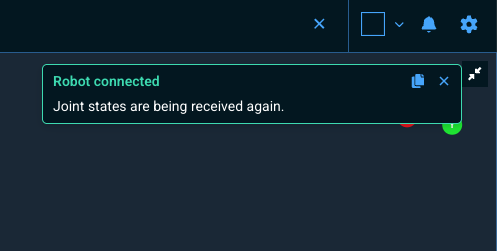
The web UI now stays calm and recovers cleanly when the MoveIt Pro backend restarts mid-session. The runtime Behavior Tree view refits its viewport once rosbridge comes back, so framing returns on its own without a browser refresh. When the backend is genuinely offline — or when /robot_description never publishes — the UI shows a quiet, branded placeholder ("MoveIt Pro Backend Not Running" or "Robot Description Not Received") with concrete troubleshooting steps, instead of a generic red "Something went wrong" error screen. Operators on flaky networks and developers cycling agent_robot.app no longer have to refresh the browser to recover.
Windows Support via WSL
MoveIt Pro now runs on Windows via Windows Subsystem for Linux (WSL). After installing WSL with wsl --install, follow the standard Ubuntu installation steps inside the WSL Ubuntu shell. See the Quick Start Install page for details.
Other Enhancements
Misc User Interface Improvements
-
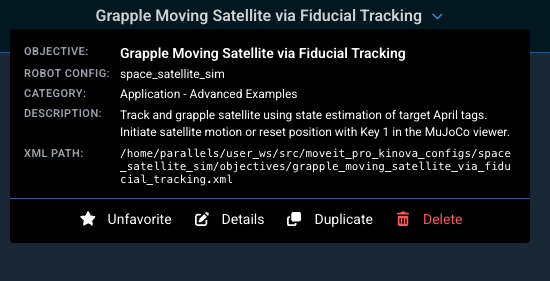
Clicking the current Objective's name in the top navbar now opens an expanded dropdown showing the Objective's name, active robot configuration, category, description, XML file path, and quick actions (favorite, details, duplicate, delete). A new deselect button (X) to the right of the title clears the current Objective selection.
-
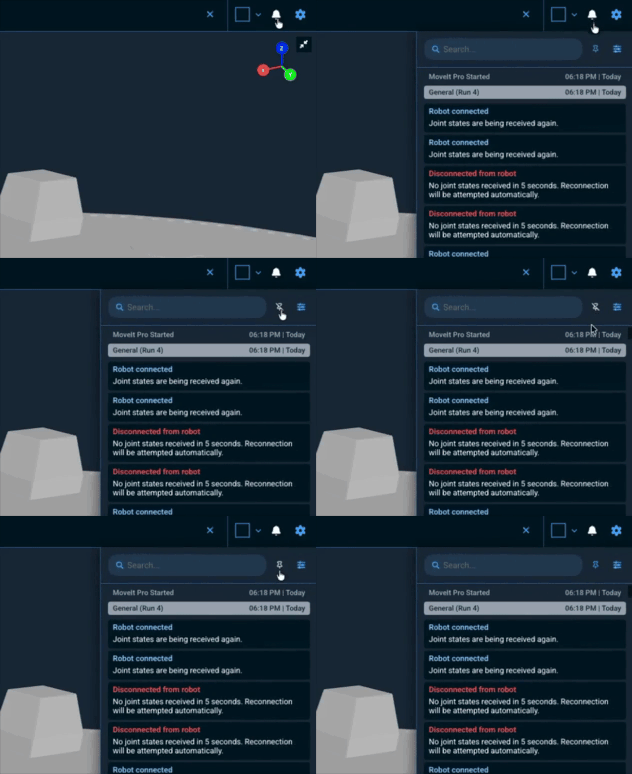
Added a pin toggle to the alerts drawer header: when pinned, the drawer stays open through outside clicks and Escape presses, and pin state persists across browser sessions.
-
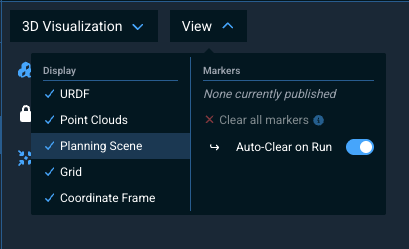
Added a Planning Scene toggle to the View menu in the 3D Visualizer, allowing users to hide planning scene collision objects similar to existing toggles for URDF, point clouds, and grid. Preference persists in browser local storage.
-
The trajectory preview controls are now a single compact row (play/pause, current time, scrubber, total duration) with per-stage tick marks on the scrubber and a footer line showing point count and the current
Stage N/Mplus stage comment. Replaces the previous four-button layout (jump-to-start, play, pause, jump-to-end).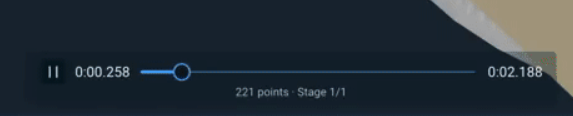
-
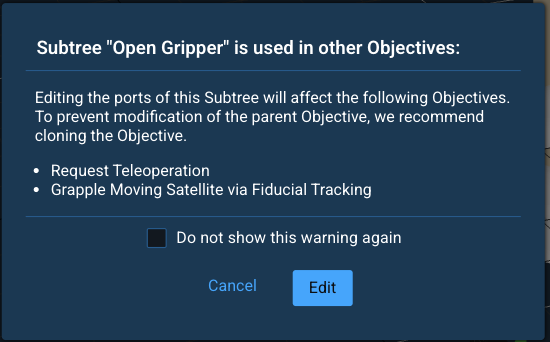
The "Subtree is used in other Objectives" warning popup that appears when editing a shared Subtree's ports now has a Do not show this warning again checkbox; the preference persists in browser local storage and skips the popup on subsequent edits.
-
Added a last-Objective completion indicator to the main navigation: after an Objective finishes, the area next to the Run and Edit buttons shows "Objective Succeeded" or "Objective Failed" until the next run starts or the user deselects the Objective.
-
Subtree port types (
std::string,geometry_msgs::msg::PoseStamped, etc.) are now visible in the edit panel when a Subtree is used as a child node, matching the type-label experience for regular Behaviors. All ports across the built-in Subtrees incore_objectives(Move to Waypoint,Move to Pose,Execute MTC Solution, and others) have been annotated with their C++ data types. -
The Behavior Tree status viewer now highlights failed nodes with a thicker red border, pulses the leafmost failing node, and raises failed nodes and their edges above the rest of the tree so the highlight is not occluded.
-
The 3D Visualizer's View menu now opens as a two-column panel: display, navigation, and marker toggles sit on the right while view selection stays on the left, so the menu fits more controls without growing taller. Marker labels were also refreshed for clarity.
-
The alerts drawer can now be resized by dragging its left edge.
-
The Planning Scene Editor's
Delete Objectbutton moved to the top of the selected-object panel and is now a filled red button so it's discoverable without scrolling past the size, position, and rotation controls. -
Tightened View Pane overlay margins so the View selector and the expand button sit at matching 8 px offsets, freeing up room inside custom view panes.
-
The runtime Behavior Tree view now has a port visibility toggle, matching the editor view. Click the eye icon to choose how many input/output ports each node displays (hide all ports, show the first 1 through 5, or show all ports). The selection persists across browser sessions.
-
The Behavior sidebar hover popover now shows the source file path of the Behavior with a copy-to-clipboard button, making it easier to locate the underlying XML or C++ source.
-
The Auto Layout toolbar button in the Behavior Tree editor is now hidden when Snap to box connection mode is active. Snap to box already relayouts after every edit, so the manual button is only useful in Classic line draw mode and clutters the toolbar otherwise.
-
All on/off toggle switches in the web UI now share a single design — the Quaternion-input radian/degree toggle, Admittance Control axis enables, Require Approval, Jog Collision Checking, and the View Settings auto-clear toggle previously used two different visual styles. Switches also have accessible labels (via
aria-labelor associated labels) so screen readers announce each control's purpose. -
The Request Teleoperation and Breakpoint popups now share the same prompt-row layout as the existing
Approve Trajectorypopup — title plus optional body, with a red destructive button (Abort/Stop) on the left and a primary action (Continue/Resume) on the right. -
Added a startup warning when the browser is rendering with a software WebGL fallback (e.g. SwiftShader, llvmpipe, Microsoft Basic Render Driver) instead of a real GPU. The warning links to Performance Troubleshooting and can be dismissed permanently per browser.
-
The runtime Behavior Tree view now shows a pencil edit icon on Subtree nodes, matching the editor view. Clicking the pencil navigates to the Subtree's source Objective. Subtrees that cannot be edited (inline content, missing Objective ID, or built-in read-only Objectives) render the icon as greyed-out with a tooltip explaining why.
New Behaviors (Skills)
GetConvexHullPointCloudcomputes a 3D convex hull around a point cloud and densely resamples the surface to fill holes and gaps.RotateTwistToFramerotates ageometry_msgs::msg::TwistStampedinto a target frame's orientation. Both the linear and angular components are rotated; any translation between the two frames is ignored, so no omega-cross-r reference-point shift is applied. Useful when a velocity controller interprets commanded twists in its own end-effector frame and the operator wants to issue world-frame commands.SetRos2Parametersets any ROS2 parameter on any node at runtime. Acceptsnode_name,parameter_name,parameter_value, andparameter_typeports. Useful for tuning Nav2 costmap parameters (e.g.robot_radius), controller gains, or any other parameter exposed via the standard ROS2 parameter service.AddOverageToPathextends a coverage path past its endpoints by a configurable overage distance, useful for ensuring full edge coverage when sanding, painting, or sealing surfaces.AvoidPointsInCoveragePathremoves coverage-path waypoints that fall within a configurable distance of an obstacle point cloud, so a generated path can be pruned around obstructions without regenerating it from scratch.FindSlicePlanesAlongEdgefinds a sequence of slice planes oriented along an edge feature in a point cloud, useful for generating Cartesian via-points along a part contour.TrimPointcloudSurfacecrops a point cloud to a region around a target surface so downstream perception or planning Behaviors operate only on the relevant points.RepeatUnlessFailureEachTickis a new decorator that ticks its child up tonum_cyclestimes, advancing one iteration per parent tick. It replaces bothRepeatandKeepRunningUntilFailure, and unlikeRepeat, it cannot deadlock the tree onnum_cycles="-1"(the default) with a synchronous always-successful child. An explicitRepeatUnlessFailureWithinTickalias is also registered for users who intentionally need the legacy within-tick loop semantics. See Behavior Tree Troubleshooting.BlockUntilParameterIsTruereturns RUNNING until a named blackboard entry evaluates astrue, then returns SUCCESS. Accepted forms oftrue: nativebool true, non-zero ints, and bool-parseable strings ("true"/"1", as written by XML<SetBlackboard value="true"/>). A missing entry keeps the Behavior in RUNNING (the writer may not have run yet); an entry that exists but cannot be interpreted as bool returns FAILURE so configuration mistakes surface immediately. Designed for use under a Parallel control to gate one branch on a flag set by another branch.GetPoints2DFromGeminiQueryqueries Google Gemini's multimodal API with a text prompt and a ROS image to locate 2D image points corresponding to features described in the prompt. The Behavior returns a narrative answer, a vector ofgeometry_msgs::msg::PointStampedwith normalized image coordinates, and a parallel vector of short labels Gemini attached to each point so prompts can plumb metadata such as object IDs or colors through to downstream Behaviors. Requires theGOOGLE_GEMINI_API_KEYenvironment variable to be set.- New
WaitForJointTrajectoryApprovalBehavior that takes atrajectory_msgs/JointTrajectoryinput, previews it in the UI, and waits for the user to approve or deny. Accepts an optionalplanning_sceneport so joints outside the trajectory (mobile bases, extra arms) keep their current values in the preview. - New
Wait for Joint Trajectory ApprovalSubtree that fetches the current planning scene before previewing the trajectory, so authors don't need to chain the fetch themselves. - New
WaitForMTCSolutionApprovalBehavior that replacesWaitForUserTrajectoryApproval(now deprecated) for previewing MTCSolutionobjects.
Behavior Improvements
- Reduced UI log noise from
SavePoseStampedToYamland relatedSaveToYamlBehaviors: the "optional input port was not set" messages are now debug-levelrclcpplogs instead of UI info messages. WaitForUserTrajectoryApprovalhas been deprecated in favor of the newWaitForMTCSolutionApprovalBehavior, and will be removed in a future release.- The
Repeat,RetryUntilSuccessful, andKeepRunningUntilFailuredecorators are deprecated. The Behavior palette flags them as deprecated and the Objective Server logs a one-shot deprecation warning at startup. They still execute their legacy semantics so existing Objectives continue to work, but will be removed in MoveIt Pro 10.0. Migrate toRepeatUnlessFailureEachTick(orRepeatUnlessFailureWithinTickif the within-tick loop is intentional). - The
CreateStampedPose,CreateStampedTwist, andCreateStampedWrenchBehaviors have been deprecated in favor ofCreatePoseStamped,CreateTwistStamped, andCreateWrenchStamped, whose names match the underlyinggeometry_msgsmessage types. The Behavior palette flags the old names as deprecated and they emit a deprecation warning when used. Existing Objectives continue to work unchanged, but the deprecated Behaviors will be removed in a future release — migrate to the new names. When migrating Objective XML, also update the output port attribute names fromstamped_posetopose_stamped,stamped_twisttotwist_stamped, andstamped_wrenchtowrench_stamped; the blackboard variable names they write to can stay the same if desired. - TF lookup error messages from Behaviors now include a subtype-specific hint (different advice for "extrapolation into the past", "extrapolation into the future", and "extrapolation at time") and a link to the new Transforms Troubleshooting docs page. Replaces an earlier monolithic "check CPU and memory" hint that did not differentiate between the three distinct failure modes.
GetMasks3DFromMasks2Dhas been migrated to the shared helper and is the first Behavior to benefit. - The
LoadFromYamlandLoadMultipleFromYamlfamily of Behaviors (LoadPoseFromYaml,LoadPoseStampedFromYaml,LoadPoseVectorFromYaml, and the other type-specific registered names) now accept an optionalpackage_nameinput port. When set, the YAMLfile_pathis resolved relative to that ROS package's share directory, matching the resolution pattern used byAddURDF.
Reference Application Changes
- Added
publish_mj_world_tfhardware parameter topicknik_mujoco_rosto suppress MuJoCo'smj_world → odomTF when a nav stack owns that edge. - Set
memory="64M"on thelab_simMuJoCo scene so the constraint-solver arena does not overflow under contact-dense Objectives after the MuJoCo 3.6.0 upgrade. See the Breaking Changes section. - Clarified the operator pose-prompt copy in the
Navigate to Clicked PointObjective so the expected pick action is unambiguous. - Fixed an incorrect
VisualizePoseport wiring in thelab_simMPC pose-tracking Objectives. - Renamed bundled uses of
CreateStampedXtoCreateXStampedandWaitForUserTrajectoryApprovaltoWaitForMTCSolutionApproval, matching the Behavior renames in this release.
Documentation Improvements
- Added a new Motion Planning Best Practices guide covering joint-limit and waypoint best practices for raising motion-planning success rate.
- Added a new Transforms Troubleshooting page covering the three TF2 extrapolation error messages ("into the past", "into the future", "at time"), missing-frame and disconnected-tree cases, per-subtype root causes, and design patterns to avoid (one-shot dynamic TF publications that corrupt a frame otherwise intended to be static).
- Rewrote Tutorial 3 (Perception & Machine Learning) around the new
lab_simmedicine-bottle scenario, replacing the legacy stack-blocks running example. The tutorial now walks through three end-to-end picking workflows —AprilTag → Pick from Pose → Move to Waypoint,SAM3 + ICPwith Cartesian via-points, and a pointer to thePick All Pill Bottlescapstone Objective — plus a reusableFit Bottle to Cloud via ICPSubtree walkthrough, a Planning Scene Editor keep-out-zone teleop-recovery example, and a SAM3-vs-SAM2 technical reference appendix. - Added a new how-to guide, Adjusting the Simulated Camera Resolution, covering the
<camera resolution>attribute and the<global offwidth/offheight>offscreen framebuffer that must be raised in tandem when sharper MuJoCo camera images are needed. - Added a new how-to guide, Visualize 3D Markers, documenting which parts of the
visualization_msgs/Markerspec the MoveIt Pro 3D Visualizer supports and showing a minimal Python publisher example. - Added a new how-to guide, Configure Frontend Settings, describing the new sparse YAML override file (
frontend_settings.yaml) for deployment-specific frontend values (reference frame, Nav2 plan topic).
Other Improvements
- The MoveIt Pro license-validation banner now writes to stderr instead of stdout. The banner is emitted before the ROS spdlog sink is installed in the Objective Server, so previously it polluted stdout in any tooling that captured stdout-only.
- Surface MoveIt Pro license activation errors in the terminal when running
moveit_pro runwithout--verbose, so connectivity issues are visible without digging through the log file. - Renamed the
moveit_studio_commonpackage tomoveit_pro_common, which is now the canonical home for the shared utility headers and the precompiled-header helper. The oldmoveit_studio_commonpackage remains as a backwards-compatibility shim that forwards tomoveit_pro_common(and tomoveit_pro_packagefor CMake macros) and emits deprecation warnings on every header include, namespace use, and macro call. TheMOVEIT_PRO_PACKAGE()macro insidemoveit_pro_commonitself is also now a thin deprecation wrapper around the canonicalmoveit_pro_packagemacro. All deprecated APIs will be removed in MoveIt Pro 10.0 — update existing packages to depend onmoveit_pro_commonfor the utilities and onmoveit_pro_packagefor theMOVEIT_PRO_PACKAGE()macro before then. - Added
POST /v2/objectives/verifyREST endpoint that validates an in-memoryBehaviorTreeJSON payload against BehaviorTree.CPP without persisting to disk. Used by the LLM proposed-changes flow so the agent can verify candidate trees before the user accepts them, replacing the round-trip through the v1 XML verify path. The sharedverify_xml_texthelper now also surfaces 504 timeouts as real HTTP errors instead of masking them as "could not verify" (only the 500 service-unavailable case continues to soft-fail). moveit_pro runno longer rebuilds the user Docker images (and re-pulls the multi-GB upstream base image) when only the colconinstall/directory is missing — for example, after a previous build failure.- If the three locally-tagged user images (
moveit-studio-base,moveit-studio-agent-bridge,moveit-studio-drivers) already exist,runnow skips the image build and only re-runscolcon build. moveit_pro buildstill rebuilds unconditionally, so it remains the escape hatch when an explicit image rebuild is desired.- The
No kinematics plugin defined for group 'X'startup warning is now suppressed for planning groups with at most one active joint, which covers typical vacuum (0-DOF) and parallel-jaw (1-DOF) grippers where Cartesian IK isn't applicable. Manipulator groups with two or more active joints still surface the warning when their kinematics plugin is missing. - Extended
moveit_pro shellto accept a command to run non-interactively (e.g.moveit_pro shell colcon build --packages-select my_pkg), a--service/-sflag to explicitly target a docker compose service, and an ephemeralagent_bridgecontainer fallback when no MoveIt Pro instance is running. - The AI chat's proposed-change preview now renders the actual Behavior Tree the agent proposes, instead of showing an empty tree. The LLM service emits v2 JSON directly and the frontend consumes it without an XML round-trip.
- Added optional Behavior Tree file logging. Set the
enable_bt_file_loggingROS parameter totrueon the Objective Server node at startup to enable. When enabled, each Objective run writes a Groot2-compatible.btlogfile to~/.ros/log/bt_logs/. This parameter is only configurable at node startup and requires a restart to change. parameter_overridesonDoObjectiveSequenceandExecuteObjectiveis now fully wired end-to-end, so external callers (Python scripts, REST clients, fleet managers) can inject runtime values directly into a Behavior Tree's blackboard without editing the Objective XML. Built-in support covers primitives plusgeometry_msgs/PoseStamped,PointStamped,TransformStamped,TwistStamped,WrenchStamped,sensor_msgs/JointState,trajectory_msgs/JointTrajectory, and thestd::vectorforms ofgeometry_msgs/PoseStampedandgeometry_msgs/PointStamped. Each override is parsed as YAML into the port's declared C++ type before the tree runs; unknown ports, unregistered types, and malformed YAML abort the Objective with a clear, parameter-specific error message instead of silently storing a string. Custom message types register their parser in one line —moveit_pro::behavior::registerParameterType<your_msgs::msg::YourType>()— from the Behavior loader plugin'sregisterBehaviors(). See Passing Parameters to Objectives at Runtime.- Reduced terminal log spam from the
rosbridge_websocketnode: its log level is now set towarnat launch, so per-subscription INFO messages (which flooded the terminal when clients rapidly toggled topic subscriptions, e.g. costmap layers) are suppressed while warnings and errors remain visible. - Added a user-configurable frontend settings file. Deployment-specific values previously hardcoded in the frontend — the 3D Visualizer reference frame (
world) and the Nav2 plan topic (/plan) — can now be overridden per deployment via a sparse YAML file (with comments), withiframeViewportsreserved for future use. Supply the file withmoveit_pro run --frontend-settings <path>, or commit it to your robot configuration package as<config_package>/config/frontend_settings.yaml. Unknown keys are logged in the browser console and ignored so typos are easy to spot without breaking the rest of the file. Per-field validation is tolerant in the same way: a single bad value falls back to its default while every other override still applies. See Configure Frontend Settings.
Bug Fixes
- Fixed MuJoCo hardware interface reporting
qfrc_applied(external user force) instead ofqfrc_actuator(actuator-produced force) for joint effort state interfaces. - The web UI now shows a targeted
Missing Objectivescreen (orObjective Load Failedwith the HTTP status code for other errors) when an Objective can't be loaded — for example after switching robot configurations — instead of the genericSomething went wrongmessage. Objective IDs containing special characters such as/or?are also now fetched correctly. - Fixed MuJoCo lidar site transforms being published relative to
mj_worldinstead of the body the lidar is attached to. - Cleaned up INFO logging for the URDF planning scene services;
AttachURDFandDetachURDFno longer log at INFO for internal scene transitions that are indistinguishable from user-invokedAddURDF/RemoveURDF, and those transitions are now logged at DEBUG with their reason. - Fixed the MuJoCo hardware interface publishing
mj_world → base_linkat 60 Hz, which overwrote anyodom → base_linktransform produced by the odometry stack (wheel odometry, fuse, slam_toolbox). When the new optionalodom_framehardware parameter is set (e.g.,<param name="odom_frame">odom</param>), MuJoCo instead publishesmj_world → odomas an identity anchor, leaving theodom → base_linkedge entirely to the odometry stack. - Fixed gamepad button highlights in the teleoperation panel showing the opposite direction from the actual robot motion (e.g., pushing the stick up highlighted -Y instead of +Y).
- Fixed compressed camera streams from publishers using best-effort QoS (e.g. RealSense
*/compressedtopics) silently dropping frames in the web UI. The video stream subscriber now uses the sensor-data QoS profile that camera publishers use by default. - Fixed an apparent hang where pressing Approve immediately after a trajectory preview popup appeared could leave the robot paused for many seconds (and on slow links indefinitely) before motion started. Most visible on long Cartesian plans previewed via
WaitForMTCSolutionApprovalorWaitForUserTrajectoryApproval(for example, the multi-thousand-point spray and grind paths inhangar_simandgrinding_sim). Approve and Deny clicks are now processed promptly regardless of preview size. - When the MoveIt Pro backend is not running, the Behavior Tree editor now shows a calm "MoveIt Pro Backend Not Running" placeholder matching the camera-feed unavailable style, instead of the generic red "Something went wrong" error screen.
- Fixed the expand/collapse toggle on Behavior Tree control nodes (Sequence, Fallback, Parallel) and Subtrees being disabled outside editor mode, so users can now drill into collapsed nodes from non-editor views like the Supervisor.
- Fixed
PlanMTCTaskaborting the Objective when the non-criticalstore_uid_mapdebug telemetry service is unavailable or times out. The Behavior now publishes a UI warning and proceeds with planning. - Fixed Subtree blackboard port editing silently breaking when the user typed a name with spaces or other characters that are not valid XML attribute keys. The port-name input now validates against an XML-attribute-safe rule (must start with a letter or underscore; only letters, digits,
_,.,-), normalizes spaces to underscores as the user types, and rejects invalid names on blur with an inline error and toast instead of saving a broken tree. New ports added via the + Port button now default to anew_portplaceholder so autosave doesn't fail before the user types a name. - Fixed
GetTrajectoryStateAtTimefailing on single-pointJointTrajectoryinputs with the opaque errorSampler failed to initialize.. When the trajectory has exactly one point andtime_from_referenceis0.0, the Behavior now returns that point directly (regardless offrom_start) without invokingTrajectorySampler::init, which requires at least two points. - Fixed the Behavior Tree editor leaving a node visually disabled after editing its
_skipIfport from a literal"true"to a runtime expression (e.g."{condition}"). The editor now re-resolves the expression on every port change, so the node's dashed border reflects the current expression instead of latching on the saved value until reload. The hovered-waypoint joint-preview also no longer fails when the same joint limit is registered from multiple URDF sources. ExecuteTrajectorynow demotes Joint Trajectory Admittance Controller (JTAC) absolute force/torque-threshold aborts from ERROR to WARN, so contact-detection Subtrees that wrap it inForceSuccess(where the abort is the success criterion) no longer flood the UI with red toasts.- Fixed the Behavior Tree editor silently dropping non-boolean
_skipIfexpressions on save. Runtime gating like_skipIf="pick_alignment != 'side'"was parsed as a boolean and stripped when saving any unrelated edit, quietly turning conditional branches into always-on branches with no user-visible signal. The editor now round-trips the expression verbatim. Disable Node on an expression-bearing node opens a confirm dialog before overwriting; the original expression is stashed and restored when the node is re-enabled. DetachURDFnow returns a failure response if the tool cannot be re-added to the planning scene after detach, surfacing what was previously a silent log-only error.- Fixed the Behavior Tree pane staying stuck on its error screen after a render failure. Starting a new Objective run or switching Objectives now clears the previous error and renders the new tree.
- Duplicating a Behavior Tree node now places the new node next to the original instead of jumping 100 px above and to the right, so the duplicate remains visually adjacent to the node the user clicked.
- Fixed
BlendJointTrajectoriesintermittently failing on time-optimally-retimed input trajectories that cruise at the joint velocity limit. - Fixed a spurious
Objective Failedtoast appearing roughly 5 seconds after starting any Objective on Jazzy installs. The rosbridge service-call timeout upstream default changed from 0 (wait forever) on Humble to 5 s on Jazzy, which made every long-running Objective look like it had failed even though it kept running and completed normally. The agent bridge now pinsdefault_call_service_timeoutto 0 to match Humble's wait-forever default across distros. - Disabled Behavior Tree nodes (
_skipIf="true") now render with a dashed border in both the Edit view and the read-only Behavior Tree view, matching the runtime view, so operators can see at a glance which nodes are being skipped. The View pane also now returns to the saved tree state after editing, instead of staying frozen on the last run's status until another run starts. - Fixed the Behavior Tree zoom-out button (and scroll-wheel zoom-out) shrinking the tree past the point where nodes were too small to see, making the tree appear to vanish. The minimum zoom level now stops at a node size of ~19 px wide, so the tree always stays findable on screen.
- The Stop Objective and Stop Motion buttons now switch to a disabled "Stopping..." state with a spinner the moment they are clicked, instead of waiting for the next status heartbeat before reflecting that the request was received. Repeat clicks while stopping are ignored, so the second click no longer disappears into a silent no-op on the agent.
- Fixed
Cmd('git') failed due to: exit code(1)withfatal: cannot chdir to ...aborting themoveit_pro runexample-workspace upgrade prompt when the workspace contained nested submodules (e.g.phoebe_ws) whose worktrees were stale or missing on disk. The upgrade now deinitializes all submodules before fetching, so the fetch step no longer trips over missing nested submodule directories. - Fixed
moveit_pro configure --config-package <invalid_name>listing robot configuration packages marked withMOVEIT_PRO_IGNOREin its error message. The failure message now matches the list shown bymoveit_pro run --list. Explicitly passing the name of an ignored config is still accepted. - Fixed
SaveImageToFileaborting the Behavior Tree on Jetson hardware when received images had corrupted dimension metadata. The Behavior now sanity-bounds the image dimensions (rejecting anything over 16K per side) and returns a cleanFAILUREwith a descriptive error string instead of crashing OpenCV with a multi-terabyte allocation. - Fixed
ResetMujocoKeyframecausing the MuJoCo backend to hang or the service to time out (Timed out waiting for service response at /mujoco_system/reset_keyframe) when the Behavior was called repeatedly — for example from inside aRepeatdecorator looping forever during a long-running demo. The MuJoCo hardware interface no longer races with the reset service on the underlying simulation control data. - Fixed
Move to Waypointintermittently failing partway through long Objectives withTimed out waiting for service response.RetrieveWaypoint's service-response handler shared the Behavior Tree process's default callback queue, so an unrelated long callback elsewhere in the running Objective could delay it past the 3 second client timeout. The handler now runs on a dedicated reentrant group and is no longer affected by other Behavior Tree traffic. - Fixed
cartesian_planning::transformTwistmixing frames in its lever-arm term, which produced incorrect linear velocities for offset frames whenever both rotation and translation were non-trivial. The function now implements the standard SE(3) body-twist adjoint and its second argument is renameda_pose_b(the pose of the destination frame in the source frame's coordinates), matching the natural composition direction. The single in-tree caller,ComputeVelocityToAlignWithTarget, has been updated. - Fixed
PublishMask2Dcrashing with an opaque OpenCVarithm_opsize-mismatch error when the masks were computed against a different image than the one passed to theimageport. The Behavior now returns a cleanFAILUREnaming the offending mask index and both sets of dimensions instead of throwing. - Fixed
ComputeLinkPoseForwardKinematicsemitting a spurious warning toast on every tick when the inputjoint_statelisted fewer joints than the planning scene but the missing joints had no effect on the requested link's pose. The Behavior now warns only when a joint in the kinematic chain tolink_nameis actually missing from the input. - Fixed the masked image disappearing from the view pane shortly after running ML Objectives like
ML Find Objects on Table,ML Segment Image, orSegment Image from Text Prompt. Low-frequency image topics (such as/masks_visualization) now stay rendered until the user switches the view pane to a different topic, instead of vanishing after a brief idle period. - The Objective deselect button (X) in the navbar is now hidden while editing an Objective, and the Run button is now disabled with an explanatory tooltip when the current Objective is marked as Non-Runnable.
- Fixed the Manage Planning Group modal opening off-center and rendering an internal scrollbar with light-theme colors against the dark application background. The modal is now centered and its scrollbar matches the rest of the dark theme.
- Default planning-scene object color for
AddURDFandAddVirtualObjectToPlanningSceneis now MoveIt 2's "Scene Color" —(50, 230, 50)at alpha0.9— instead of the previous saturated transparent red, so out-of-the-box scene objects render in the same green RViz already uses. Existing Objectives that explicitly seturdf_colorare unchanged. - Fixed the 3D Visualizer ignoring
marker.nsonDELETEALLactions — it cleared every marker on the topic regardless of namespace. Per thevisualization_msgs/msg/Markerspec, a namespacedDELETEALLnow removes only markers in that namespace; an emptynsstill clears everything. - Fixed the runtime Behavior Tree view failing to refit its viewport after a rosbridge close + reconnect. The view now re-runs its "fit to viewport" framing on reconnect, so operators no longer need to toggle Follow active node to force a refit after the backend restarts.
- WARN-level log messages published to
/failure_reason_collector(e.g. fromLoggerBase::publishWarnMessage) now render as yellow toasts in the web UI as intended, instead of falling through to the default blue styling that made them visually indistinguishable from INFO toasts. - Reduced peak GPU memory used by SAM3 on a 640×480 input by roughly 3 GiB, so it now fits comfortably alongside other GPU users on 8 GiB cards where it previously caused out-of-memory crashes when combined with voice services or other ML models.
- The LLM server now logs ROS connection errors as a single line instead of a ~30-line WebSocket dump.
- Action buttons (run, edit, kebab menu) in the Objective list sidebar now appear only when hovering a row, giving the full Objective name room to display without truncation.
- Fixed the waypoint hover preview retaining stale joint positions from the previously-hovered waypoint when switching between waypoints in different planning groups. Joints outside the new waypoint's planning group now reset to the live robot state instead of staying frozen at the previous waypoint's values.
- Unified active-state styling across the navbar's toggle buttons (Planning Scene Editor, Lock Keepout Zones, Settings, Alert History, Alert Settings, Teleoperate): the filled background is gone and the active state is now indicated by an icon color change only. The Lock/Unlock Keepout Zones tooltip is now Title Case to match the Open/Close Planning Scene Editor tooltip.
- Collapsed Control nodes in the Behavior Tree viewer are now visually distinct from empty ones — the expand/collapse button uses a brighter background while collapsed, and the inline add-child button and source handle are hidden until the node is expanded.
- Quieted rosbridge log spam coming from a rosapi shutdown race amplified by frequent image-topic discovery polling, and from a React Strict-Mode advertise/unadvertise race in roslib service clients.
- Fixed the iMarker end-effector visualization showing the gripper stuck in its URDF default state (typically open) regardless of the real gripper position. The gripper mesh attached to the iMarker handle now tracks live
/joint_states, so closing the gripper updates both the robot and the iMarker preview. - Fixed
moveit_pro run --only-driversfailing with a spurious port-in-use error when agent_bridge was already running in another terminal (e.g. started bymoveit_pro run --no-drivers). The drivers service does not use the ports 3200-3203 that were being checked, so the check is now skipped when--only-driversis set. - Fixed
moveit_pro run --only-drivers(and any scopedmoveit_pro run) tearing down the entire docker compose project on exit, killing sibling services that were started by a separate terminal (for examplemoveit_pro run --no-drivers). The CLI now stops only the services it started instead of runningdocker compose downagainst the whole project. Note that stopped containers remain visible indocker ps -a(inExitedstate) and named volumes are preserved across runs; usemoveit_pro downfor a full cleanup. GetMasks2DFromExemplarnow publishes a UI warning when the text prompt is longer than the SAM3 text encoder's 32-token budget. Previously the prompt was silently truncated and the user had no indication that part of it had been dropped.GetMasks2DFromExemplarnow responds to Stop within tens of milliseconds instead of running the full SAM3 inference to completion. Previously, clicking Stop mid-inference had no effect until the prediction finished — particularly painful in CPU mode on macOS where a single inference can take many seconds.- Fixed the toast notification container and
Clear Allbutton overlapping with the right-side view pane in the web UI. - Fixed text selection in the Behavior Tree pane so users can now select and copy text from Behavior Tree node labels and from error messages on the Behavior Tree error fallback screen.
- When the UI's version check fails (network error, invalid server response, or non-semver version values), the error now shows the endpoint URL, local and remote version values with their sources, and a remediation hint — instead of a generic toast message.
- When the
/robot_descriptiontopic times out, the web UI now displays a "Robot Description Not Received" screen with troubleshooting steps (check backend, ROSBridge, and try restarting the frontend) instead of the generic "Something went wrong" error. - Fixed
SystemConfigParserswallowing the underlying cause of unexpected errors during config load, which causedros2 launchto print an emptySystemConfigException:line instead of the real failure (e.g. a missing xacro include). - Fixed Objectives aborting on
Plan To Joint Stateand similar Behaviors when the requested joint goal was effectively identical to the current robot state. The RRT planner's zero-motion threshold is now ~1e-5 rad per joint (previously it required bit-exact equality), so trivial near-zero-motion plans return a clean single-waypoint trajectory instead of producing a degenerate near-zero-length path that downstream trajectory timing and controllers rejected.
Breaking Changes
MuJoCo 3.6.0 - Joint armature Sensitivity
The MuJoCo 3.2.7 → 3.6.0 upgrade corrected the implicit integrator's derivatives for clamped actuator forces, changing how joint armature contributes to the mass matrix when PD actuators saturate.
Audit custom armature values in MuJoCo models: per-joint <joint armature="..."/> values on the order of 1e-6 can now produce an ill-conditioned mass matrix — symptom: distal wrist joints drifting from their targets. Either delete the armature attribute (MuJoCo's 0 default is safe) or raise it to a real reflected-rotor inertia (0.01–0.1 is typical for arm joints). Re-run your Objectives in simulation to confirm every joint reaches its commanded setpoint.
MuJoCo 3.6.0 - Arena Memory No Longer Grows Dynamically
The same upgrade made the constraint-solver arena statically sized at model compile time. Scenes that don't set <size memory="..."/> fall back to ~15 MB; exceeding that triggers mjWARN_CNSTRFULL and MuJoCo silently drops constraint rows, producing unstable grasps and flaky trajectory execution.
Set memory on contact-heavy MuJoCo scenes: if grasping or pushing turns flaky after the upgrade, check MUJOCO_LOG.TXT or ros2_control_node logs for mjWARN_CNSTRFULL. Fix by adding <size memory="64M" /> to the top of your scene.xml (raise further if the warning persists). The bundled lab_sim scene has been updated for this reason.
Breakpoint Topics Now Use BreakpointStatus Instead of String
The /breakpoint_encountered and /breakpoint_resumed topics now publish moveit_studio_agent_msgs/msg/BreakpointStatus (fields: string topic, string message) instead of std_msgs/msg/String. Built-in Behavior Trees, the UI, and BreakpointSubscriber are updated automatically — no action required for normal use. Custom tooling subscribing to these topics directly must switch to the new message type and read the topic field instead of data. The Bool-resume protocol on the user-named breakpoint_topic is unchanged.