9.2.0
Major Features
Trajectory Stitching via Smooth Blending

The new BlendJointTrajectories Behavior allows combining a sequence of pre-planned joint trajectories into a single, smooth trajectory — eliminating full stops between consecutive motions and significantly reducing cycle time. At each connection point, a jerk-limited transition segment is generated that respects the robot's velocity, acceleration, and jerk limits. A configurable blending radius controls how much of the original path is replaced by the smooth transition. See the Stitch Trajectories guide for details.
Mobile Base Navigation Live Path Visualization
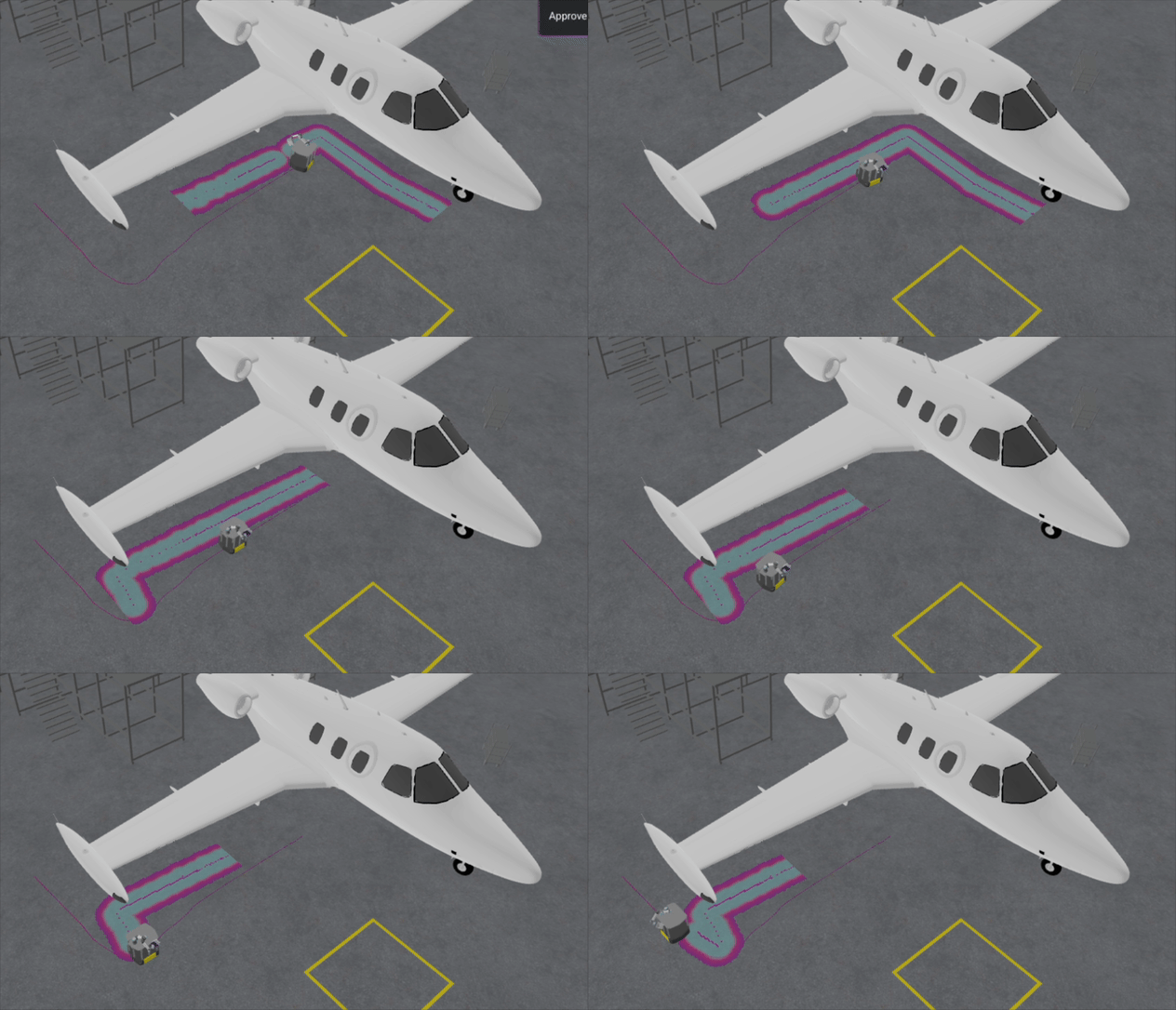
The MoveIt Pro 3D visualization now displays the live navigation path during Nav2 replanning. When running NavigateToPoseAction with a replanning Behavior Tree, the UI subscribes to the /plan topic and continuously updates the rendered path as Nav2 replans around obstacles.
Improved AI Segmentation with Morphological Mask Operations
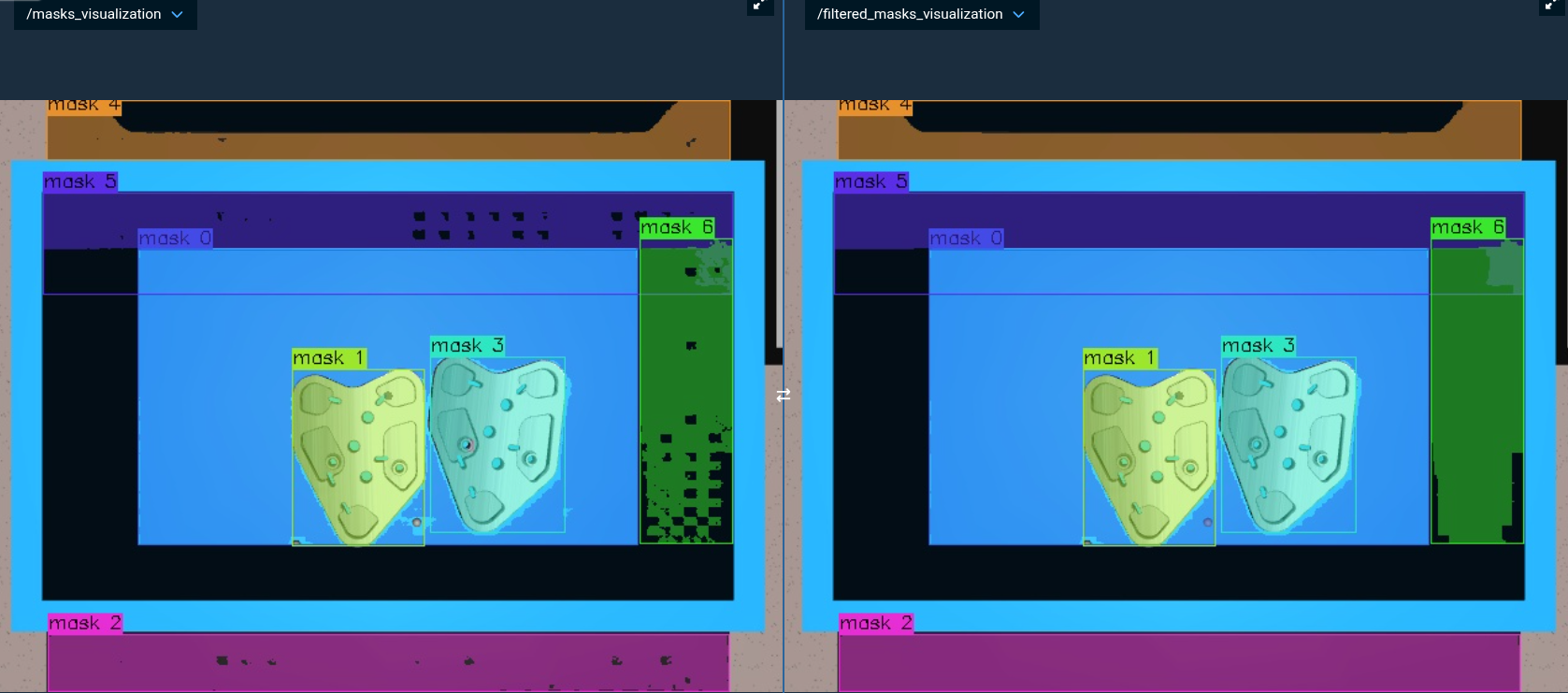
The new Behaviors ErodeMask2D and DilateMask2D apply morphological erosion and dilation to 2D masks using a configurable square kernel and iteration count. These operations are useful for removing noise, filling holes, and refining mask boundaries.
New Camera Field of View Visualizations
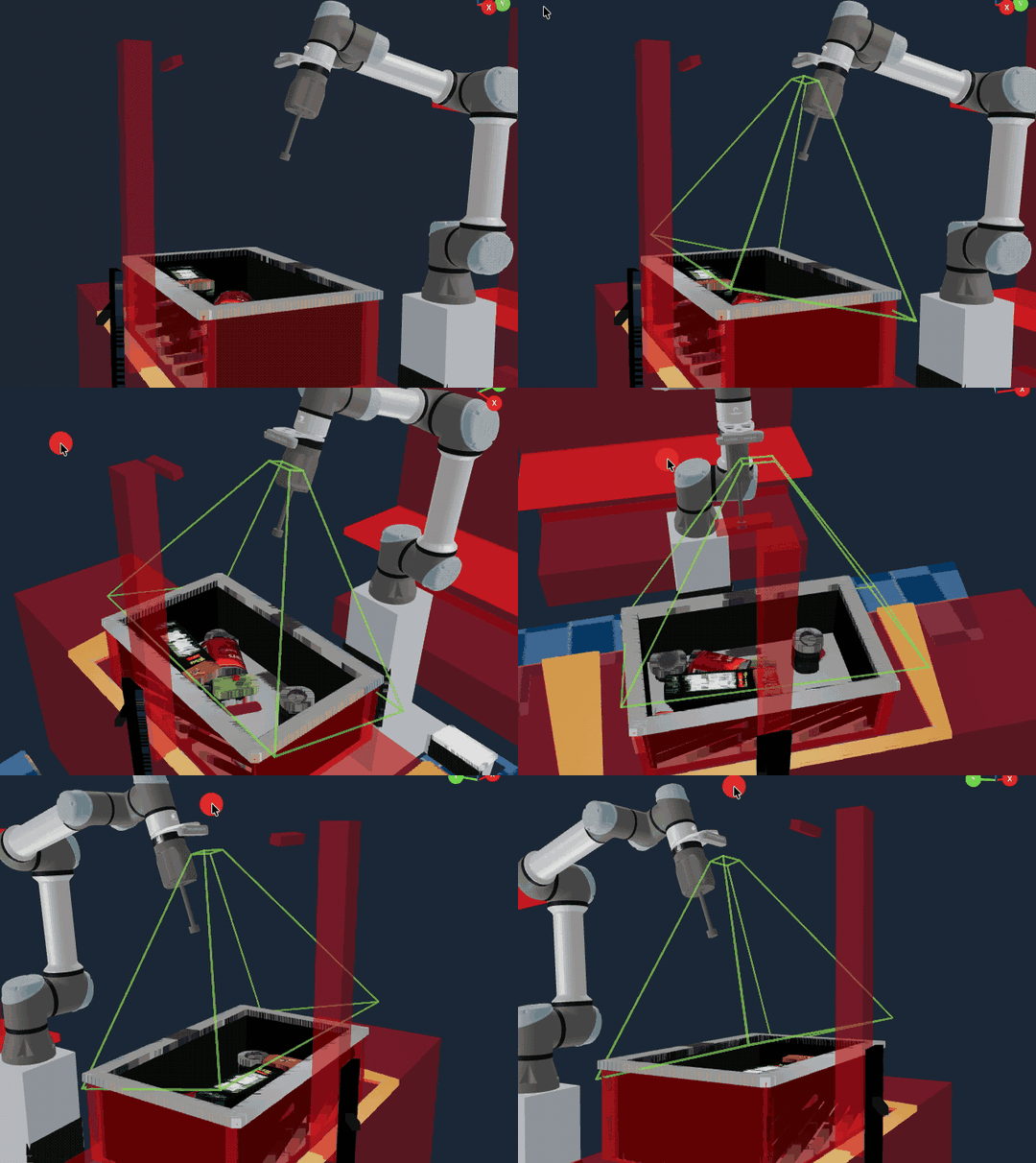
The new Behavior VisualizeCameraFrustum publishes LINE_LIST markers showing a camera's viewing frustum (near plane, far plane, and connecting edges) given a camera pose and field-of-view parameters. This is useful for debugging camera placement and coverage in 3D scenes.
More Compact, Optional Behavior Tree Display
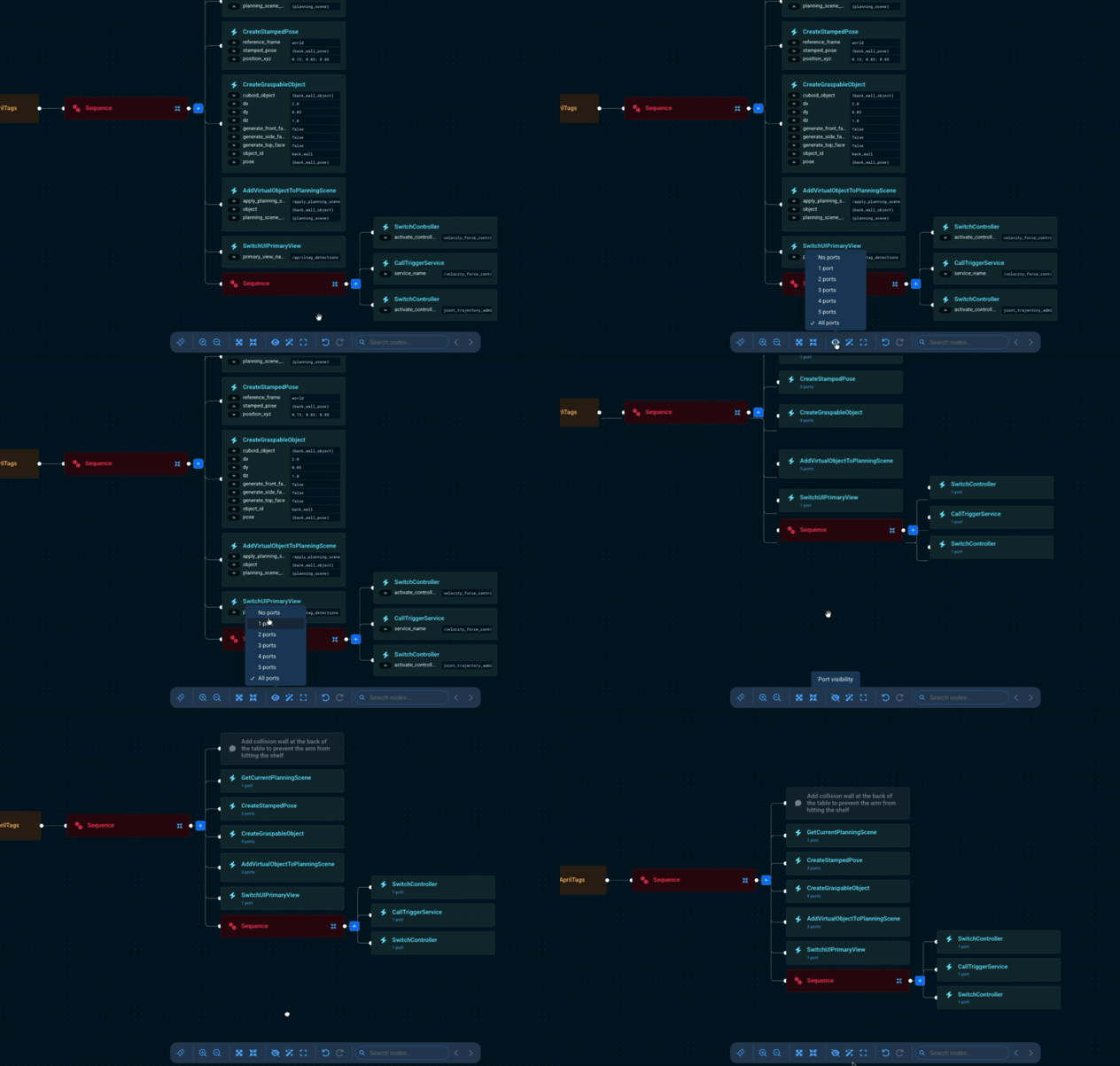
The "show all ports" toggle in the Behavior Tree editor has been replaced with a dropdown menu that lets users choose how many ports to display: No ports, All ports, or 1–5 ports.
Other Enhancements
Misc User Interface Improvements
- The Behavior Tree editor is now faster and more responsive, especially on large trees with many nodes.
- Non-runnable Objectives are now hidden by default in the sidebar. Users can toggle visibility with the existing filter, and the choice is preserved across mode switches.
- Changed the default keepout zone shape from a cube (0.3 m) to a thin wall (0.5 m × 0.5 m × 0.05 m), which better represents a typical keepout barrier.
- Reduced vertical spacing between sibling nodes in the Behavior Tree editor for a more compact layout.
- The sidebar pin button now remains clickable while an Objective is running, allowing users to pin or unpin the sidebar at any time.
- Camera feeds in the view-select dropdown are now grouped into hierarchical submenus based on ROS topic namespaces, making it easier to navigate setups with many cameras.
- After adding a new Custom View Pane from a view pane's dropdown menu, that pane automatically switches to display the newly-created Custom View Pane. Previously users had to reopen the dropdown and select it manually.
- In editor mode, the Behavior sidebar search can now optionally match port names when the Include Ports toggle is enabled in the filter dropdown. Matching ports are displayed below the Behavior name with a direction label and highlighted match text.
Behavior Improvements
SendPointCloudToUIhas a new optionaluse_latest_transformboolean port (defaultfalse). When set totrue, the Behavior uses the latest available Transform Frame (TF) instead of the point cloud's timestamp. This is useful for static cameras in simulation where the simulation clock can diverge from the TF buffer, causing timestamp-based lookups to fail.LoadImageFromFilenow supports an optionalpackage_nameinput port for loading images using package-relative paths, consistent withLoadPointCloudFromFile.- Trajectory execution error messages now include the controller's detailed
error_string(both via the Joint Trajectory Controller (JTC) and the Joint Trajectory with Admittance Controller (JTAC)), showing details on controller errors. For instance, on trajectory tracking errors, the message will show which joint violated which tolerance and by how much.
Reference Application Changes
- Added dual SICK TIM571 lidars and Nav2 obstacle avoidance to
hangar_sim. - Switched
hangar_simto wheel-driven mecanum locomotion withfuse-based Inertial Measurement Unit (IMU) odometry. - Deduplicated SAM2 and SAM3 models in
lab_simso both use the shared package models rather than per-config copies. - Added lab desk objects and updated associated Objectives for
lab_sim. - Started
multi_arm_simreference config with gripper controllers activated by default. - Removed
ros2_controloverrides fromspace_satellite_sim.
Other Improvements
- The
moveit_proCLI now displays a colored ASCII art banner with a bold "MoveIt Pro" header when running commands likemoveit_pro configure. - Reduced LLM context consumption by compacting stale Behavior tool results in message history, trimming redundant response fields, and caching Behavior XML fetches.
- The MuJoCo odom publisher now supports an
odom_publish_tfhardware parameter to optionally disable TF broadcasting while still publishing odometry messages. This is useful when another node (e.g., a localization stack) is responsible for the odom TF.
Bug Fixes
- Improved the
DoTeleoperateActionerror message when the web UI is disconnected. The message now explains that the/do_teleoperateaction server is provided by the browser and suggests a hard refresh. LoadPointCloudFromFileandAddUrdfnow guard against an emptyobjective_library_directoriesparameter instead of crashing on an unchecked[0]access.- Fixed
CYLINDERandSPHEREmarkers invisualization_msgs/MarkerArrayrendering at twice their intended diameter in the 3D web visualization. The markers now match the size shown in rviz. - When the
/get_agent_infoservice times out (e.g., when the backend is not running), the web UI now displays a friendly "Connection Error" screen with troubleshooting steps instead of the generic "Something went wrong" error. - Fixed a use-after-free crash in
RclcppSubscriberInterfacethat could occur when a subscriber was destroyed while a message callback was in-flight. - Fixed the Lock keepout zones toggle losing its state across page refreshes. The lock is now preserved in
localStorageand is no longer overwritten on Supervisor mount. - Fixed the Behavior Tree pane occasionally displaying a previously-selected Objective's tree instead of the one currently running when switching between Objectives.
- Fixed the Behavior Tree editor not auto-layouting after a node was deleted while Snap to Box was enabled. The remaining nodes now re-flow to fill the blank space, the same way they do when Snap to Box is first toggled on.
- Fixed the Behavior Tree editor blocking drops at the bottom of a sequence when another sequence followed it. The drop zone below the last child is now reachable.
- Fixed Decorator nodes (such as
ForEach) with collapsed children showing no expand button in the Behavior Tree editor, making their children unreachable. - Fixed misleading error messages when a Behavior Tree node has an unrecognized port. The error now shows the actual Behavior name and correct line number instead of the generic XML tag name and an incorrect line.
- Fixed error toast messages not appearing in the Alert Sidebar. Previously, many call sites raised error toasts via
toast.errordirectly fromreact-hot-toast, which bypassed the toast history. They now go through theuseToastwrapper so the Alert Sidebar stays in sync with toasts raised anywhere in the UI. - Fixed the
AdjustPoseWithIMarkerinteractive marker snapping back to its initial orientation when rotating the gripper. - The 3D Visualizer now persists camera position, target, and zoom to
localStorageso the view angle is restored on page refresh instead of resetting to the default. - Fixed
GetPoseFromPixelCoordssilently broadcasting dynamic transforms on/tffor each detected point, which could overwrite existing static frames (such as camera optical frames) and cause subsequent TF lookups to fail withtf2::ExtrapolationException. The Behavior's documented contract (writing poses tooutput_poses) is unchanged.
Documentation Improvements
- Added Mobile Navigation (Nav2) guide covering lidar sensing, costmaps, localization with Fuse, and replanning Objectives on the Clearpath Ridgeback in
hangar_sim. - Added Navigation with Replanning guide explaining how the
Navigate to Clicked Point with ReplanningObjective delegates continuous replanning to Nav2.