Programmatic SDKs Overview
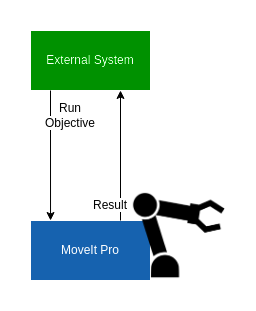
MoveIt Pro exposes its ROS 2 actions, services, topics, and parameters to external programmatic clients. Choose either:
- A native ROS 2 client library (
rclpyfor Python orrclcppfor C++) on the same DDS network as the MoveIt Pro Runtime. - A Web Bridge client using the Foxglove protocol connecting over TLS to port
3201. This works across routed networks without joining the Runtime's DDS network.
The MoveIt Pro Desktop App's transport on port 3201 uses the Foxglove WebSocket protocol, not the rosbridge JSON protocol. See Migrating rosbridge Clients for supported replacements.
This section is organized by feature. Feature pages use tabs to keep the native ROS 2, Web Bridge, and command-line examples together.
Native ROS 2 Setup
Install ROS 2 matching the distro that MoveIt Pro is running (Jazzy for Ubuntu 24.04) and source its setup script before running your client. Add moveit_studio_sdk_msgs to your package.xml so the action and service definitions are available.
Your client process must be on the same DDS network as the MoveIt Pro Runtime, typically the same host or the same L2 segment with multicast enabled. If you need to drive MoveIt Pro from across a routed network where DDS does not work cleanly, run an intermediate ROS 2 node on the robot's network and have it forward the calls.
Web Bridge Clients (Foxglove)
MoveIt Pro 10.0 serves the Foxglove WebSocket protocol at this default endpoint:
wss://<certificate-hostname>:3201
If the Runtime was started with --web-bridge-port, use that configured port instead.
Direct clients must present the Runtime frontend key during the WebSocket upgrade. Most clients send it as Authorization: Bearer <key>; browser clients that cannot set this header use the WebSocket subprotocol fallback below. Display the key on the Runtime computer with moveit_pro frontend-key. The endpoint uses TLS; use a CA-signed certificate for remote access, or trust the Runtime's generated certificate explicitly for a local or tunneled connection. Never disable certificate verification or put the key in the URL. See Endpoint Security for pairing, certificate, and key-rotation guidance.
PickNik maintains Web Bridge clients with familiar ROS APIs that speak the Foxglove protocol:
| Language | Client | MoveIt Pro 10.0 setup |
|---|---|---|
| JavaScript / TypeScript | foxglove-ros-adapter | Install npm package foxglove-ros-adapter@^0.5.0; use webSocketFactory to set the bearer header and TLS trust in Node.js, or to pass the frontend key as a WebSocket subprotocol in a browser. |
| Python | foxglove-ros-client-py | Install from source; pass the bearer header through Ros(..., headers=...). |
| C# | foxglove-ros-sharp | Install from the repository's main branch; set RosSocketOptions.RequestHeaders. The current NuGet release predates MoveIt Pro Web Bridge authentication support. |
The bridge must advertise hidden ROS 2 endpoints for action support. MoveIt Pro configures its bridge this way, so the clients above can use /do_objective directly.
What You Can Do
- Run an existing Objective — execute an Objective by name, optionally cancel it, or call it synchronously through the
/execute_objectiveservice. - Run an Objective from a custom Behavior Tree XML — send a Behavior Tree as a string at runtime, including Subtree port remapping.
- Pass parameters to Objectives at runtime — inject blackboard values without editing the Objective XML.
- Invoke a Python service from a Behavior — bridge a
rclpyservice into an Objective viaCallTriggerService. - Migrate an existing rosbridge client — choose a supported native ROS 2, Web Bridge, or custom-pane replacement.
- Connect an AI assistant with the MCP server — inspect Objectives, Behaviors, Waypoints, robot state, and logs remotely, or use a target-bound local session for Objective validation and owner-approved workspace and Runtime lifecycle tools.
Browser and Custom-Pane Access
The MoveIt Pro Desktop App and MoveIt Pro Cloud (simulation only, no robot hardware) use the same bridge. Browser JavaScript cannot add an Authorization header to a WebSocket upgrade, so the MoveIt Pro 10.0 proxy also accepts the frontend key as an additional WebSocket subprotocol and removes it before forwarding the connection to the bridge. A browser using foxglove-ros-adapter can configure that handshake with:
const ros = new Ros({
  url: "wss://robot.example.com:3201",
  webSocketFactory: (url, protocols) =>
    new WebSocket(url, [...protocols, frontendKey])
});
The browser must already trust the Runtime certificate, and frontendKey must be obtained at runtime. Do not embed the key in a shipped JavaScript bundle or place it in the URL.
Custom View Panes loaded inside MoveIt Pro should continue to use IframeROSClient; the parent app owns authentication and routes the pane's ROS traffic.
The full set of action, service, and topic definitions is available in moveit_studio_sdk_msgs. Follow the SDK's branch guidance and use the release branch matching your MoveIt Pro version.