End a Policy Run on a Signal
ExecutePolicy runs a VLA policy until its step budget, total_action_steps, runs out, or until the policy reports that it has no more actions. It cannot tell whether the task is done, and most policies cannot say so either. A run that finishes the task early keeps moving until the budget runs out, and a run that never finishes it still ends as SUCCESS.
To end the run once the task is done, add a Behavior that tests for a condition that only holds then, such as a part sitting in its fixture. When the condition holds, the Objective stops the policy and succeeds.
Choose a Check or a Detector
MoveIt Pro updates a Behavior Tree 100 times a second. Each update is called a tick. On each tick, every Behavior the tree is running reports SUCCESS, FAILURE, or RUNNING. RUNNING means the Behavior has not finished and needs more ticks.
Where the Behavior goes in the tree depends on how long it takes to answer:
- A check answers on the tick it runs. It returns SUCCESS if the condition holds and FAILURE if it does not hold yet. Comparing two poses is a check.
- A detector needs more than one tick, for example because it waits for a camera image or a reply from a model. It returns RUNNING while it waits and SUCCESS when the condition holds. It returns FAILURE when it cannot do its job, for example when its camera stops publishing, and that ends the run as a failure.
Run a Check Before the Policy
Put the check first in a ReactiveFallback and ExecutePolicy second. On every tick, the ReactiveFallback runs the check before the policy. While the check fails, the policy keeps running. When the check passes, the ReactiveFallback stops the policy and succeeds.
This tree comes from the cube-pose example at the end of this page.
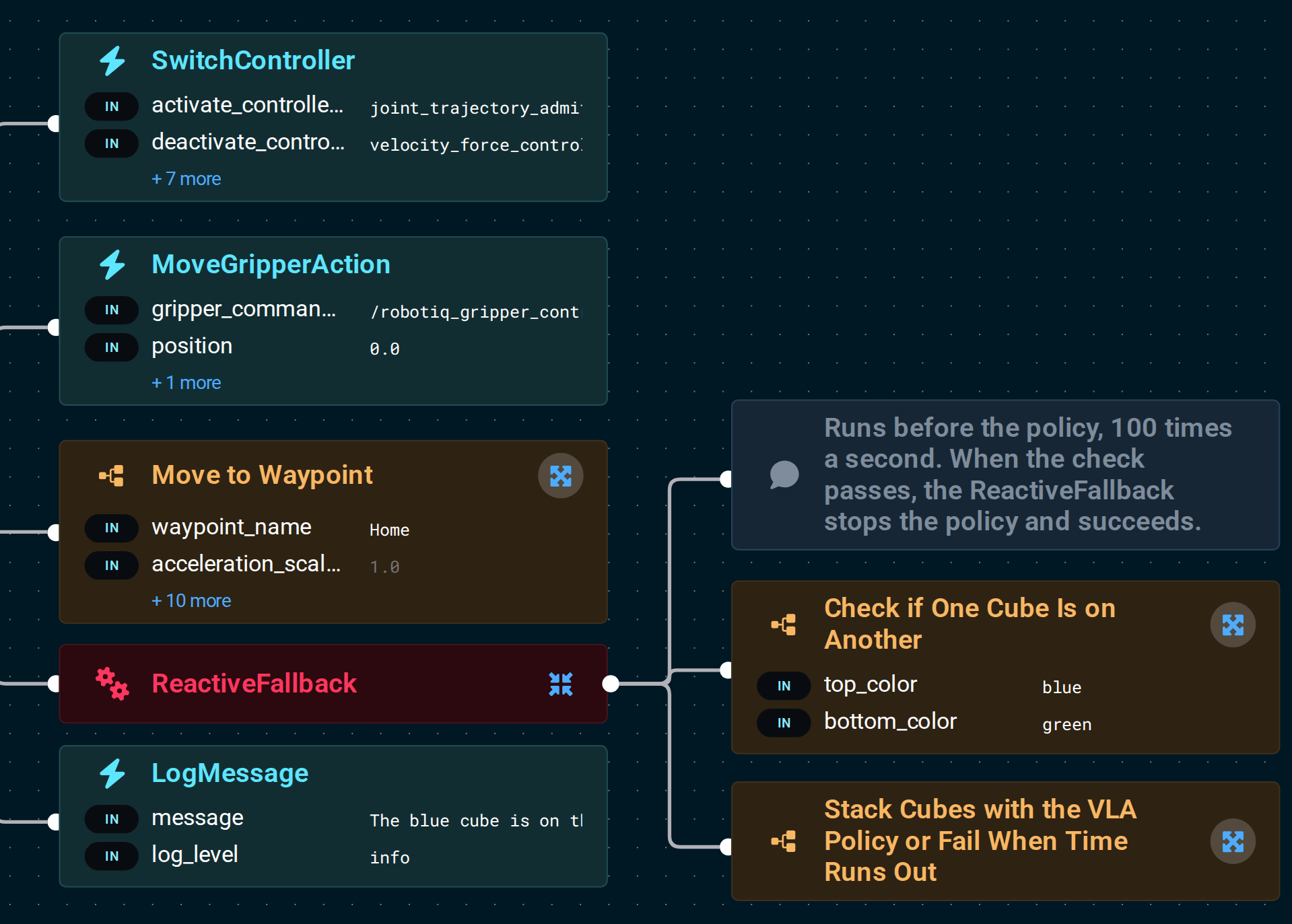
The check runs 100 times a second, so it must not log anything when it fails. It must also answer on the tick it runs. If it returns RUNNING, the ReactiveFallback stops the policy, and the policy starts over once the check fails again. Anything that has to wait belongs in a detector.
Run a Detector Next to the Policy
Put the detector and ExecutePolicy under a Parallel with success_count and failure_count both set to 1. Both run at the same time. The first to finish decides the result, and the Parallel stops the other. When the detector succeeds, the run succeeds. When it fails, the run fails.
This tree comes from the Gemini example at the end of this page.
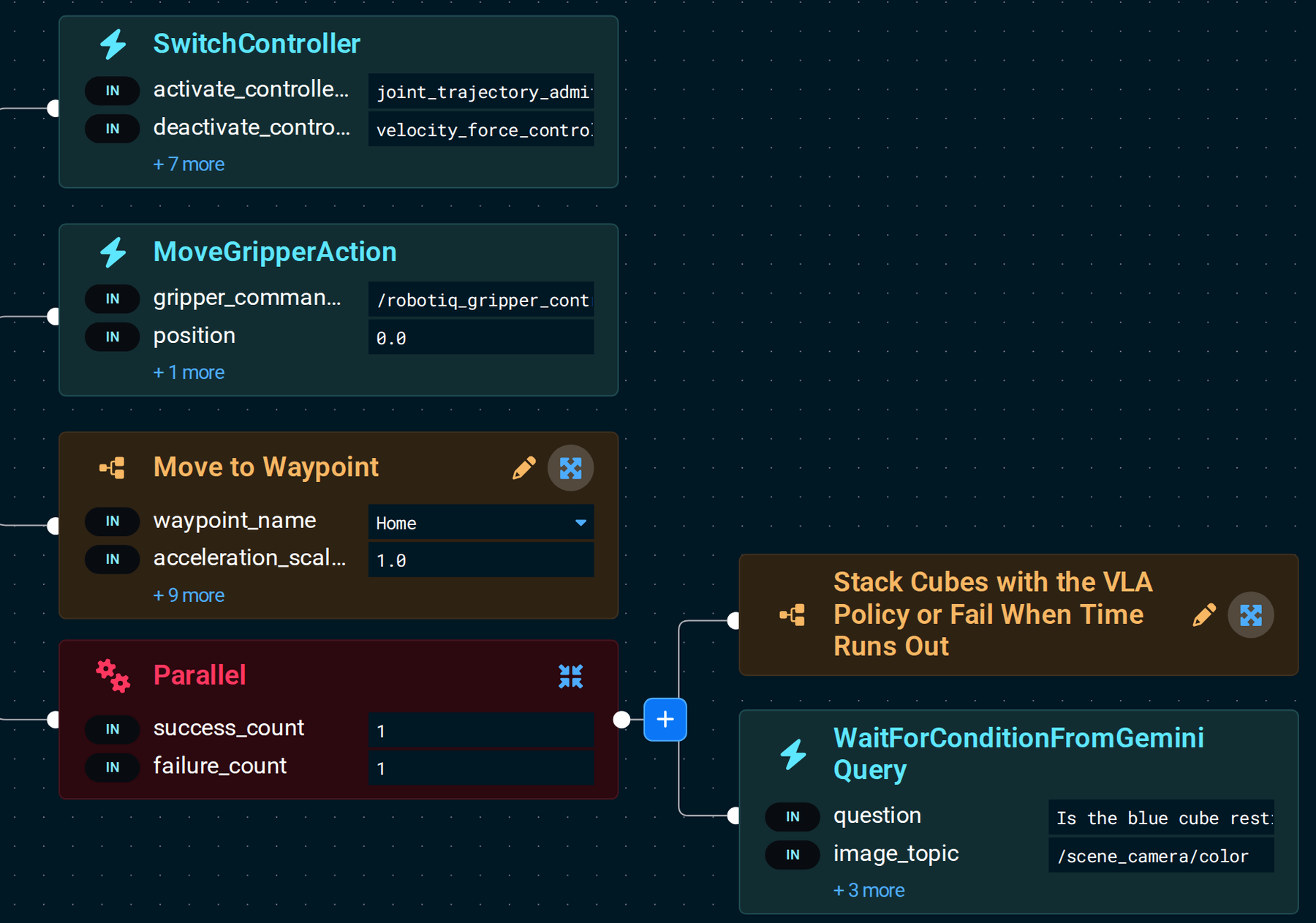
WaitForConditionFromGeminiQuery is a detector. So are ForceExceedsThreshold, which waits for a force limit, and WaitForDuration, which waits for a time limit. A signal from outside the tree, such as a PLC input, needs a detector Behavior of your own, as described in Creating Behaviors. When the Parallel stops your detector, the detector must cancel any request still waiting for an answer.
A Parallel can hold several detectors. To make one end the run as a failure, put it first in a Sequence, then a LogMessage with log_level set to error, then AlwaysFailure.
Fail the Run If the Policy Finishes First
To let only the check or the detector end the run as SUCCESS, put ExecutePolicy first in a Sequence, then a LogMessage with log_level set to error, then AlwaysFailure. If the policy finishes first, the run fails and the message says why.
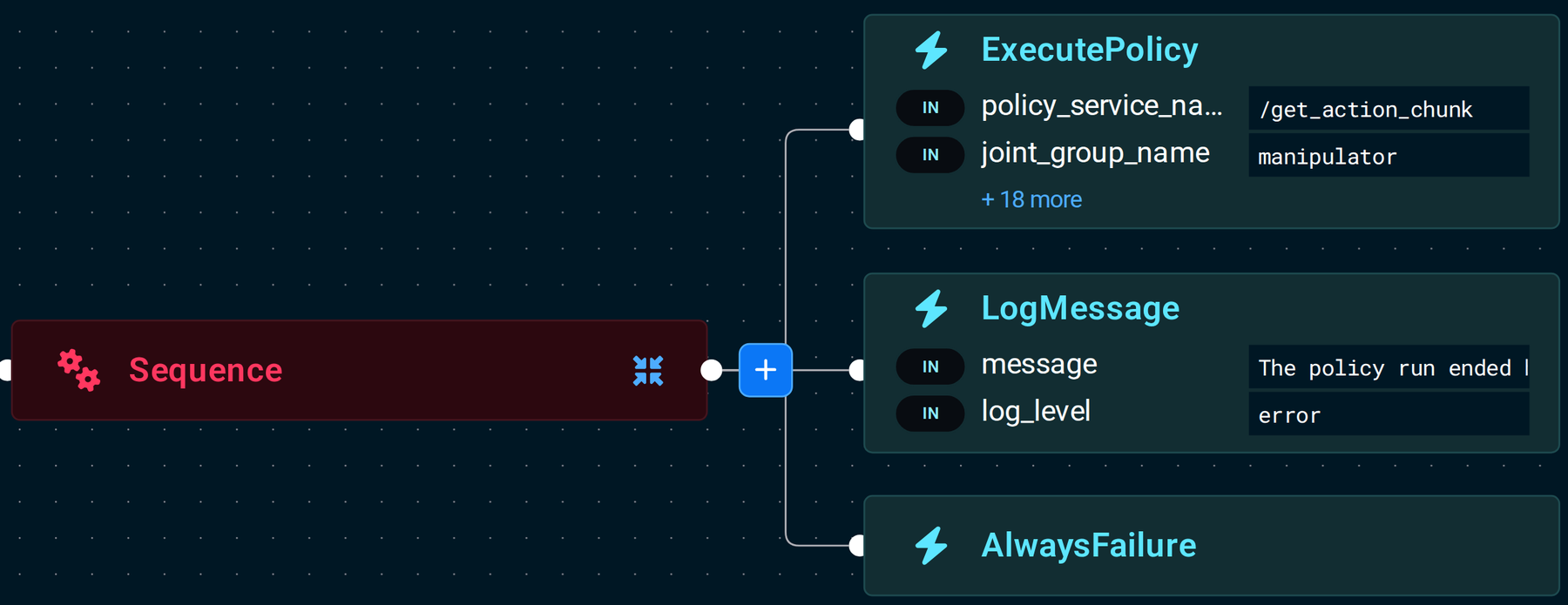
If your policy reports that the task is done by answering NO_MORE_ACTIONS, as described in Reporting Status, leave the LogMessage and AlwaysFailure out so that answer counts as success. A spent budget then counts as success too.
What Happens When the Policy Stops
The tree stops the policy on the same tick that the check passes or the detector finishes. The controller then slows the arm to a stop, as described in Controlled Stops. The next Behavior may start before the arm is at rest, and the controller rejects new motion until the arm has stopped. Add a WaitForDuration before the next motion. The gripper stays as it was, so a gripper that closed on an object keeps holding it.
ExecutePolicy does not log why it stopped. Add a LogMessage after the ReactiveFallback or Parallel that says the task is done. WaitForConditionFromGeminiQuery logs its own reason, so it needs none.
MoveIt Pro has no software emergency stop. Stop the robot for safety with its hardware safety chain.
Try It in the Cube-Stacking Example
The vla_sim robot configuration has an Objective for each approach. Both build on the cube-stacking example, so get that running first.
Stack Cubes Until the Cube Poses Confirmruns a check on the cube positions the simulator publishes. It passes when the blue cube sits on the green one and the gripper is at least 5 cm from the blue cube. A real robot has no exact cube positions. It gets them from perception, which takes more than one tick, so there the test belongs in a detector.Stack Cubes Until Gemini ConfirmsrunsWaitForConditionFromGeminiQuery, which asks Gemini a yes/no question about the scene camera image. It needs a Gemini API key, as described in the Gemini guide's prerequisites. Each answer takes a few seconds, so the run stops up to about ten seconds after the gripper lets go.
Both test for the result the prompt stack the blue cube on the green cube asks for. If you change the prompt, change the check or the question to match.
When you write a question for Gemini, ask about a state that only holds once the task is done. The blue cube is already on the green cube while the gripper still holds it there, so the example asks: "Is the blue cube resting on top of the green cube, with the gripper not holding it?"