Plan the Next Bin Pick During the Current Cycle
In a typical bin-picking cycle the robot finishes one part, then stops while the camera looks for the next part and the planner computes a path to it. That perception and planning time is pure idle time for the arm. Lookahead moves that work into time the robot is already busy: while the arm processes the current bracket, a second branch of the Behavior Tree observes the next bracket and plans its pick. When the arm returns, the next pick is ready to check and execute.
Two related techniques complete the application: reusing motions that repeat every cycle, and checking a plan made in advance before executing it.
The example runs in the factory_sim robot configuration package: a six-joint Fanuc arm with a suction gripper, a processing jig, two bins, and three brackets. It is an optional Objective that sits alongside the original bracket application; existing workspaces do not need to change. The same pattern applies to other cells, but the handoff checks and tolerances described below must be adapted to each robot.
Launch the Runtime and Desktop App
We assume you have already installed MoveIt Pro to the default install location. Start the MoveIt Pro Runtime using:
moveit_pro run -c factory_sim
Then launch or connect the separately distributed MoveIt Pro Desktop App. The Runtime does not serve a bundled user interface.
Run the Example
- Run
Reset MuJoCo Simso that all three brackets are in the left bin. - Run
Pick and Place Brackets with Lookahead.
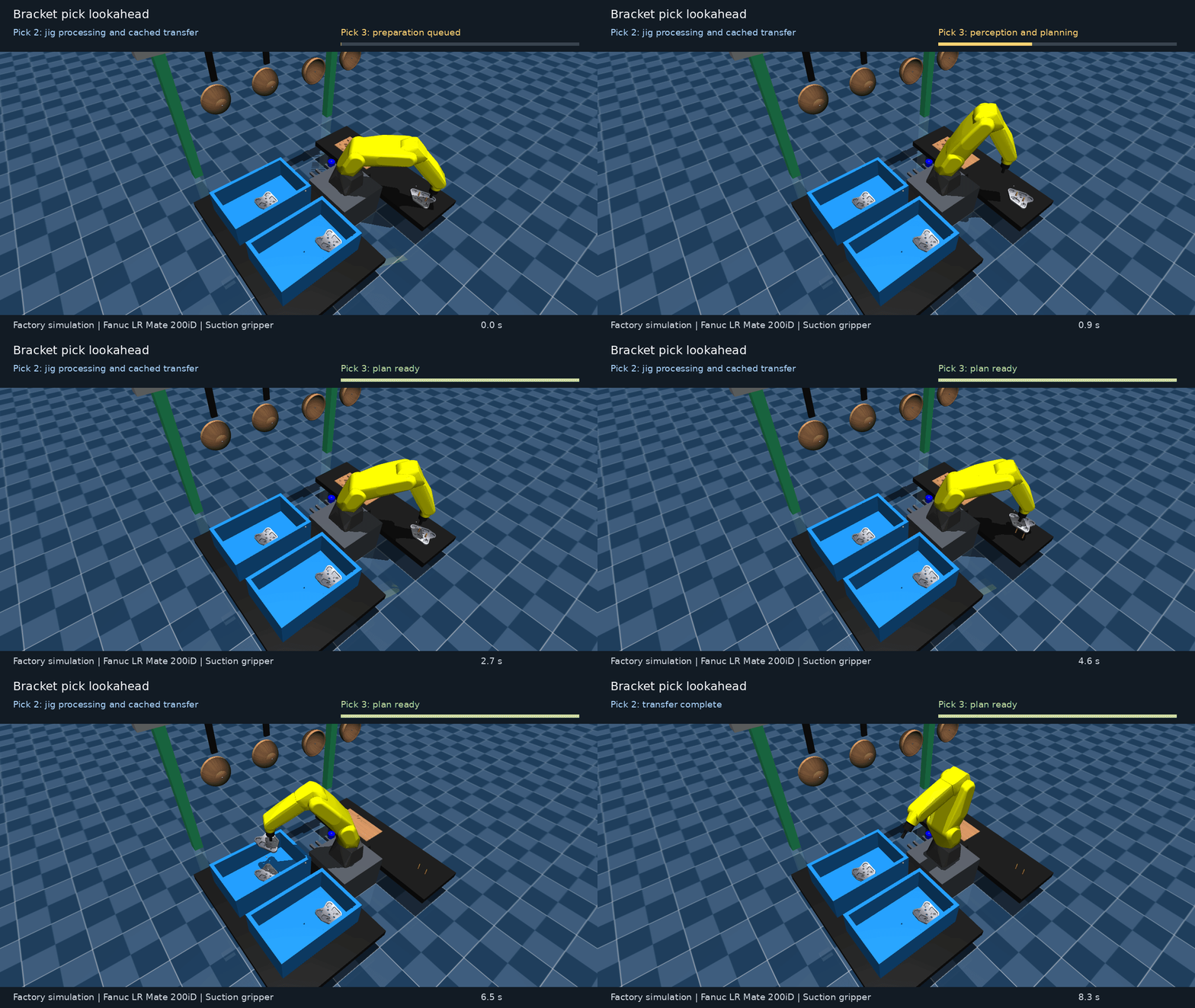
Each bracket is picked from the left bin, placed on the jig, processed for 2 seconds, and dropped in the right bin. Watch the log for these messages:
| Message | Meaning |
|---|---|
HANDOFF: bracket pick requires planning from the current state. | No prepared pick was available, so the robot observed and planned now. This is expected for the first bracket. |
LOOKAHEAD: next bracket observation and planning started. | The preparation branch started while the robot continued with the current bracket. |
LOOKAHEAD: next bracket pick prepared. | The next pick is planned and waiting for the handoff checks. |
HANDOFF: bracket pick candidate accepted. | The prepared pick passed its checks and is executed without replanning. |
CACHE HIT: jig_approach (and jig_contact, jig_retreat, right_bin, home_return) | A motion planned in an earlier cycle was checked and reused. |
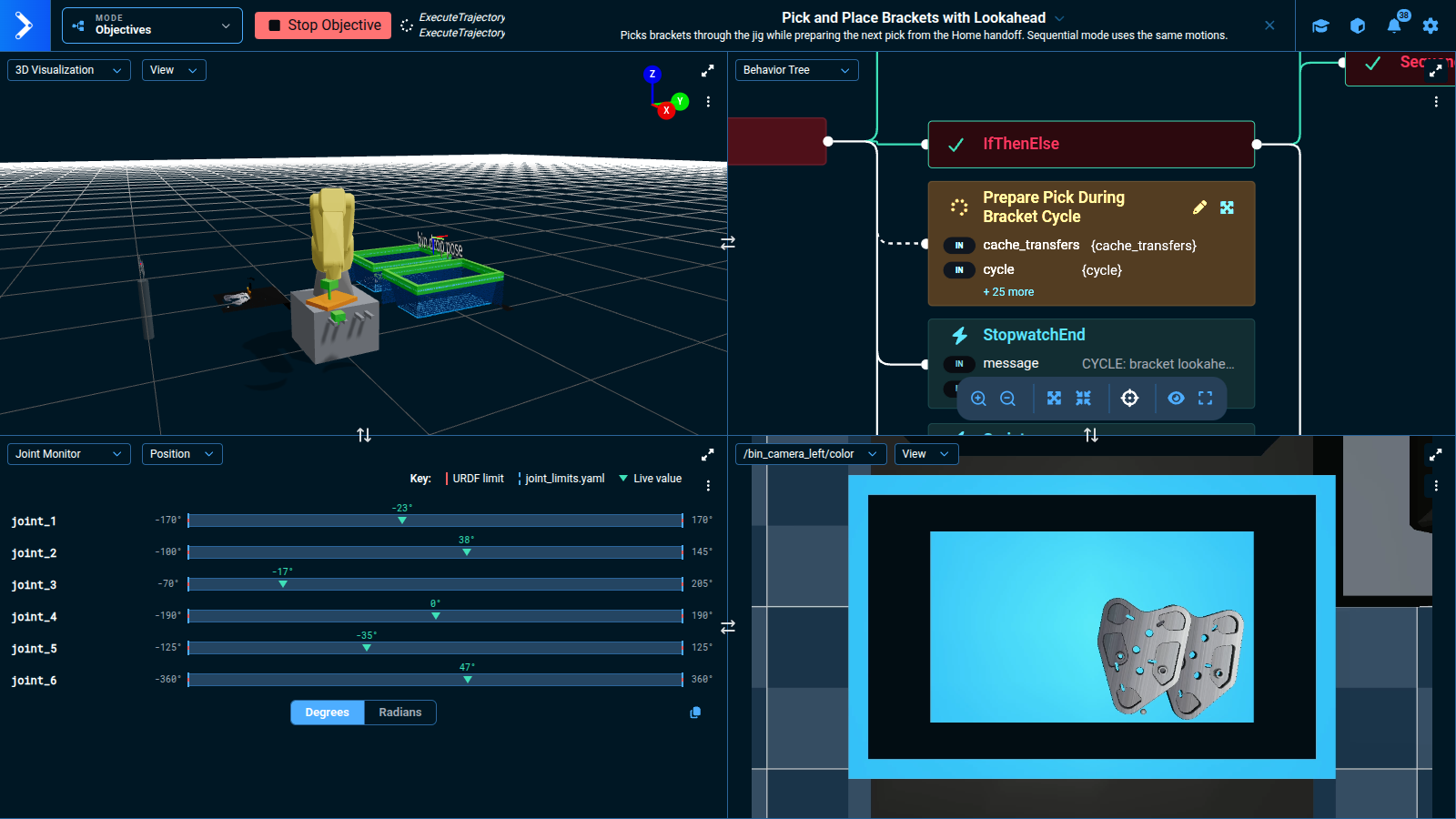
Pick and Place Brackets with Lookahead exposes four inputs that can be changed independently to see what each one contributes:
| Input | Default | Effect |
|---|---|---|
parallel | true | Prepare the next pick while finishing the current bracket. With false, the same preparation runs afterward, with the same route and cache settings. |
near_jig_wait | true | Wait at the elevated Jig Wait Waypoint during processing instead of returning to Home. |
cache_transfers | true | Reuse checked jig, bin, and Home-return motions after their first successful plan in the Objective run. |
num_cycles | 3 | Process 1–3 brackets, matching the scene. An empty bin finishes the batch early. |
The full source is in pick_and_place_brackets_with_lookahead.xml.
Why Preparing Ahead Saves Time
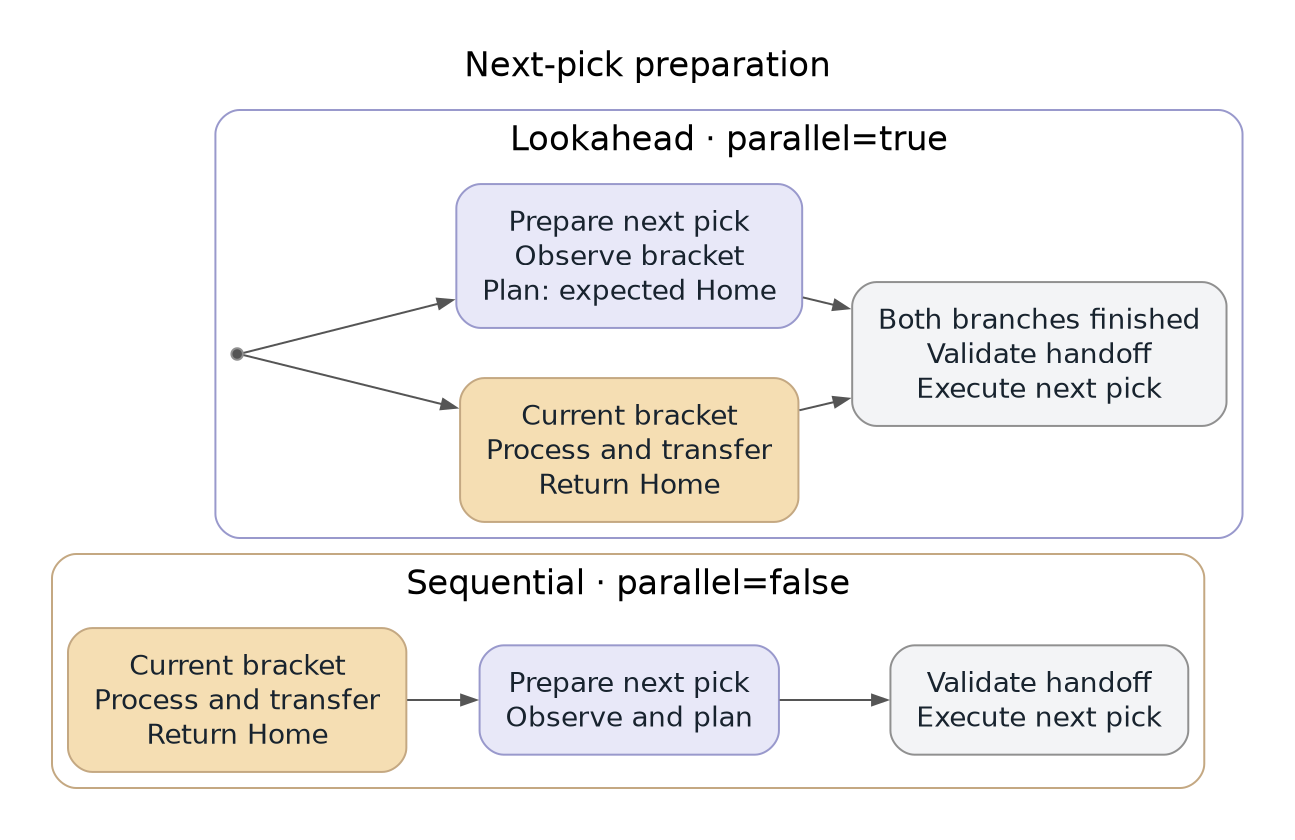
If finishing the current bracket takes E seconds and preparing the next pick takes P seconds, doing them one after the other takes about E + P. Running them side by side takes about max(E, P), plus a short check before the next pick. As long as preparation fits inside the time the arm is busy, its cost disappears from the cycle.
Two cycles cannot benefit. The first bracket has nothing prepared yet, and the last bracket has no next pick to prepare. When comparing timings, look at complete batches and at the middle cycles separately.
The Behavior Tree
Two Branches, One Robot
The overlap happens in the Prepare Pick During Bracket Cycle Subtree. When parallel is true, a Parallel node runs two children at the same time:
Finish Bracket Cyclemoves the robot: jig pick, right-bin drop, and return to Home.- The
Sequencenext to it observes the next bracket withLook for Bracket Part or Empty Binand plans its pick withPlan Bracket Pick. It sends no motion commands.
success_count="2" means both branches must finish before the Subtree succeeds, and failure_count="1" means a failure in either branch halts the other. The preparation branch catches its own failures with a Fallback, so in practice only a failure in Finish Bracket Cycle halts preparation. When parallel is false, the lower Sequence runs the same two children one after the other.

Only one branch commands the robot, so the two branches never compete for the arm. The preparation branch plans from where the robot will be, the Home Waypoint, rather than from where it is now. When near_jig_wait is true, Plan Bracket Pick uses SetupMTCFixedJointState with the Home joint positions and a copy of the current planning scene. When near_jig_wait is false, it starts from the planned Home move with SetupMTCFromSolution.
Finishing the Current Bracket
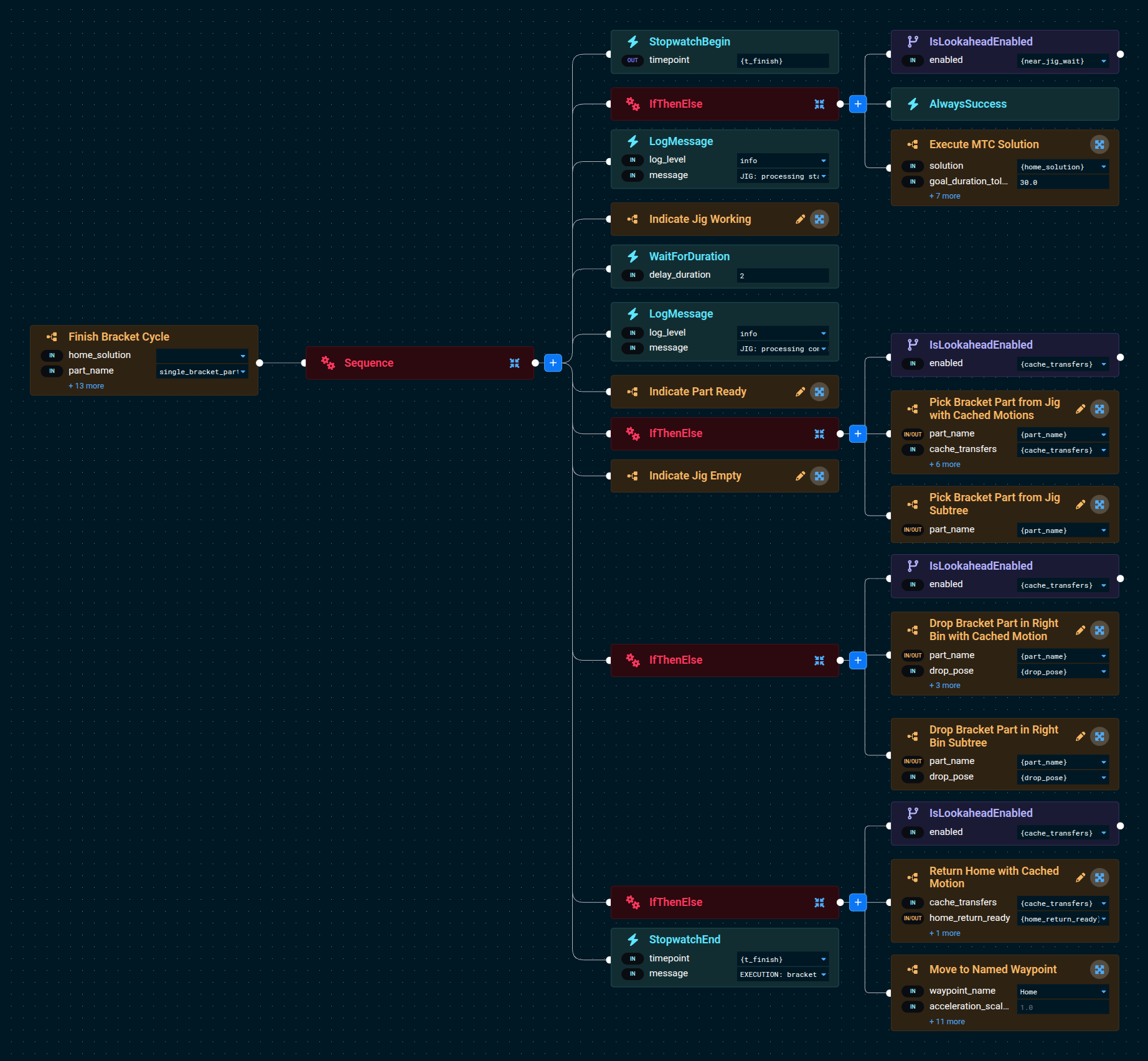
Finish Bracket Cycle contains the jig processing wait and the transfers. Each transfer is an IfThenElse that selects the cached version of a motion when cache_transfers is true and the original Subtree when it is false.
How Motion Caches Work
A motion cache is not a Behavior. It is two blackboard entries per motion, a ready flag and a stored MTC solution, passed into the shared Plan or Execute Cached Fanuc Motion Subtree. Return Home with Cached Motion shows the wiring: it builds the Home MTC task, then hands it to the cache Subtree with its own home_return_ready and home_return_solution entries.
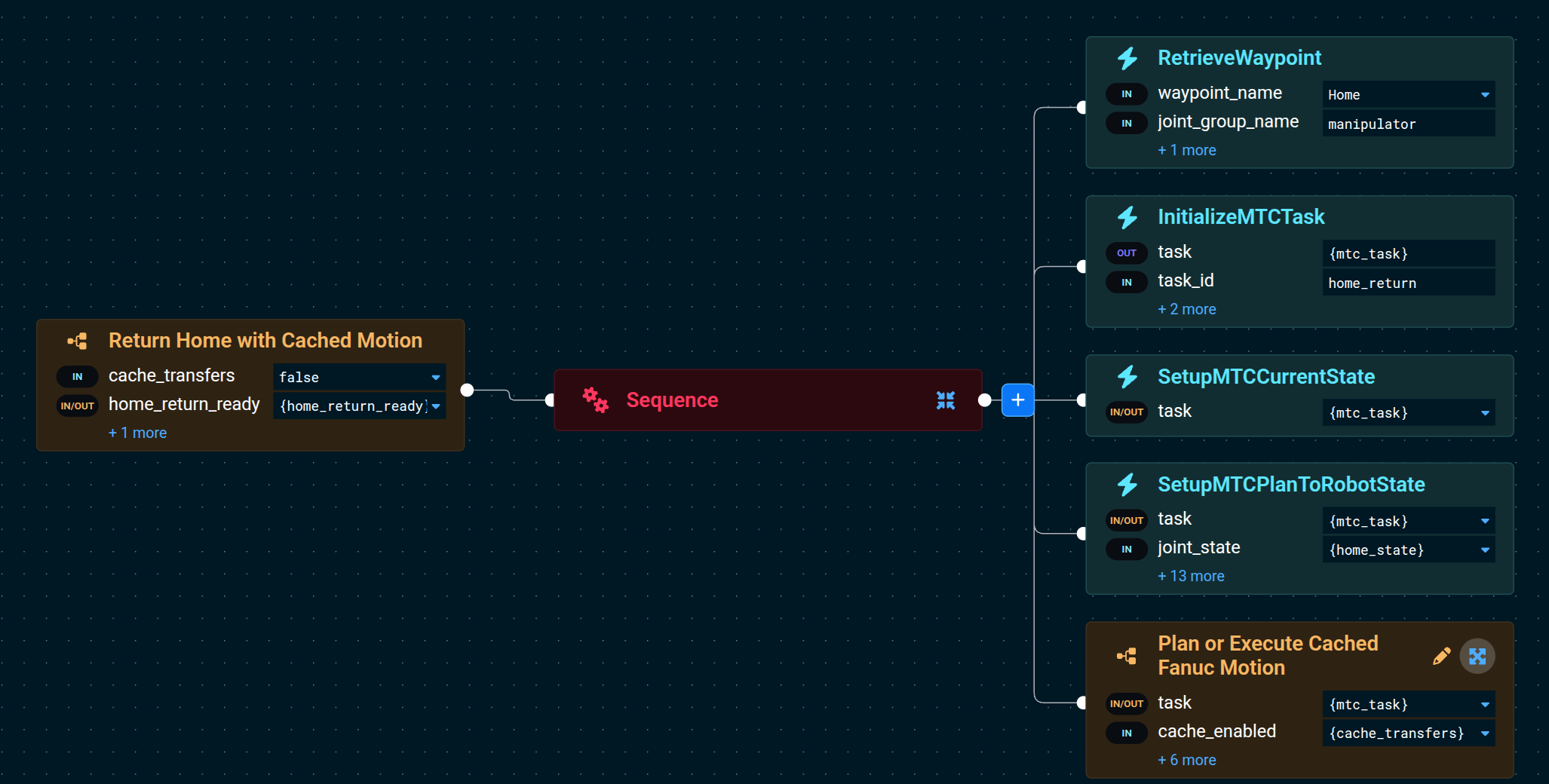
Inside Plan or Execute Cached Fanuc Motion, a Fallback tries reuse first:
- Reuse branch. If
cache_readyistrue, wait for a stopped robot at the stored start (Wait for Bracket Pick Handoff), convert the stored solution withConvertMtcSolutionToJointTrajectory, pad a copy of the current scene withPadPlanningSceneForMotion, and check the trajectory withValidateTrajectory. If every step succeeds, logCACHE HIT. - Plan branch. If any reuse step fails, set
cache_ready = false, plan withPlanMTCTask, store the result incached_solution, and setcache_ready = true.
Either way, the selected trajectory is executed with ExecuteTrajectory. If execution fails or is halted, _onFailure and _onHalted reset cache_ready to false, so the next cycle plans again. When cache_enabled is false, the lower Sequence plans and executes every time.
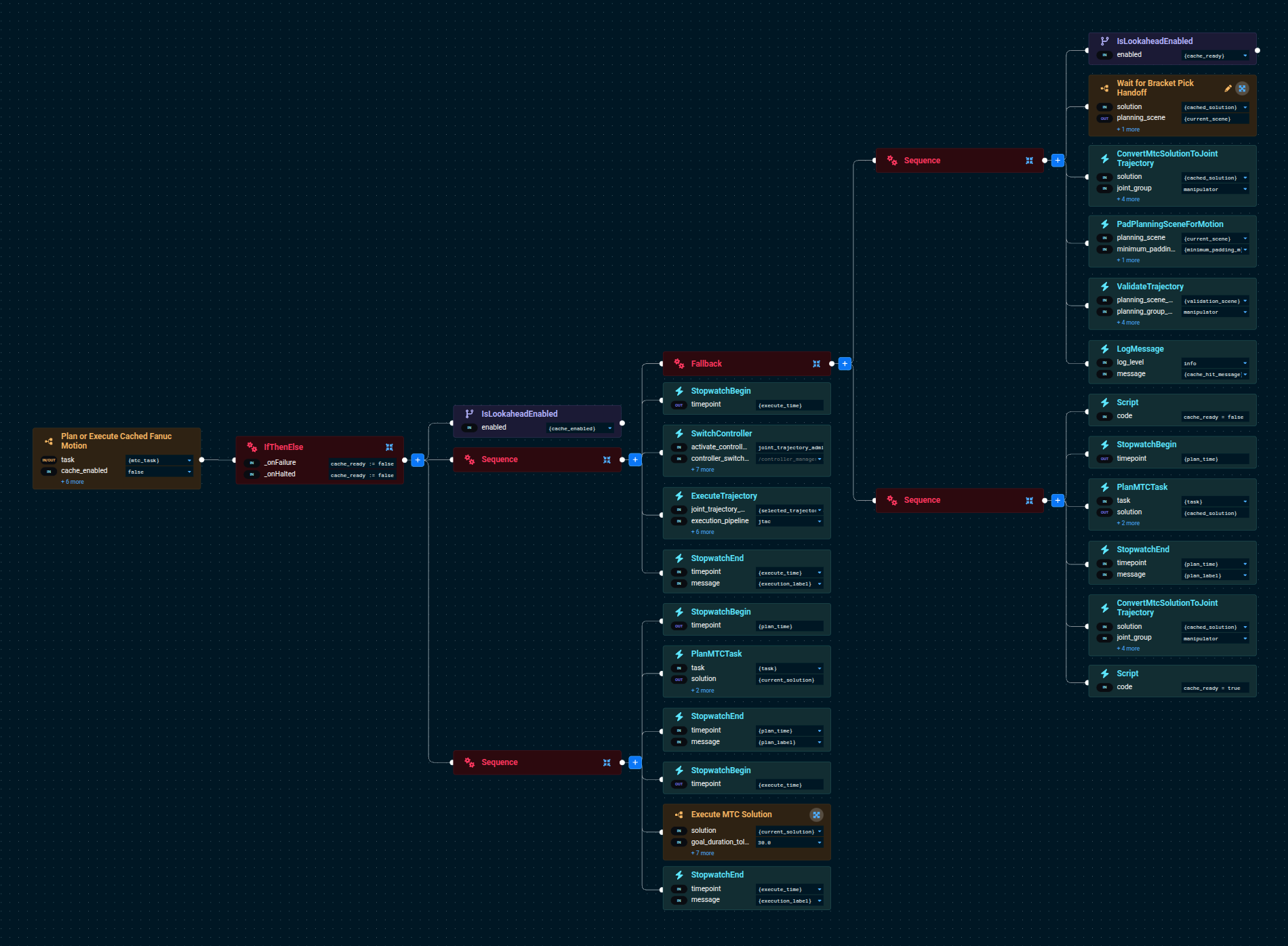
The factory application keeps five caches:
| Motion | Blackboard entries | Gripper state |
|---|---|---|
| Jig approach | jig_approach_ready, jig_approach_solution | Empty |
| Jig contact | jig_contact_ready, jig_contact_solution | Empty |
| Jig retreat | jig_retreat_ready, jig_retreat_solution | Holding a bracket |
| Right-bin transfer | right_bin_ready, right_bin_solution | Holding a bracket |
| Home return | home_return_ready, home_return_solution | Empty |
Motions with and without a bracket are cached separately because the attached bracket changes the collision geometry; a path checked without a bracket does not guarantee clearance with one. A cache hit replays only the arm trajectory. Vacuum activation, release, and bracket attachment still run every cycle. Caches start empty for each Objective run, so the first cycle pays the planning cost. The Waypoints, bins, and transfer targets must not change during a run.
Checking a Prepared Plan Before Using It
A plan made in advance predicts where the robot will be. Before using it, the Objective confirms that the prediction came true and that the path is still collision-free. Both prepared picks and cached motions use the same Wait for Bracket Pick Handoff Subtree.

Inside a 2-second Timeout, the Subtree repeatedly reads the current planning scene and the latest /joint_states message, then evaluates IsBracketPickStartCurrent. The condition passes when:
- The joint-state message's header stamp is no more than 0.2 s older than the Runtime's ROS clock when the message is received.
- All six Fanuc joints are within 0.02 rad of the first point of the planned trajectory.
- Every arm joint speed is at most 0.02 rad/s.
The scene is read before the joint state so that a slow scene read does not make the joint state stale. After the handoff passes, PadPlanningSceneForMotion adds at least 0.01 m of link padding to a private copy of the scene, keeping any larger existing padding, and ValidateTrajectory checks the prepared path against it. The jig contact and jig retreat caches use a 0.0 m minimum, which keeps only the scene's existing padding, to match their Cartesian strokes into and out of the jig.
If any check fails, a prepared pick is discarded and the robot observes and plans from its current state; a rejected cached motion is replanned from the current state. If execution itself fails, the Objective stops; it does not retry the motion through the planning fallback.
GetJointStateFromTopic, IsBracketPickStartCurrent, IsLookaheadEnabled, and PadPlanningSceneForMotion are provided by the factory_sim::PickBehaviorsLoader workspace plugin. IsBracketPickStartCurrent supports the six bounded rotational Fanuc joints; another robot needs its own joint set, units, tolerances, and handling for other joint types.
What the Prepared Pick Contains
A prepared pick is the registered bracket pose, its MTC solution, and the cycle number it was prepared for. It becomes ready only after planning succeeds, and it is used only by that cycle. If preparation fails, the current bracket still finishes and the next cycle plans normally. Motion failure or cancellation discards the prepared pick. The final cycle does not prepare another pick.
Look for Bracket Part or Empty Bin treats an empty cropped point cloud as a successful observation with part_found=false, which ends the batch. Camera, transform, and registration failures remain failures; a failed observation during preparation is retried by the next cycle's ordinary perception and never marks the bin empty.
Adapting the Pattern
The pattern depends on these conditions:
- The robot stops at the same unloaded Home state that the next pick was planned from.
- The bin, Waypoints, and transfer targets stay fixed during the run.
- Nothing moves the next part between observation and pick.
The factory example observes the bin with a fixed camera after a known Waypoint sequence. To observe earlier in the cycle, check that the arm, tool, and carried part are outside the camera's view, and use an image captured after that point; receiving a new point-cloud message does not prove the image is newer. The example does not implement an exposure-time or clearance check.
This pattern overlaps preparation with motion and keeps a stopped handoff between picks. Trajectory blending and controller goal replacement remove the stop and need their own continuity checks.
Measuring Cycle Time
Changing only parallel measures the preparation overlap. Comparing Pick and Place Brackets from Left Bin with this Objective's defaults also includes the shorter jig-wait route and cache reuse. These answer different questions, so report them separately.
Run the benchmark in the sourced workspace while the factory simulation is running:
python3 src/factory_sim/test/benchmark_parallel_pick.py --output comparison.json --runs 6 --cycles 3
The harness resets MuJoCo between sequential and parallel runs and requires every run to succeed. It records how many prepared picks were accepted or fell back, and reports complete-batch time separately from the first cycle, the middle cycles that can use a prepared pick, and the last cycle. Pooling the last cycle with the middle cycles understates the savings. Also check suction contact and final bracket placement; a successful action result alone does not prove a physical pick.
See Parallel Motion Planning for the general control-node pattern and Optimize Cycle Time for other timing improvements.