9.1.0
Major Features
ROS Jazzy Support

ROS Jazzy builds are now available, alongside our existing ROS Humble build! Support for ROS Jazzy is still experimental, but all you need to do to try it out is set the variable MOVEIT_ROS_DISTRO to jazzy in your ~/.config/moveit_pro/moveit_pro_config.9.yaml file.
Segment Anything (SAM3) Multimodal AI Support
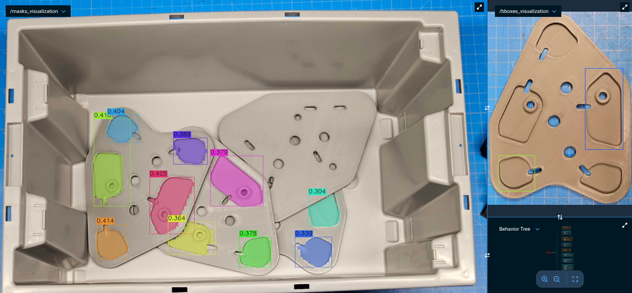
SAM3-based multimodal image segmentation is now available through the new GetMasks2DFromExemplar Behavior. This capability enables flexible object detection using combinations of text prompts, exemplar images, and bounding boxes, allowing developers to build robust exemplar-based perception pipelines. To help users get started, the lab_sim environment now includes three new Objectives demonstrating exemplar-driven segmentation workflows: ML Segment Bottles from File, ML Find Objects on Table, and ML Find Bottles on Table from Image Exemplar.
Better CPU Usage for ML Models

The CPU-only ONNX (Open Neural Network Exchange) inference now uses all available cores and enables memory pooling, providing a significant speedup (4-8x) on machines without a GPU. Previously, threading and memory settings were tuned for GPU execution and left CPU inference single-threaded. Also, when no GPU is available and ONNX Runtime falls back to CPU inference, a warning is now surfaced in the UI log panel. Previously this was only printed to the console, so users had no visibility into why ML inference was slower than expected.
Custom View Panes in the UI
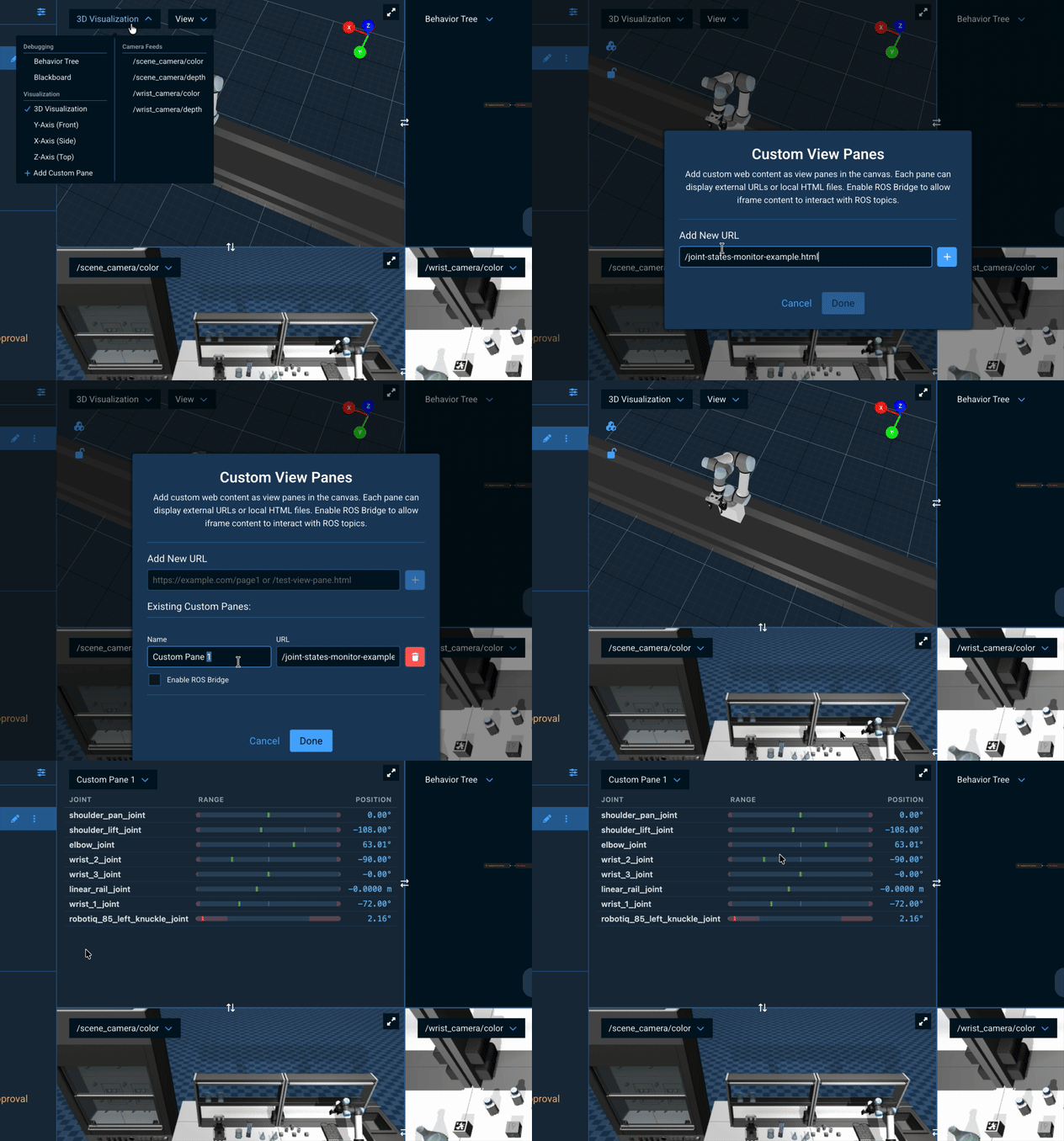
You can now add custom dashboards, data displays, and web content as custom view panes in the canvas. You can add external URLs or local HTML files, and optionally enable ROS Bridge for each pane to allow content to interact with ROS topics. Access the management modal by clicking "Add Custom Pane" in any view pane's dropdown menu to add, edit, or remove custom view panes. An example Joint States Monitor pane (joint-states-monitor-example.html) is included as a reference for building custom panes with live ROS data.
See the Creating Custom View Panes in the MoveIt Pro UI for more details.
Monitor Currently Executing Behavior Tree Node
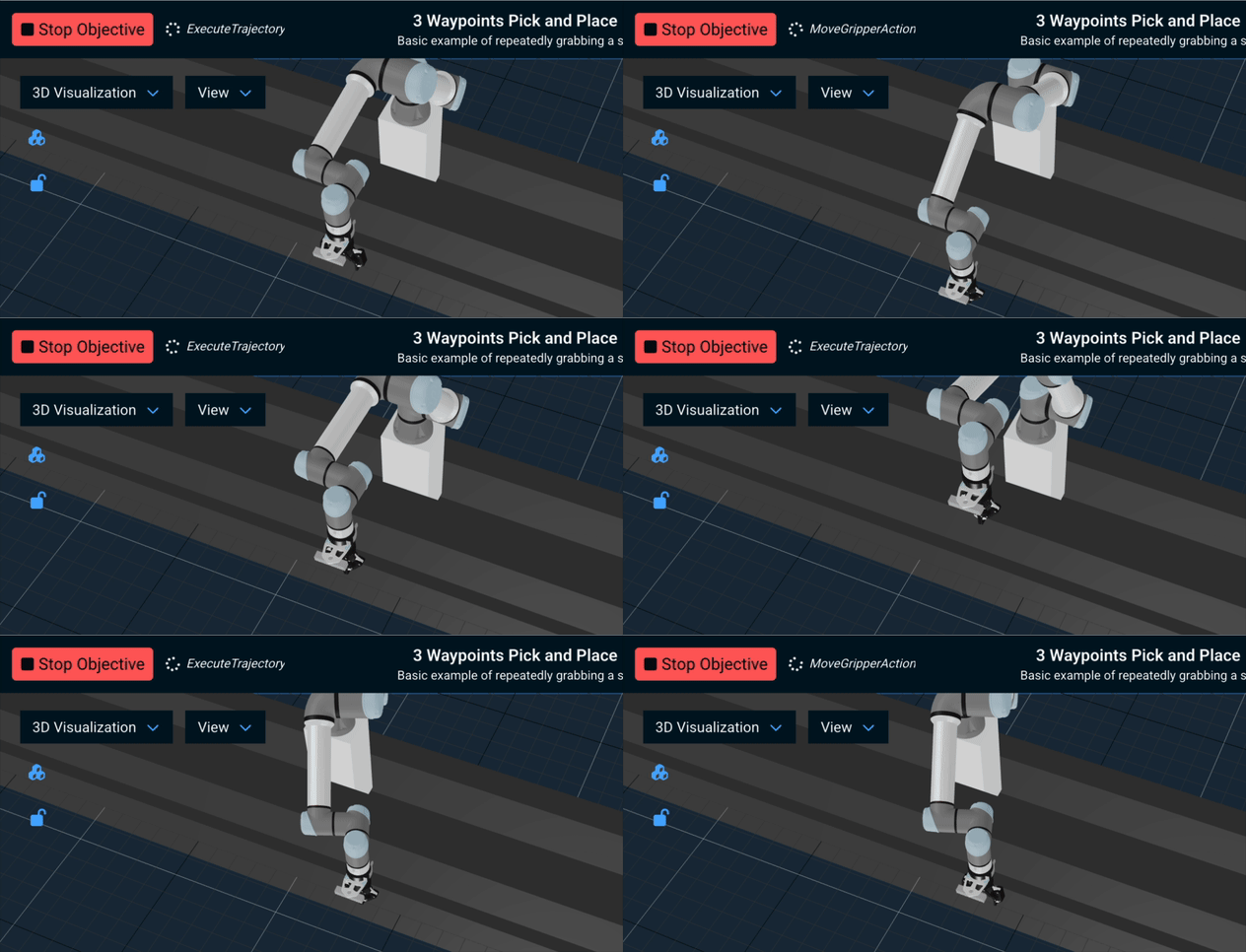
The navigation bar now shows the name(s) of currently running Behavior Tree leaf nodes during Objective execution instead of the static "Executing..." text.
Easier Teleop with Ghost Preview
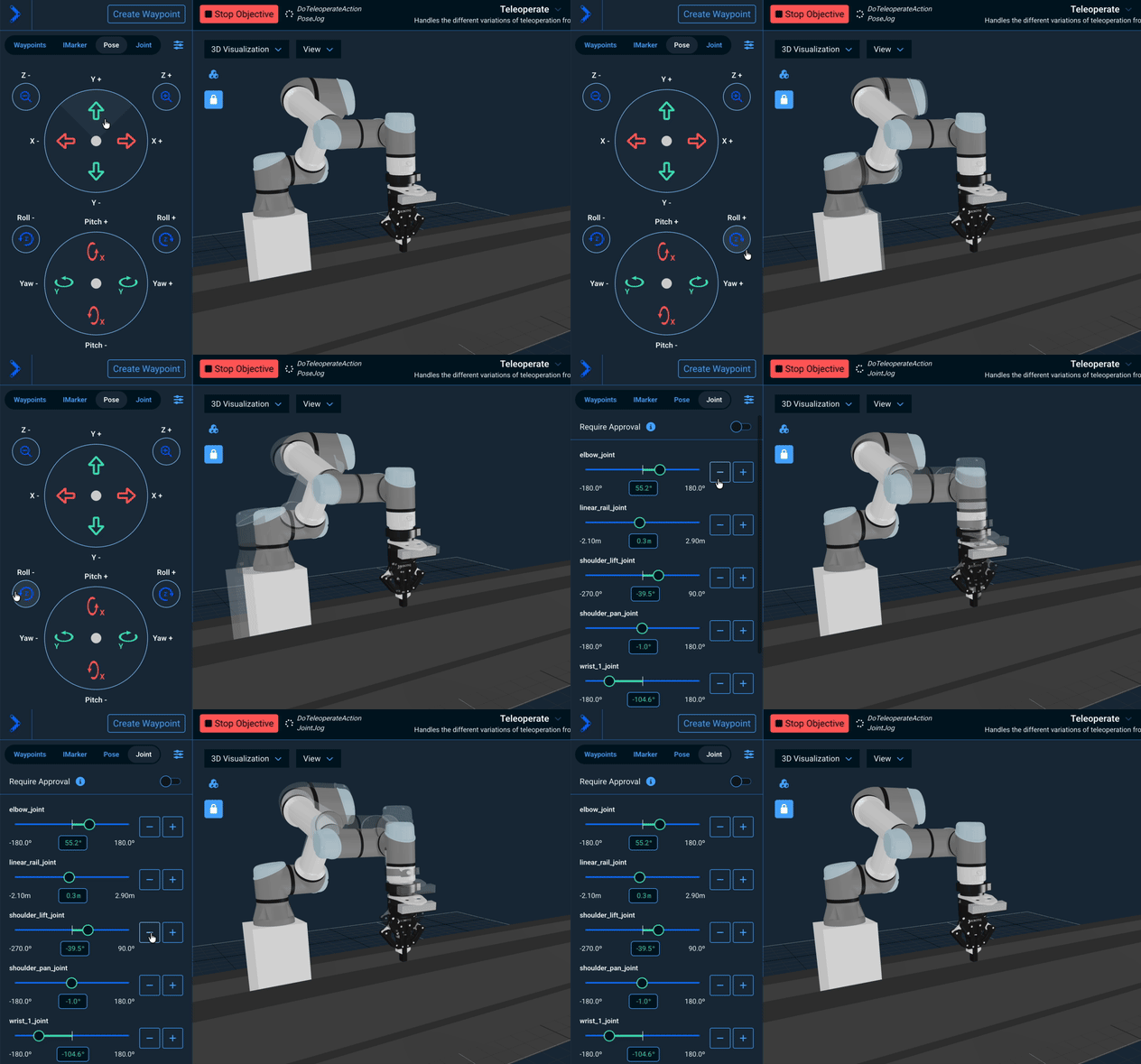
Hovering over teleop buttons now shows a transparent ghost robot previewing the target position. This works for Pose teleop D-pad buttons, Joint teleop +/- buttons, and gripper open/close buttons (joints at their limit positions). The ghost hides during button press and reappears on the next hover.
Improved View Pane and Navigation Menu
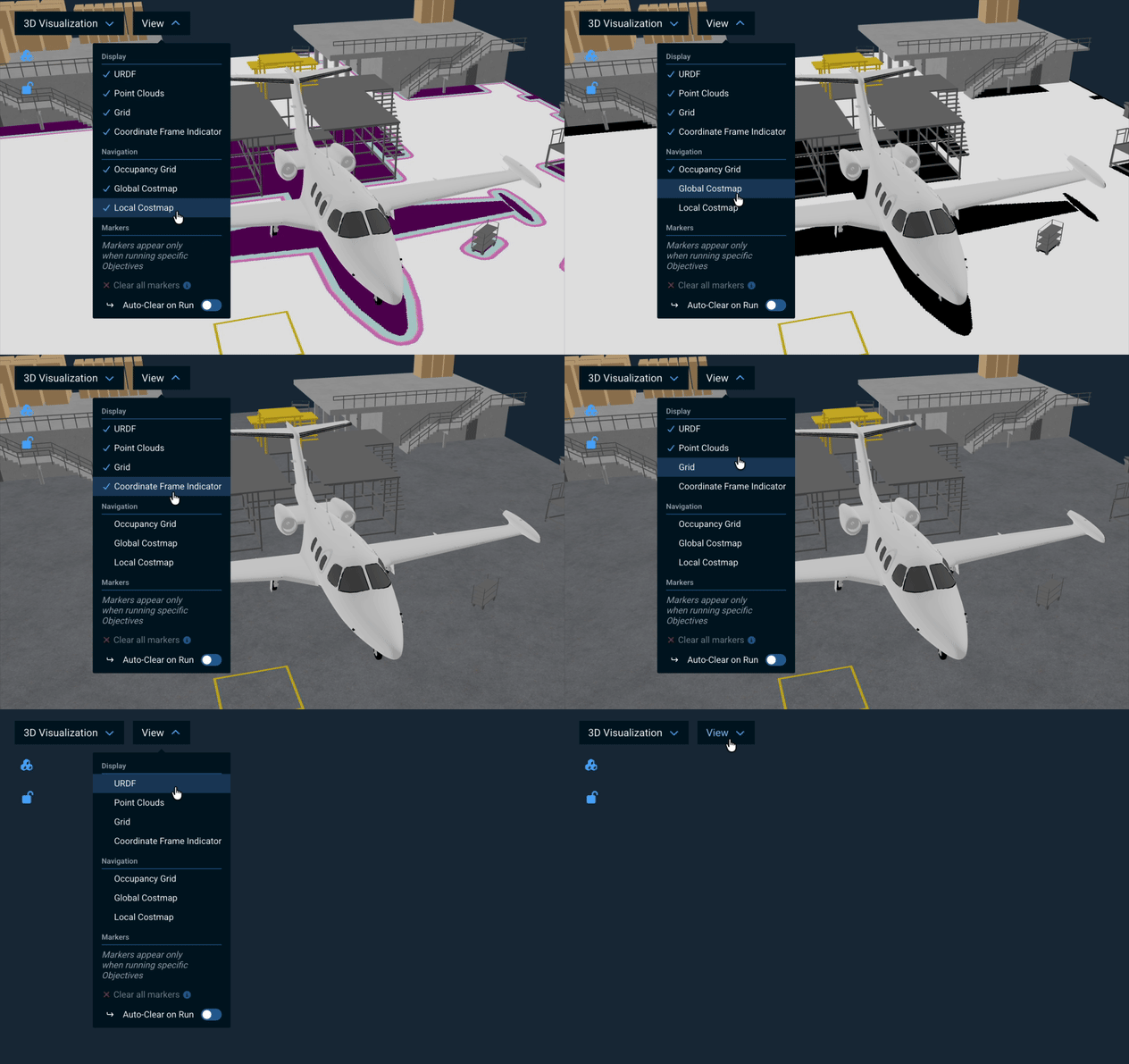
The UI has been streamlined by consolidating navigation controls into the View dropdown menu, where navigation costmaps (Occupancy Grid, Global Costmap, and Local Costmap) now appear alongside Display options and Markers in a single visibility toggle. Additionally, the View Pane menu has been redesigned to show all available panes with checkboxes indicating the active one, making it easier to see and switch between views without hiding the currently selected pane.
New Planning Scene Sidebar for Environment Editing
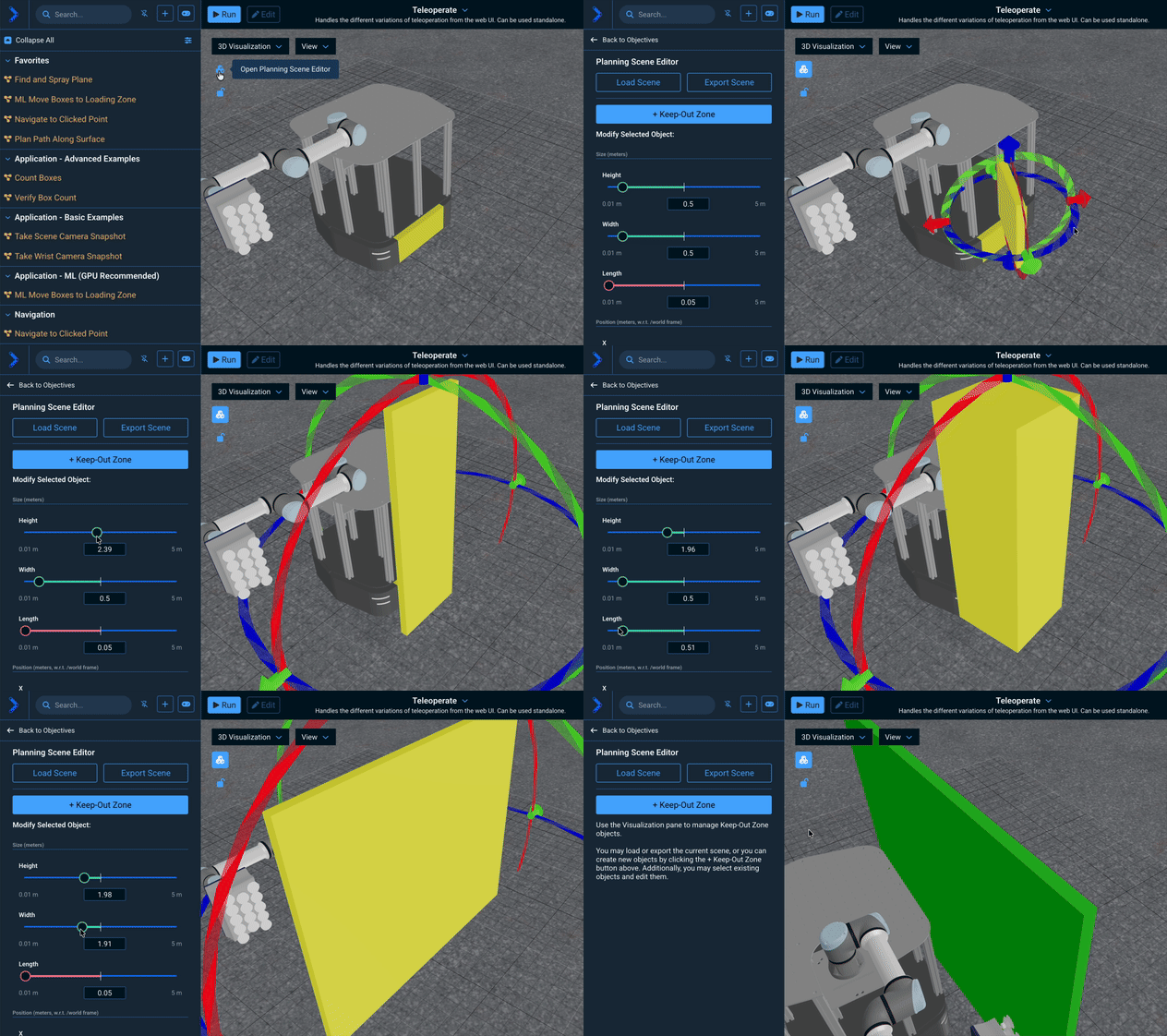
The Keep-Out Zone modal has been replaced with a dedicated Planning Scene Editor sidebar, making it easier to create and edit environment objects directly within the UI. The new panel supports adjustable Height, Width, and Length for non-cube shapes, precise position and rotation controls (X/Y/Z and Roll/Pitch/Yaw), object deletion, and quick access to Load Scene and Export Scene tools.
Coordinate Frame Indicator
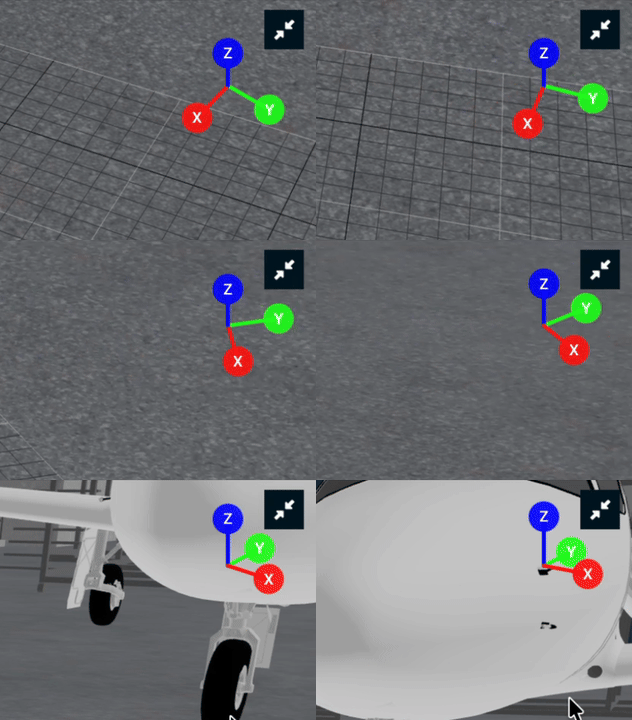
A new coordinate frame indicator in the 3D viewport shows labeled XYZ axes that rotate with the camera, helping you identify the world coordinate frame at a glance. The indicator can be toggled from the View menu.
Other Enhancements
Misc User Interface Improvements
- Added a filter dropdown to the sidebar for filtering Objectives and Behaviors. Users can filter by type (Runnable, Non-Runnable, and Behaviors in editor mode) and by access level (Editable, Non-Editable). The filter button is positioned next to the Collapse All button in the sidebar.
- Added vertical 2-pane layout option to the canvas layout selector, allowing users to stack two panes top/bottom in addition to the existing side-by-side layout.
- Added a toast warning when a point cloud is captured but "Point Clouds" is disabled in the View menu, so users know to re-enable visibility.
- Added a tooltip for viewing the full Behavior port value.
- Added a "Stop" button to the Breakpoint popup, allowing users to cancel the running Objective directly from the breakpoint prompt without needing to use the navbar stop button.
- Added an "Auto-Clear on Run" toggle to the View menu's Markers section. When disabled, markers from previous Objective runs are preserved instead of being cleared at the start of a new run.
- Added a double-click guard on the Edit/Done button to prevent accidental toggling when clicking too fast.
- Added a "Clear all alerts" button to clear alert history directly from the Alert Sidebar settings dropdown.
- Added Expand All / Collapse All buttons to the runtime Behavior Tree status viewer, allowing users to quickly expand or collapse all subtrees without switching to editor mode.
- Added the "Create Waypoint" button to the navbar, allowing users to create waypoints from any teleoperation tab without needing to switch to the Waypoints tab.
- Added auto-hide for the Behavior Selection Sidebar in Edit mode. The sidebar automatically closes when entering editor mode and opens when exiting, encouraging the use of the inline plus button for adding Behaviors to Behavior Trees.
- Added navigation costmaps (Occupancy Grid, Global Costmap, Local Costmap) to the View dropdown menu alongside Display options and Markers in a unified visibility toggle, replacing the separate Navigation dropdown.
- Added the "Show All Ports" toggle to the Behavior Tree controls bar and the "Snap to Box" checkbox to the Settings dropdown, decluttering the Objective dropdown menu.
- Added the "Back to Parent" button when editing subtrees, allowing users to quickly navigate back to the parent Objective.
- Added Enter key navigation in the search nodes bar, allowing users to jump to the next search result with a keyboard shortcut.
- Added automatic point cloud clearing when using "Reset Simulation", preventing stale point cloud data from remaining visible after a reset.
- Added port value matching to Behavior Tree search. Search now matches port values in addition to node names and port names, with the value field highlighted when a match occurs.
- Added a block on dragging nodes from expanded subtrees in the Objective Builder. A warning toast explains that the subtree must be edited directly to rearrange its nodes.
- Added multi-line wrapping for Behavior Tree node titles instead of truncating with ellipsis.
- Added improved View Pane swap button positioning and styling. The swap button now appears above the resize handle to prevent accidental resizing when hovering over it, and the background is transparent by default, only appearing on hover.
- Added automatic navigation back to the previously viewed Objective after using Teleoperate from an Objective.
- Added automatic dismissal of toast notifications from previous Objective runs when a new Objective starts, preventing stale notifications from cluttering the UI.
- Added automatic rosbridge WebSocket reconnection when the backend restarts, re-subscribing all active topics. Previously, users had to manually refresh the browser. A "Robot connected" success toast confirms when joint states resume.
- Added dynamic resizing for joint sliders to fill available space when the sidebar width changes.
- Added file path display to the Objective hover tooltip in the sidebar, making it easier to locate Objectives within the robot configuration package inheritance structure.
- Added persistence for the last selected teleoperation mode (Waypoints, IMarker, Pose, or Joint) in the Teleoperation UI.
New Behaviors (Skills)
ListControllersis a new Behavior to retrieve controllers based on their type and activation state.SetMujocoStateis a new Behavior to set the joint state of the robot inside MuJoCo simulation.CreateBoundingBox2Dis a new Behavior that constructs aBoundingBox2Dmessage from individual coordinate and size ports, suitable for wiring into Behaviors that accept box prompts.CreateBoundingBoxes2Dis a new Behavior that converts a flat vector of doubles into a vector ofBoundingBox2Dmessages, where each group of four values (x, y, width, height) specifies a single box.CreateBoundingBoxFromOffsetis a new Behavior that generates aBoundingBox2Dcovering an exemplar image's dimensions with optional padding, ready to be passed toGetMasks2DFromExemplar.PublishBoundingBoxes2Dis a new Behavior that publishes a visualization of labeled bounding boxes overlaid on an image to a ROS topic.OverridePoseOrientationis a new Behavior that replaces the orientation of a pose with a fixed quaternion, useful for enforcing gripper-down approach orientations.GetCenterMostAprilTagis a new Behavior that selects the AprilTag detection closest to the camera image center from a set of detections.ClearAllVisualMarkersis a new Behavior that deletes all visualization markers from the/visual_markerstopic.VisualizeLineis a new Behavior that draws a line marker between two poses, useful for visualizing spatial relationships such as detection-to-grasp offsets.
Behavior Improvements
SwitchControllersnow detects control chains and automatically activates or deactivates controllers in a chain ifautomatic_activationorautomatic_deactivationare set to true.PlanMTCTask(MoveIt Task Constructor) now has asuppress_failure_messageport that silently returns failure instead of publishing a UI alert when MTC planning fails. This is useful when planning failures are expected and handled by retry decorators.ResetMujocoSimdisables all active command controllers before resetting MuJoCo, and re-enables them after.TransformPosecan now optionally visualize the resulting pose as a coordinate-frame marker.VisualizePathnow supports customizable line color (line_color_rgbport, RGB 0-255) and line width (line_widthport, in meters). Defaults match the previous green color and 1 cm width, with the line opacity increased from 0.8 to 1.0 for improved visibility.MoveGripperActionprovides improved timeout error messages with current port values and actionable troubleshooting steps.PlanMTCTaskerror messages now include the task name, indent each failing stage for readability, and include a legend explaining the(solutions found / failures)notation.SetupMTCFixedJointStatenow has anignore_collisionsport that allows users to skip collision checking in theFixedStatestage. This is useful when the initial planning scene is expected to be in collision and the ACM rules are not yet set up, allowing downstream stages with the correct ACM to handle collisions instead of failing immediately.
Reference Application Changes
- Added a new
lab_sim_behaviorspackage forlab_simwith aComputeTrayPlacePositionsUsingAprilTagscustom Behavior that computes grid-based place positions relative to a tray AprilTag for bottle placement workflows. - Added an example Objective for
SetMujocoStateinlab_simdemonstrating how to set the robot's joint state inside the MuJoCo simulation. - In
lab_simthere are three new Objectives to demonstrate how to use exemplars withGetMasks2DFromExemplar.ML Segment Bottles from Fileloads an image from file of a laboratory table and uses text prompting to find bottles. Useful for troubleshooting and tuning parameters and prompts.ML Find Objects on Tableuses text prompting to find various objects on the MuJoCo lab table.ML Find Bottles on Table from Image Exemplaruses an image exemplar of a square pill bottle to find simulated pill bottles in MuJoCo scene. Combine image exemplar with text prompts for more performance.
Documentation Improvements
- Added documentation for Custom View Panes feature, including guides for creating custom iframe panels and integrating with ROS topics via the ROS Bridge API.
- Updated teleoperation comparison table and gamepad teleop guide with improved hardware guide organization.
- Added UI teleoperation and UI overview how-to guides for custom view panes.
- Updated the defining a grasp pose guide.
Other Improvements
- The Joint Trajectory Admittance Controller (JTAC) now accepts trajectories that specify only a subset of the controller's joints. Unspecified joints will hold their current position throughout the trajectory execution.
- Updated LLM server models to the latest versions: Claude Opus 4.6, Claude Sonnet 4.6, and GPT-5.4.
- Exposed
set_jacobian_inverse_dampingin the PythonPathIKOptionsAPI, allowing users to tune the Jacobian inverse damping factor for Path IK solving. - Added Objective REST API V2, which uses structured JSON instead of XML for data transfer, improving performance and simplifying programmatic access to Objectives.
Bug Fixes
- Fixed controller activation in STRICT mode by skipping already-active controllers before activation and already-inactive controllers before deactivation.
- Fixed scroll position not being preserved in the Quick Add Behavior menu when navigating back from the description view to the Behavior list.
- Fixed port value tooltip remaining visible while editing port values in Behavior Tree nodes. The tooltip now hides when the input is focused and reappears on hover after editing.
- Fixed warning toast notifications rendering with blue (info) styling instead of yellow (warning) styling.
- Fixed a bug where the optimization-based IK (Inverse Kinematics) solver would perform solution validation only at the very end of the optimization process, causing it to always report optimal but invalid solutions.
- Fixed a bug where
SetupMTCFixedJointStatechecked for collisions using its own isolated planning scene, ignoring ACM (Allowed Collision Matrix) modifications from upstream MTC stages likeSetupMTCIgnoreCollisionsBetweenObjects. A newignore_collisionsport (default:true) defers collision checking to downstream stages that have the correct ACM. To restore the previous Behavior, setignore_collisionstofalse. - Removed the whole-scene collision check from the MTC
ModifyPlanningScenestage. This stage is used to modify the ACM and add/remove collision objects, not to plan motion. The unscoped collision check caused false failures when unrelated objects in the scene were colliding (e.g., an octomap overlapping a static collision object). - Fixed a bug in
MergePointCloudswhere NaN (Not a Number) values in the point clouds could cause ICP (Iterative Closest Point) alignment to fail and throw an exception. The Behavior now removes NaN values from the point clouds before alignment to ensure robust operation. - Added missing access stand and cart collision objects to the
hangar_simplanning scene. The access stand (collision_Cube_002.001) was not in the URDF, and the cart (collision_Cube) position did not match its Mujoco world location, causing the robot to plan through both objects. - Fixed the default
poseport value forVisualizePoseto use{pose_stamped}(previously{stamped_pose}) to match MoveIt Pro conventions. - Fixed an issue where the JTAC would accept trajectories that don't start at the robot's current position, causing sudden jumps at the start of execution.
- Fixed an issue where rosbridge_server could end up consuming large amounts of CPU