Overload Configuration for Simulation
If you are following this guide with example_robot_ws, your workspace should look like branch step9.
We are inheriting from our example_robot_mock config, but will need to make some adjustments to leverage new functionality:
config.yamlhardware.robot_description.urdf- to add Xacro arguments to switch between mock and MuJoCo hardware interfaceshardware.robot_description.urdf_params- to leverage the new Xacro arguments
hardware.robot_description.urdf
Define MuJoCo ros2_control hardware interfaces
We need to update our Xacro to enable switching between mock and sim hardware sources.
Create new ros2_control Xacro macro file for MuJoCo hardware src/example_robot_sim/urdf/r6bot_mujoco_ros2_control_macro.xacro
Our ros2_control plugin for MuJoCo simulation has a number of configuration options.
<?xml version="1.0" ?>
<robot xmlns:xacro="http://www.ros.org/wiki/xacro">
  <xacro:macro
    name="r6bot_control"
    params="mujoco_model mujoco_viewer"
  >
    <xacro:arg name="mujoco_model" default="mjcf/assets/arm_with_gripper_description.xml" />
    <xacro:arg name="mujoco_viewer" default="false" />

    <ros2_control name="r6_2f_proto1_mujoco" type="system">
      <hardware>
        <plugin>picknik_mujoco_ros/MujocoSystem</plugin>
        <param name="mujoco_model">$(arg mujoco_model)</param>
        <param name="mujoco_model_package">example_robot_sim</param>
        <!-- Whether to launch the MuJoCo interactive viewer -->
        <param name="mujoco_viewer">$(arg mujoco_viewer)</param>
        <!-- The rate <camera> data is published at -->
        <param name="render_publish_rate">10</param>
        <!-- The rate transforms to <site> poses are published at -->
        <param name="tf_publish_rate">60</param>
        <!-- The rate <rangefinder> data is published at -->
        <param name="lidar_publish_rate">10</param>
        <param name="ignore_joint_validation">robotiq_85_left_finger_tip_joint robotiq_85_left_inner_knuckle_joint robotiq_85_right_finger_tip_joint robotiq_85_right_inner_knuckle_joint robotiq_85_right_knuckle_joint</param>
      </hardware>
    </ros2_control>
  </xacro:macro>
</robot>
MuJoCo Interactive Viewer mujoco_viewer
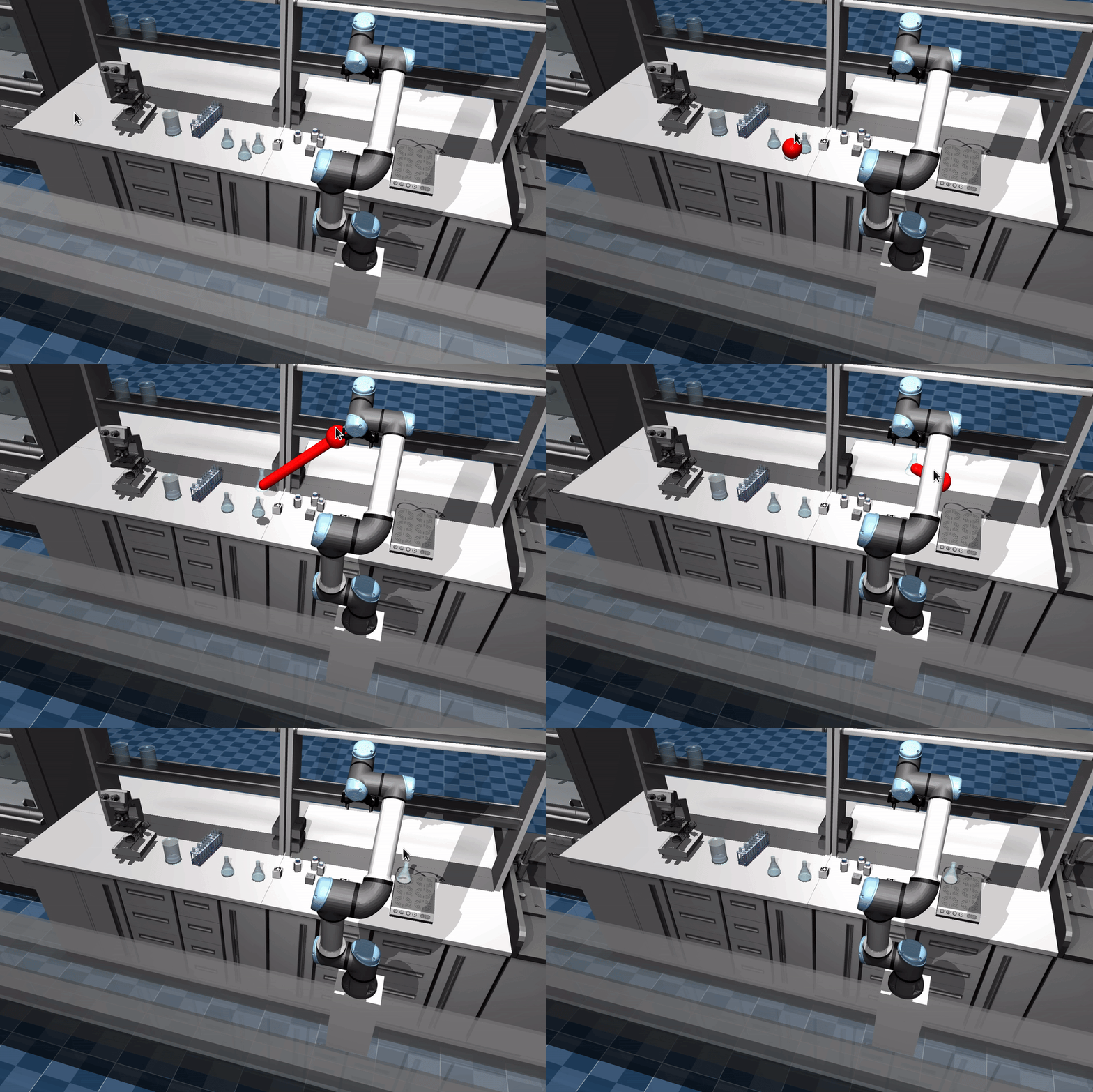
You can launch MuJoCo's interactive viewer (in passive mode) on startup and safely use it in parallel with commands sent by your Objectives.
Do this by setting the mujoco_viewer parameter to true in the above MujocoSystem plugin.
Learn more about the interactive viewer's capabilities in this video.
Ignoring Joint Validation ignore_joint_validation
By default, the simulation enforces that every joint in the URDF has a corresponding joint in the MJCF model. You may want to skip this in cases where the joint isn't intended to be simulated, for example mimic joints (which are handled differently in Mujoco) or 3 linear joints used to represent planar motion of a mobile base (which we handle differently).
A list of joints to ignore can be specified using the ignore_joint_validation parameter.
  <ros2_control>
    <hardware>
      <plugin>picknik_mujoco_ros/MujocoSystem</plugin>
      ...
      <param name="ignore_joint_validation">robotiq_85_left_finger_tip_joint robotiq_85_left_inner_knuckle_joint robotiq_85_right_finger_tip_joint robotiq_85_right_inner_knuckle_joint robotiq_85_right_knuckle_joint</param>
    </hardware>
  </ros2_control>
Use MuJoCo ros2_control hardware interfaces
Selectively use the Mujoco ros2_control Xacro macro in src/example_robot_mock/urdf/r6_2f_proto1.urdf.xacro
There is no need to duplicate the urdf.macro file in example_robot_sim just for this change - we will modify the existing urdf.macro file in example_robot_mock.
Add Xacro arguments and processing for when hardware_interface is set tomujoco instead of mock hardware and for MuJoCo hardware arguments:
<?xml version="1.0" ?>
<robot name="r6_2f_proto1" xmlns:xacro="http://wiki.ros.org/xacro">

  <xacro:arg name="hardware_interface" default="mock"/>
  <xacro:arg name="mujoco_model" default="mjcf/assets/arm_with_gripper_description.xml" />
  <xacro:arg name="mujoco_viewer" default="false" />

  <!-- R6bot Arm -->
  <xacro:include filename="$(find example_arm_description)/urdf/r6bot_urdf_macro.xacro"/>
  <xacro:r6bot_description
  />
  <!-- Mock arm hardware -->
  <xacro:if value="${'$(arg hardware_interface)' == 'mock'}">
    <xacro:include filename="$(find example_arm_hardware_interface)/urdf/r6bot_mock_ros2_control_macro.xacro"/>
    <xacro:r6bot_control />
  </xacro:if>

  <!-- Base -->
  <link name="world"/>
  <joint name="base_joint" type="fixed">
    <parent link="world"/>
    <child link="base_link"/>
  </joint>

  <!-- 2F Gripper -->
  <xacro:include filename="$(find robotiq_description)/urdf/robotiq_2f_85_macro.urdf.xacro"/>
  <xacro:robotiq_gripper name="r6_2f_proto1" prefix="" parent="tool0" include_ros2_control="false">
      <origin xyz="0 0 0" rpy="0 0 0" />
  </xacro:robotiq_gripper>
  <!-- Mock gripper hardware -->
  <xacro:if value="${'$(arg hardware_interface)' == 'mock'}">
    <xacro:include filename="$(find robotiq_description)/urdf/2f_85.ros2_control.xacro"/>
    <xacro:robotiq_gripper_ros2_control name="r6_2f_proto1" prefix="" use_fake_hardware="true"/>
  </xacro:if>

  <!-- Teleop grasp_link -->
  <link name="grasp_link"/>
  <joint name="grasp_link_joint" type="fixed">
    <parent link="robotiq_85_base_link"/>
    <child link="grasp_link"/>
  </joint>

  <!-- MuJoCo hardware -->
  <xacro:if value="${'$(arg hardware_interface)' == 'mujoco'}">
    <xacro:include filename="$(find example_robot_sim)/urdf/r6bot_mujoco_ros2_control_macro.xacro"/>
    <xacro:r6bot_control
      mujoco_model="$(arg mujoco_model)"
      mujoco_viewer="$(arg mujoco_viewer)"
    />
  </xacro:if>

</robot>
Because we are making the Xacro changes to the same hardware.robot_description.urdf file used by example_robot_mock and we are inheriting from example_robot_mock config.yaml, we do not need to override this value in example_robot_sim config.yaml.
hardware.robot_description.urdf_params
Now we can leverage these Xacro arguments via example_robot_sim config.yaml.
Update src/example_robot_sim/config/config.yaml to use the MuJoCo ros2_control hardware
Replace the entirety of your config.yaml file to look like this:
based_on_package: example_robot_mock

hardware:
  # Parameters used to configure the robot description through XACRO.
  # A URDF and SRDF are both required.
  # [Required]
  robot_description:
    # Specify any additional parameters required for the URDF.
    # Many of these are specific to the descriptions packages, and can be customized as needed.
    # [Optional]
    urdf_params:
        # Use "mock" or "mujoco"
      - hardware_interface: "mujoco"
      - mujoco_viewer: "true"
Mobile Base Configuration
To control an omnidiretional mobile base, we use the clearpath_mecanum_drive_controller.
As of writing this, we are using the latest commit of the pr-add-world-frame-control-option branch: 50ff0df61042ca5d16cf5d98c386661023bd6185 (fix test).
This controller is used to control the mecanum wheels that were generated in the "Adding mecanum wheels to the robot base" section.
To use the controller, clone the repo into your user workspace and build the package.
Add the parameters under platform_velocity_controller to the controllers.yaml file.
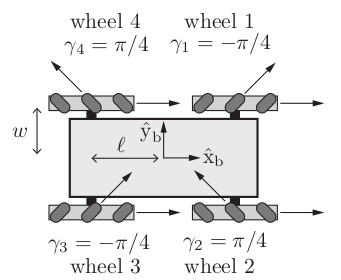
Most of the parameters are self explanatory, except kinematics.sum_of_robot_center_projection_on_X_Y_axis.
That parameter is equal to l + w in the image below (in meters).
Remove redundant src/example_robot_sim/launch/agent_bridge.launch.xml file
Remove the example_robot_sim/launch folder as we do not need to override example_robot_mock definitions.
Update src/example_robot_sim/CMakeLists.txt
Update the install directories to reflect the folder structure
cmake_minimum_required(VERSION 3.22)
project(example_robot_sim)

find_package(ament_cmake REQUIRED)

# Install configuration files
install(DIRECTORY config mjcf launch urdf DESTINATION share/${PROJECT_NAME}/)

ament_package()
Your workspace should now look like step10.
Next Steps: Cleanup
There are several dependency and cleanup steps this guide does not cover:
- Consolidate all MJCF xml files into
mjcf/ - Consolidate all MJCF meshes into
mjcf/assets - Rename primary MJCF xml file from
arm_with_gripper_description.xmltor6_2f_proto1.xml - Populate dependencies in CMakeLists.txt
- Populate dependencies in package.xml