Joint Trajectory Admittance Controller
Overview
This package contains a Joint Trajectory with Admittance Controller (JTAC), implemented within the ros2_control framework. The JTAC is similar to the ros2_control Joint Trajectory Controller (JTC), with the addition of an optional 'admittance' component that enables executing joint-space trajectories with compliance in Cartesian space. For this, a force/torque sensor (FTS) is needed at the end of the kinematic chain being controlled. Otherwise the controller can still be used, but as a standard joint-trajectory controller without compliance.
The controller also features a time-scaling capability that allows dynamically adjusting the speed of trajectory execution during runtime.
Why not use ros2_control JTC + layered admittance?
This same behavior could potentially be achieved with ros2_control JTC and a layered Admittance controller. That approach, however, has a few issues that prevent using it outside of prototype-grade implementations:
- The JTC in ros2_control allocates memory in the control loop, which makes it unsuitable for real-time systems.
- The Admittance controller in ros2_control also allocates memory in functions used in real-time loops.
- Controllers in ros2_control are implemented in a way they depend on other ROS 2 types and messages, which makes them difficult to use outside the ROS ecosystem.
- Having separate layered JTC and Admittance controllers makes it impossible to share the state between them without large architectural changes. Not having a shared state makes it difficult to implement important functionality, such as stopping a trajectory when the force exceeds a threshold, or just resetting the admittance state when a new trajectory is received.
Our approach
Our approach is to implement a new JTC with an embedded admittance component, which we call a Joint Trajectory with Admittance Controller (JTAC). This offers several advantages:
- Having trajectory tracking and admittance in the same controller allows both components to have full access to each others’ state and handle transitions properly (e.g. command preemption).
- Trajectory and admittance parameters can be in the same command message, e.g. run a trajectory with given admittance parameters, as opposed to a command and a separate ROS parameter interface. This enables better error handling and reporting.
- It offers the possibility to update the command message as needed, e.g. different admittance on different trajectory segments, without potentially affecting other controllers.
Design
The JTAC has been designed with the following ideas in mind:
- ROS-agnostic core library + ros2_control wrapper. This makes it easier to reuse the core in other control frameworks outside ROS if needed.
- The admittance parameters are part of the controller command, as opposed to a separate ROS 2 parameters.
- Real-time safe: no allocations in real-time thread. Validated via memory allocation tests (see malloc_counter.hpp).
- Exit conditions as part of the command, e.g. exit on a maximum deviation threshold from the nominal trajectory, or exit on excessive sensed force.
- All exit conditions should end in a full stop at user-defined decelerations.
- MISRA C++ 23 compliant.
Frames
There are four frames involved in the JTAC computations:
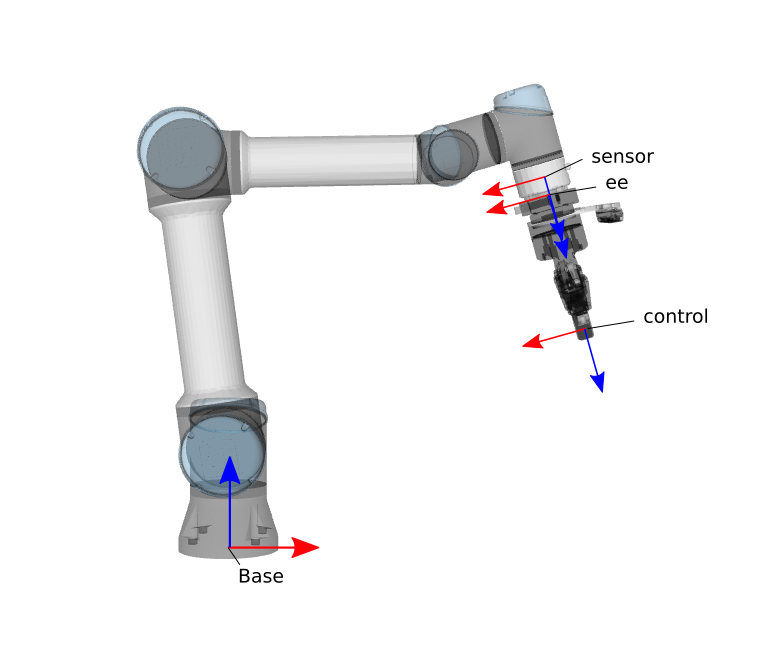
- Base frame: the root of the kinematic chain to be controlled, e.g. the base link of the arm.
- Sensor frame: the frame where the sensed force/torque is given by the FTS.
- End-effector (ee) frame: the tip of the kinematic chain where the end-effector is attached. The end-effector center of gravity will be given with respect to this frame.
- Control frame: the frame that is being controlled, normally a descendant of the end-effector frame, e.g. the tool tip.
Control approach
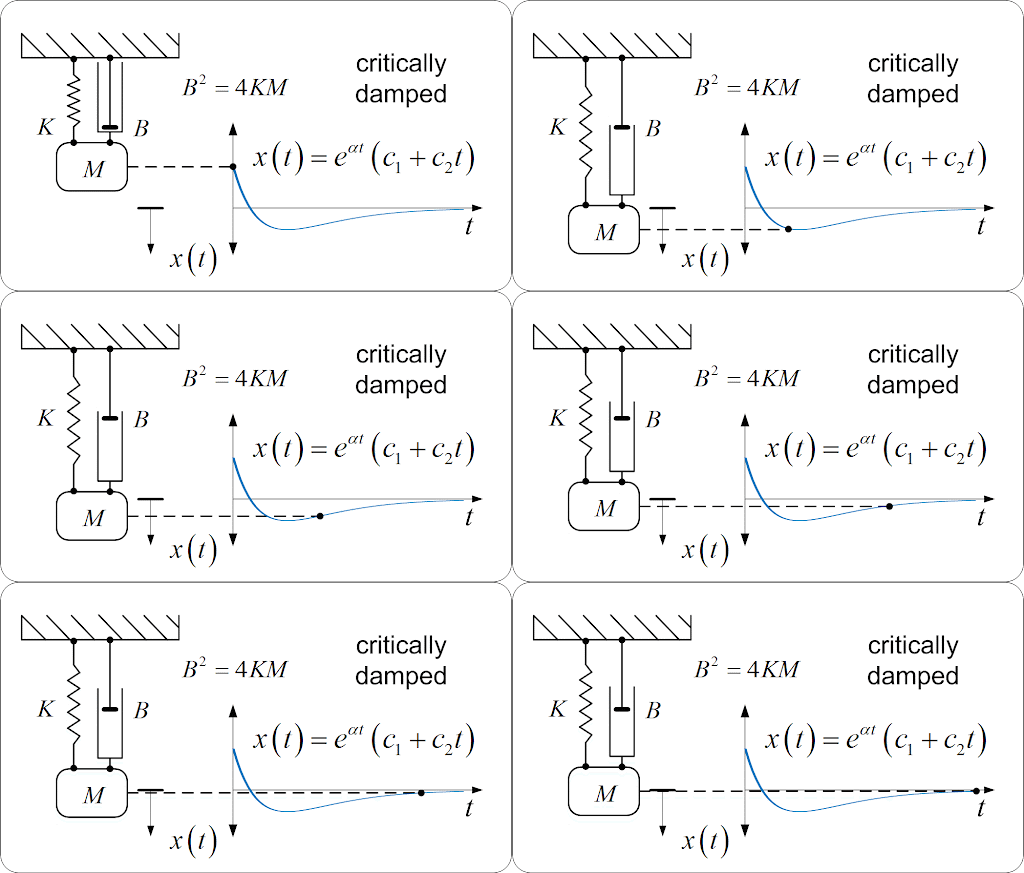
The controller has a joint-space trajectory tracking component, and an admittance component. In the absence of any force/torque at the end-effector, or if there isn't a force/torque sensor, the controller behaves as a joint trajectory controller, i.e. it tracks a given joint-space trajectory. In the presence of a sensed wrench, the controller deviates from the nominal trajectory according to a spring-mass-damper model, i.e. it deviates as needed to accommodate the force, then converges back to the nominal trajectory when the force/torque disappears:
The spring-mass-damper behavior is applied in Cartesian space, and mapped into joint-space via the robot kinematic model. The following image shows the spring-mass-damper model applied in Cartesian coordinates at the robot tip.
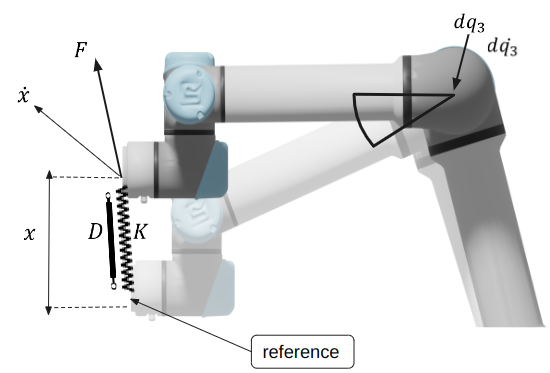
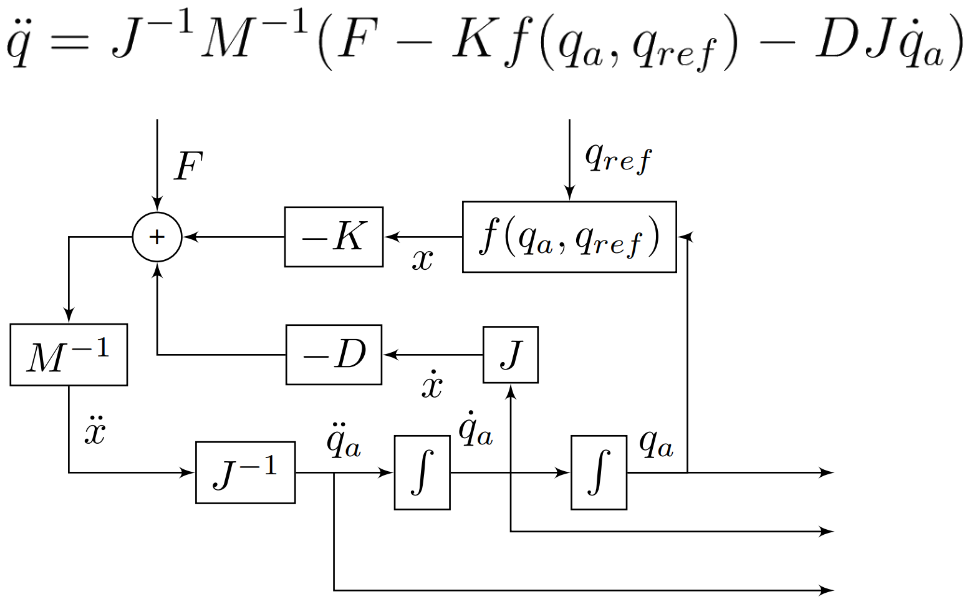
The arm is following a trajectory and needs to reach a joint-space reference (semi-transparent UR5). The robot is currently at a different joint-space configuration because a sensed wrench F made it deviate. The controller computes the displacement from the current configuration, in Cartesian space, to the desired one, x. It then applies the spring-mass-damper model with user given mass (M), stiffness (K) and damping (D) parameters, and the sensed wrench F. The output of the model is a Cartesian-space acceleration at which the arm end-effector needs to move. That Cartesian-space acceleration is then transformed into joint-space via inverse differential kinematics, and integrated into new joint-space velocities and accelerations.
Here's a more detailed control diagram:
Force filtering
The sensed wrench goes through a sequence of steps before it gets used by the controller:
- A second-order Butterworth filter is first applied to the raw input, to filter out high-frequency noise.
- A configurable deadband is applied to filter out values close to zero, which helps with control stability.
- The wrench introduced by the end-effector weight under gravity is estimated and subtracted from the filtered wrench before feeding it to the controller.
The behavior of these filters can be configured via the runtime parameters ft_cutoff_frequency_ratio, ft_force_deadband, ft_torque_deadband and gravity_vector (see the Parameter interface section below).
Each accepted goal captures gravity_vector in the URDF root frame (world), in m/s², together with each tip's end_effector_mass in kg and end_effector_cog in meters in the end-effector frame. Changes to gravity do not alter an active goal's compensation. A zero gravity vector disables the payload gravity load; a zero end-effector mass skips gravity compensation for that tip. Set the mass to zero when the sensor measurements already exclude the payload's weight, to avoid subtracting it twice. Force/torque thresholds apply to the filtered sensor measurements before gravity compensation.
Goals require finite, nonnegative end_effector_mass. For each tip with nonzero payload mass, every end_effector_cog and gravity_vector component must also be finite; invalid settings return INVALID_GOAL before execution. Zero-mass tips ignore these unused components.
When stitching trajectories, changes to gravity or center of gravity are compatible if both goals specify zero end-effector mass. With a nonzero payload mass, these values must match between goals.
Zeroing the force/torque sensor
Each configured sensor exposes a ~/zero_fts/<sensor_frame> trigger service that tares the sensor: it captures the current wrench and subtracts it from every subsequent reading, so a constant bias (for example a sensor offset or a mounted tool's weight) does not drive the compliant motion. Trigger it from a Behavior with CallTriggerService.
To keep a single noisy reading from biasing the offset, the service averages zero_fts_num_samples consecutive readings (default 10, one per control cycle) before applying the tare. Keep the sensor load constant for those cycles after triggering. The tare runs only while the controller is idle — a trigger received while a trajectory is executing is rejected and the reply reports failure — so zero the sensor while the robot is idle and stationary, the ideal moment to capture a clean offset.
Warning: the tare subtracts the average wrench the sensor reports over the sampling window that follows the trigger. Trigger it only when the sensor is free of external contact — any real contact or preload present across that window is subtracted from every later reading, so it no longer registers and cannot trip an absolute_force_torque_threshold stop. Triggering during motion or contact captures a changing signal, producing a meaningless offset; zero the sensor while idle and unloaded.
Time Scaling
The Joint Trajectory Admittance Controller includes a time scaling feature that allows dynamic adjustment of trajectory execution speed during runtime. This feature enables operators to slow down trajectory execution (up to 100% of the original speed) based on real-time conditions, safety requirements, or operational needs.
What it does: Time scaling modifies the rate at which the controller progresses through a trajectory. When enabled, the controller can execute trajectories slower (e.g., 50% speed) up to the original full speed (100%), providing fine-grained control over motion execution while maintaining safety limits.
Parameters:
- time_scale_filter_constant: Positive finite time constant, in seconds, for the first-order lag filter that smooths time scaling changes. Lower values provide faster response, while higher values provide slower, smoother transitions. The filtered scale approaches the requested percentage without overshoot and changes by at most 180 percentage points per second. Without rate limiting, the filter covers about 98% of a change in four time constants; larger changes can take longer because of the rate limit.
Safety behavior
While executing a trajectory, the controller runs the following checks:
- Path tolerance. The commanded joint positions (the trajectory sampled at the current time) are compared against the measured joint positions. If any joint deviates by more than the goal's path tolerance (defaulting to default_path_tolerance, 0.05 rad, when the goal does not specify its own), the controller aborts with PATH_TOLERANCE_VIOLATED and brakes to a stop.
- Goal tolerance. At the end of the trajectory, each joint must be within the goal tolerance (defaulting to default_goal_tolerance, 0.05 rad) of its target, otherwise the controller aborts with GOAL_TOLERANCE_VIOLATED. This check can only fail when the goal tolerance is tighter than the path tolerance, because a joint outside the path tolerance has already aborted the goal. The controller rejects a goal whose path or goal tolerance is zero, negative or NaN.
- A motion that ends in contact needs a goal tolerance that covers the expected deviation, and a simulation that lags the command needs a larger default_goal_tolerance or a settling time.
- A robot that lags the command may need time to settle. Set default_goal_time_tolerance to the number of seconds the controller waits after the trajectory end time. During that time it keeps commanding the final point and checking the path tolerance. The goal succeeds as soon as every joint is within the goal tolerance, and aborts with GOAL_TOLERANCE_VIOLATED if the time runs out. With the default of 0.0, the controller checks the goal tolerance once, at the trajectory end time. Available in MoveIt Pro 10.2 and later.
- The time scales with time_scale_percentage, like the trajectory. At 50.0 the controller waits twice as long.
- The controller cannot stitch a goal sent during that time to the active trajectory, which has already ended, so it aborts the new goal and stops the active one.
- Continuous joints. Independent continuous joints use the shortest angular difference for start, path, and goal tolerances and the published position error. Wrapped feedback therefore does not cause a false full-turn tracking error. Bounded revolute and mimic-coupled joints retain raw differences. Available in MoveIt Pro 10.2 and later.
- Planners must provide a continuous, timed path. JTAC preserves its relative motion, including complete turns. The control thread applies one fixed whole-turn offset per goal to keep motor commands continuous through feedback wrapping, idle intervals, and braking. Activation resets this command reference to the reported position when the first goal starts.
- Replacements are aligned to the active path at the actual stitch time, after skipping their elapsed prefix. The controller then checks raw position and velocity continuity. It does not repair discontinuities within a path.
- Declare a joint continuous only when it has no physical travel limit. Modulo feedback cannot establish an absolute turn count, and tolerances of π or more cannot detect an angular tracking error.
- Absolute force/torque threshold. When admittance is active, the filtered measured wrench is compared per axis against the goal's threshold (default default_absolute_force_torque_threshold: 45 N of force along the X, Y, Z axes and 10 Nm of torque about each). Exceeding it on any axis aborts with FORCE_TORQUE_THRESHOLD_EXCEEDED and brakes to a stop, independent of the spring-mass-damper compliance behavior.
- Non-finite value rejection. The controller rejects non-finite (NaN/Inf) values at every boundary: trajectory setpoints, the force/torque reading, the joint state from hardware, the admittance integrator output, and the final hardware command. A value caught before motion fails the goal with INVALID_GOAL; one caught during motion engages the stop trajectory. In both cases it logs the offending joint or wrench component, interface, and value. Available in MoveIt Pro 9.4 and later.
Every stop the controller initiates is a minimum-time deceleration computed from the configured stop_accelerations; the controller never cuts the command to zero or releases the joints, and it reports the trajectory action as finished only once the robot has fully stopped. Deactivation is the exception, described below.
The controller tracks the trajectory it is given and does not re-check joint position, velocity, or acceleration limits on the nominal trajectory; those are enforced upstream by the planner, and only the stop trajectory is bounded by stop_accelerations.
Deactivating the controller while a goal is pending aborts that goal immediately, without a stop trajectory: the action result is ABORTED with error_code INVALID_STATE, also for a goal the client was already canceling, and a stop already braking for its own reason keeps that reason in the result. The immediate abort follows from how the ros2_control controller manager deactivates a controller: it assumes the transition succeeds, releases the hardware interfaces as soon as on_deactivate() returns, and runs the transition on its own update thread, so the controller cannot keep commanding the robot through a stop trajectory. All it can do is resolve the goal and leave its state consistent. The controller then releases its hardware interfaces without commanding a hold or zero, so the last position setpoint stays on the command interface and what the arm does next is up to the hardware interface: a driver that tracks the setpoint stops there at once. This is intended for a driver that deactivates controllers when the robot stops (a protective stop or fault). To switch controllers deliberately during motion, cancel the goal and wait for its result first, so the arm brakes along stop_accelerations. Reaching a safe state is left to the robot driver and the physical safety chain.
ROS Interface
The JTAC is exposed to the ROS 2 ecosystem as a ros2_control plugin with name moveit_pro_controllers/JointTrajectoryAdmittanceController. It exposes four ROS 2 interfaces:
- Command action interface, used to send commands to the controller, e.g. a trajectory to be executed.
- Parameter interface, used to configure the controller from configs, or at runtime.
- State topic interface, used by the controller to communicate internal state to clients.
Command action interface
The controller command interface is exposed as a ROS 2 Action. The action message and its documentation is included in moveit_pro_controllers/FollowJointTrajectoryWithAdmittance.action.
Unlike the JTC in ros2_control, the JTAC won't report the command as finished until the robot is fully stopped. If, for instance, an error happens during trajectory execution (e.g. excessive force), the controller will plan and execute a minimum-time stop trajectory before returning control to the caller.
State topic interface
The controller state is published as a control_msgs/JointTrajectoryControllerState message, and includes the reference state, the actual state and the current error.
Time scaling parameter interface
The controller listens to a parameter named time_scale_percentage of type double. The parameter expects values between 0 and 100, where 100 means full speed (no time scaling), and 0 means stop. Values in between will slow down the trajectory execution proportionally.
The time scaling feature integrates seamlessly with the admittance control system, ensuring that force-based interactions remain stable regardless of the selected execution speed.
How to make the controller available
To make the JTAC available in your configs, add and adapt the following snippet to your ros2_control.yaml config file:
Parameter reference
Parameters marked read_only are set through the initial controller configuration. Runtime changes are rejected, including while the controller is inactive. To change these values, unload the controller and load it again with the updated configuration. Other parameters remain adjustable at runtime within their validation constraints.
Relevant headers
- interpolation.hpp: ROS-agnostic trajectory interpolation functions.
- admittance.hpp: ROS-agnostic admittance setpoint generation functions.
- stop_trajectory.hpp: ROS-agnostic functions to compute minumum-time stop trajectories.
- signal_processing.hpp: ROS-agnostic force-torque signal processing functions (e.g. filtering, deadband)
- joint_trajectory_admittance_controller.hpp: The main controller implementation within the ros2_control framework.
Generated via doxygen2docusaurus 2.2.2 by Doxygen 1.9.8.