Programmatic SDKs Overview
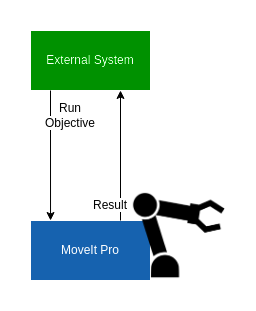
MoveIt Pro exposes its full ROS 2 surface (actions, services, topics, and parameters) to external programmatic clients. Use a native ROS 2 client library (rclpy for Python or rclcpp for C++) on the same DDS network, or connect a Web Bridge client using the Foxglove protocol in MoveIt Pro 9.4. For clients that must keep the rosbridge JSON protocol, an opt-in compatibility sidecar remains available; see Legacy Websocket Compatibility.
MoveIt Pro 9.4 switched the Desktop App WebSocket transport to the Foxglove protocol on default port 3201 and made rosbridge_server an opt-in sidecar. In earlier versions, port 3201 speaks the rosbridge JSON protocol directly and roslibpy / roslibjs clients connect there without the --enable-rosbridge flag.
This section is organized by feature. Feature pages keep the native ROS 2, Web Bridge, legacy rosbridge, and command-line examples together in tabs.
Setup
Native ROS 2 clients
Install ROS 2 matching the distro that MoveIt Pro is running (Humble for Ubuntu 22.04, Jazzy for Ubuntu 24.04) and source its setup script before running your client. Add moveit_studio_sdk_msgs to your package.xml so the action and service definitions are available.
Your client process must be on the same DDS network as the MoveIt Pro Runtime, typically the same host or the same L2 segment with multicast enabled. If you need to drive MoveIt Pro from across a routed network where DDS does not work cleanly, run an intermediate ROS 2 node on the robot's network and have it forward the calls, or use the Legacy Websocket Compatibility bridge.
Web Bridge Clients in 9.4
MoveIt Pro 9.4 clients connect to ws://<runtime-host>:<web-bridge-port>, where the Web Bridge port defaults to 3201. Use the port passed to --web-bridge-port when it was overridden. MoveIt Pro 9.4 does not create or use a frontend key, and this endpoint uses plain WebSocket rather than TLS.
The unauthenticated bridge exposes actions, services, topics, and parameters that can control the Runtime. Keep the Web Bridge port on a trusted network or behind a firewall or VPN. Never expose it directly to the public internet.
| Language | Web Bridge client (Foxglove protocol) |
|---|---|
| JavaScript / TypeScript | foxglove-ros-adapter |
| Python | foxglove-ros-client-py |
| C# | foxglove-ros-sharp |
What You Can Do
- Run an existing Objective — execute an Objective by name, optionally cancel it, or call it synchronously through the
/execute_objectiveservice. - Run an Objective from a custom Behavior Tree XML — send a Behavior Tree as a string at runtime, including Subtree port remapping.
- Pass parameters to Objectives at runtime — inject blackboard values without editing the Objective XML.
- Invoke a Python service from a Behavior — bridge a
rclpyservice into an Objective viaCallTriggerService. - Legacy Websocket Compatibility — direct Web Bridge clients using the Foxglove protocol on 9.4, plus the opt-in
rosbridge_serversidecar for clients that cannot migrate yet.
Browser and Custom-Pane Access
The MoveIt Pro Desktop App and direct Web Bridge clients using the Foxglove protocol use the configured Web Bridge port (3201 by default). Custom View Panes loaded inside MoveIt Pro should use IframeROSClient, which routes through the parent app. Applications that still speak rosbridge JSON must use the sidecar on a separate port in 9.4.
The full set of action, service, and topic definitions is available in moveit_studio_sdk_msgs.