Creating Behaviors
Within a Behavior Tree, we assemble various "Behavior" nodes, which are the smallest building block in MoveIt Pro. These Behaviors represent a discrete sensing, planning, or motion step. A Behavior's implementation must not be blocking to the Behavior Tree's execution flow, so asynchronous or long-lived tasks need their own threads. The current list of MoveIt Pro behaviors can be found here Behavior Hub.
MoveIt Pro is built on top of the standard BehaviorTree.CPP library, though we have our own tightly integrated Behavior Tree editor and debugging environment.
Creating Custom Behaviors
In practice, most of your Behaviors will be implemented as some type of BT::ActionNode or BT::ConditionNode.
For most applications, the standard set of control nodes (Sequence, Fallback, Parallel, etc.) and decorators (Inverter, Repeat, ForceSuccess, etc.) will be sufficient.
Refer to the Nodes Library documentation for more details.
Writing a New Behavior
As a developer, you can create custom Behaviors within your own packages and have the Objective Server load them at runtime from plugins. Check out our tutorial Runtime SDK & Extensions for an easy guide to creating your own Behavior, or continue below.
Broadly, you must complete three main steps:
- Create a new C++ class defining your custom Behavior.
- Create a Behavior loader plugin to register your custom Behavior with the Objective Server's Behavior Tree factory.
- Add the name of the plugin library to your robot configuration package's YAML file to allow that type of robot to load those Behaviors when running Objectives.
Behaviors that do not need to interact with ROS can derive from one of the BehaviorTree.CPP action node types, such as BT::SyncActionNode or BT::StatefulActionNode.
Behaviors that interact with ROS derive from the SharedResourcesNode class provided in the moveit_pro_behavior_interface package.
This class adds an additional constructor parameter that allows pointing it to an instance of a ROS node (along with some additional shared resources) when it is created.
The SharedResourcesNode class is templated, can take any type based on BT::TreeNode as the template parameter.
The type provided as the template parameter will be used as the base class for SharedResourcesNode -- for example, SharedResourcesNode<BT::SyncActionNode> or SharedResourcesNode<BT::StatefulActionNode>.
Additionally, we provide a set of helpful Behavior base classes you can use to interact with ROS interfaces:
AsyncBehaviorBase: Non-blocking and able to be halted, use for long running tasks. Will returnRUNNINGuntil complete.GetMessageFromTopicBehaviorBase: Gets the latest message from a ROS topic and sets its value to an output data port.ServiceClientBehaviorBase: Sends a request to a ROS service and waits for a result.ActionClientBehaviorBase: Sends a goal to a ROS action server and waits for a result.
For more information on the custom Behavior base classes provided by MoveIt Pro, refer to the Technical Documentation for the MoveIt Pro Behavior Interface.
Implementing the Behavior
Your Behavior class needs to implement the virtual functions in the BehaviorTree.CPP node class it is derived from.
Refer to the BehaviorTree.CPP documentation to see what you specifically need to do (for example, read here for BT::StatefulActionNode).
Important Behavior Design Guidelines
Here are a few key things to keep in mind when creating your own Behaviors:
Behaviors must not block while ticking
When the Behavior Tree is ticked, it is important that the state of each Behavior can be evaluated quickly.
This happens in the Behavior's tick() function.
It is important that tick() can finish very quickly, so that Behaviors derived from BT::SyncActionNode do not perform long-running processes within the Behavior's implementation of tick().
As a rule of thumb, a process that runs longer than 1 millisecond should be implemented as an asynchronous action node.
One approach for implementing asynchronous Behaviors is to handle long-running processes in a separate thread or using an asynchronous task. This way, ticking the Behavior just checks if the long-running process has completed yet.
Inheriting from BT::StatefulActionNode provides a simple way to allow your Behavior to check the progress of this long-running process.
Equivalently, the onStarted() and onRunning() functions for these derived classes must also finish quickly.
Alternatively, you can use the AsyncBehaviorBase class included in MoveIt Pro to define the contents of such a process with less boilerplate code.
Creating a Behavior Loader Plugin
Custom Behaviors are registered with the Objective Server Behavior Tree factory through a Behavior loader plugin. This is a class that is loaded at runtime using pluginlib, instantiated within the Objective Server, and called to register the Behaviors.
Behavior loader plugins are derived from the SharedResourcesNodeLoaderBase class.
Reference Behaviors can be found in the MoveIt Pro Example Behaviors repository.
Creating a Behavior to process a series of data points
When creating a Behavior whose desired functionality is to process a series of data points, such as filtering, it is best to have the Behavior inherit from BT::StatefulActionNode.
BT::StatefulActionNode allows a Behavior to retain state between ticks, so multiple data points can be collected and processed.
The Behavior can return SUCCESS if processing a finite number of data points or return RUNNING if continuously processing a number of data points.
An implementation of a Behavior that processes data points using BT::StatefulActionNode is Average Pose Stamped.
Step-by-Step: Creating a New Behavior Package
You can create a new Behavior package from one of our templates using a graphical or command line approach.
A brief summary of the node types are:
- A
SyncActionnode is expected to tick once and exit very quickly. - A
StatefulActionnode is intended for longer running processes that the Behavior Tree can continually tick until the Behavior status causes it to do otherwise. - The
WithSharedResourcessuffix provides the node with access to ROS 2 resources, allowing it to create publishers, subscribers, loggers, and other ROS 2 constructs. - An
AsyncBehaviorBasenode is a specialization of theStatefulActionWithSharedResourcesclass with convenience functions for asynchronous tasks.
For further detail, consult the API documentation or check out some examples.
Creating a New Behavior Package (Graphical Method)
For the graphical approach, start MoveIt Pro and create a new Objective (or edit an existing one).
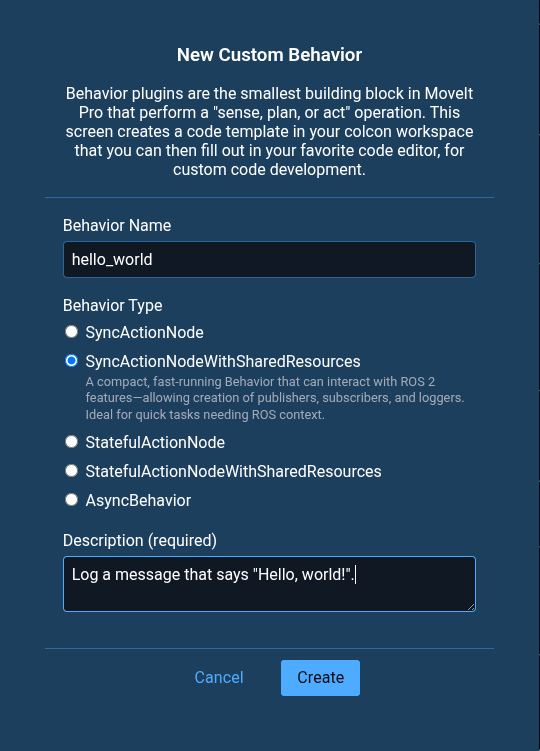
While editing an Objective, click + and choose New Behavior to bring up the Behavior creation dialog where you can give it a name, type, and description.
If you don't know which type to choose, pick AsyncBehavior.
A popup will appear containing the path to the newly-created Behavior package.
The location provided is the path that is used inside the Docker container.
The contents of the container's ${HOME}/user_ws is shared with the container's host (your system), at the location of your user workspace.
Creating a New Behavior Package (Command Line)
To create a new Behavior package using cookiecutter, you must first start a MoveIt Pro development image using moveit_pro dev.
Once started, you can invoke the package creation script using:
cookiecutter $(ros2 pkg prefix --share moveit_pro_behavior_template) --output-dir ~/user_ws/src
You will then be prompted to:
- Enter a package name (this will be the ROS 2 package name that gets created)
- Enter a Behavior name (this will be the name of the Behavior when using it in MoveIt Pro)
- Select a Behavior type (pick AsyncBehavior if you don't know which type to choose)
- Give your project a description
- Provide the package author's name
- Provide the package author's email
Once complete you will now have a package in your workspace.
Before you compile with colcon build, remove the COLCON_IGNORE file from the directory.
Inspect the New Behavior Package Directory
Open the directory where the new Behavior package was created.
Within the MoveIt Pro container it is located at ${HOME}/user_ws/, or on the host it can be found in the src folder of your user workspace.
Your new package contains the following files:
.
├── behavior_plugin.yaml
├── CMakeLists.txt
├── include
│   └── package_name
│       └── my_behavior.hpp
├── package_name_plugin_description.xml
├── package.xml
├── src
│   ├── my_behavior.cpp
│   └── register_behaviors.cpp
└── test
    ├── CMakeLists.txt
    └── test_behavior_plugins.cpp
Build the Behavior Package
Run the following command:
moveit_pro build user_workspace
Building the workspace should succeed; if not, you will see a description of the issue in the terminal window.
Write Unit Tests for your New Behavior
Even though we haven't added any additional functionality to our new Behavior, we can confirm that the basic functionality in our Behavior works as expected.
Let's add unit tests.
By default the test_load_behavior_plugins test checks two important things:
- The Behavior loader plugin that contains the Behavior can be loaded at runtime using its name and registered with the Behavior Tree factory to make its Behaviors available.
- The Behavior Tree factory can create an instance of the Behavior.
Next we will add a simple test to make sure the Behavior can be ticked, and will return success after the process completes.
Open test/test_behavior_plugins.cpp and add the following test:
TEST(BehaviorTests, test_behavior_success)
{
  pluginlib::ClassLoader<moveit_pro::behaviors::SharedResourcesNodeLoaderBase> class_loader(
      "moveit_pro_behavior_interface", "moveit_pro::behaviors::SharedResourcesNodeLoaderBase");

  // Set up and instantiate a new Behavior
  auto node = std::make_shared<rclcpp::Node>("BehaviorTests");
  auto shared_resources = std::make_shared<moveit_pro::behaviors::BehaviorContext>(node);
  BT::BehaviorTreeFactory factory;
  {
    auto plugin_instance = class_loader.createUniqueInstance("package_name::PackageNameBehaviorsLoader");
    ASSERT_NO_THROW(plugin_instance->registerBehaviors(factory, shared_resources));
  }
  auto my_behavior = factory.instantiateTreeNode("test_behavior_name", "MyBehavior",
                                                           BT::NodeConfiguration());

  // Try calling tick() on the Behavior, the first time it should return RUNNING.
  EXPECT_EQ(my_behavior->executeTick(), BT::NodeStatus::RUNNING);

  // Simulate a 100Hz tick() rate
  std::this_thread::sleep_for(std::chrono::milliseconds(10));

  // The next time the Behavior is ticked, it should return SUCCESS.
  EXPECT_EQ(my_behavior->executeTick(), BT::NodeStatus::SUCCESS);

}
The test_behavior_success test checks if the Behavior can be instantiated and ticked, as well as confirms the expected Behavior.
When the Behavior is ticked, it starts an asynchronous process and returns RUNNING.
The process completes immediately, but we simulate a 100Hz Behavior Tree tick rate by sleeping for 10 milliseconds.
The next time the Behavior is ticked it should return SUCCESS.
Run the new unit test by entering the following command. This will build the user workspace to ensure that all packages are up to date, and then run all of the tests in the workspace:
moveit_pro build user_workspace && \
moveit_pro test
At the end of the console output, you should see something similar to this:
1: [==========] Running 2 tests from 1 test suite.
1: [----------] Global test environment set-up.
1: [----------] 2 tests from BehaviorTests
1: [ RUN      ] BehaviorTests.test_load_behavior_plugins
1: [       OK ] BehaviorTests.test_load_behavior_plugins (30 ms)
1: [ RUN      ] BehaviorTests.test_behavior_success
1: [       OK ] BehaviorTests.test_behavior_success (24 ms)
1: [----------] 2 tests from BehaviorTests (54 ms total)
1:
1: [----------] Global test environment tear-down
1: [==========] 2 tests from 1 test suite ran. (54 ms total)
1: [  PASSED  ] 2 tests.
If you'd like to take a closer look at the test output for the particular test that we just modified, go to your user workspace and open log/latest_test/package_name/stdout.log.
Running Your New Behavior in MoveIt Pro
If you've already built and tested your Behavior, it is ready for use in MoveIt Pro.
If you have not built your new package, use moveit_pro build before you moveit_pro run.
Adding a New Behavior to an Existing Package
Throughout the remainder of this guide, we will refer to package files via relative paths such as include/..., src/..., and test/....
These paths are relative to a package directory, such as ~/user_ws/src/package_name/.
You do not have to create a new package for each Behavior. Additional Behaviors can be added to an existing package using the following steps:
Create .cpp and .hpp files
Following the existing structure, place your .cpp file in src/ and .hpp file in include/package_name and add content.
Add source files to CMake
Add the new source file to the CMake library target in CMakeLists.txt.
It should look something like this:
add_library(
  package_name
  SHARED
  src/my_behavior.cpp
  src/my_other_behavior.cpp
  src/register_behaviors.cpp)
Register the Behavior Plugin
Edit src/register_behaviors.cpp to include your .hpp file, and register additional Behaviors like so:
  void registerBehaviors(BT::BehaviorTreeFactory& factory,
       const std::shared_ptr<moveit_pro::behaviors::BehaviorContext>& shared_resources) override
  {
    moveit_pro::behaviors::registerBehavior<MyBehavior>(factory, "MyBehavior", shared_resources);
    moveit_pro::behaviors::registerBehavior<MyOtherBehavior>(factory, "MyOtherBehavior", shared_resources);
  }
Additional information on customizing behaviors can be found in Adding Ports to Behaviors