Key Terminology
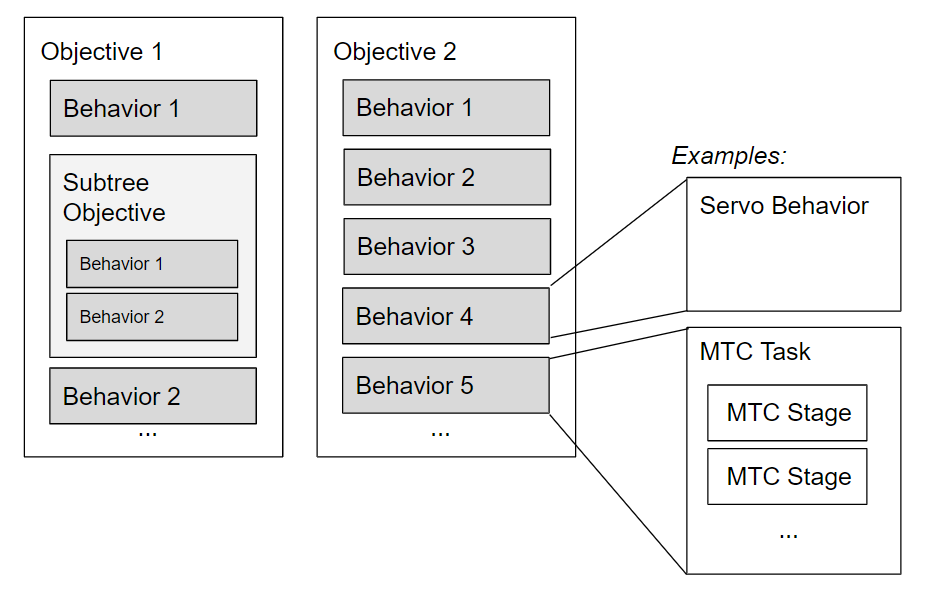
Objective: A collection of Behaviors structured as a Behavior Tree. The order of execution is determined by control flow logic within the tree.
Behavior Tree: a way to structure the switching between different tasks in an autonomous agent. An efficient way of creating complex systems that are both modular and reactive.
Behavior: The smallest building block in MoveIt Pro. Represents a discrete sensing, planning, or motion step.
Behavior Configuration Parameter: Value used to configure a Behavior when it is initialized. Does not change while the Objective is executed. Saved in YAML files.
Behavior Data Port: Input into or output from a Behavior. Generated dynamically while the Objective is executed. Defined in the BehaviorTree.CPP XML format, sometimes with default values.
MTC (MoveIt Task Constructor): The MoveIt Task Constructor framework provides a flexible and transparent way to define and plan actions that consist of multiple interdependent subtasks.
Defining Objectives
Objectives are defined in the BehaviorTree.CPP XML format.
To demonstrate this, here are the contents of an example Objective XML file:
<?xml version="1.0"?>
<root BTCPP_format="4" main_tree_to_execute="Move to Known Pose">
    <!-- ////////// -->
    <BehaviorTree ID="Move to Known Pose">
        <Sequence name="root">
            <SubTree ID="Move to Named Pose" waypoint_name="move_to_known_pose.target_state_name"/>
        </Sequence>
    </BehaviorTree>
    <!-- ////////// -->
    <BehaviorTree ID="Move to Named Pose">
        <Sequence name="move_to_waypoint_main">
            <Action ID="RetrieveWaypoint" waypoint_joint_state="{target_joint_state}" waypoint_name="{waypoint_name}" joint_group_name="manipulator"/>
            <Action ID="InitializeMTCTask" task_id="move_to_waypoint" controller_names="/joint_trajectory_controller /robotiq_gripper_controller" task="{move_to_waypoint_task}"/>
            <Action ID="SetupMTCCurrentState" task="{move_to_waypoint_task}"/>
            <Action ID="SetupMTCMoveToJointState" joint_state="{target_joint_state}" planning_group_name="manipulator" task="{move_to_waypoint_task}"/>
            <Action ID="PlanMTCTask" solution="{move_to_waypoint_solution}" task="{move_to_waypoint_task}"/>
            <Action ID="ExecuteMTCTask" solution="{move_to_waypoint_solution}"/>
        </Sequence>
    </BehaviorTree>
</root>
The main_tree_to_execute field in the root node is treated as the name of the Objective. The name provided in the /do_objective action goal request is expected to match this.
Objectives can consist of multiple subtrees. In this example, the top-level Move to Known Pose tree includes the MoveToWaypoint subtree.
In the top-level Move to Known Pose tree, the value of the waypoint_name port exposed by the MoveToWaypoint subtree is expected to be set by a Behavior parameter override.
Behaviors Architecture
Behaviors are the smallest building block in MoveIt Pro, and correspond to a node in a Behavior Tree. MoveIt Pro provides a library of pre-built Behaviors for motion planning, computer vision, basic hardware control, and more. In addition, anyone can create their own Behaviors as extensions / plugins. For more information, see Creating a Custom Behavior.
A Behavior's implementation must not be blocking to the Behavior Tree's execution flow, so asynchronous or long-lived tasks need their own threads. Behaviors that require ROS services or actions can have a reference to a shared ROS node, from which they can create publishers, call actions, etc. But it is up to your Behavior implementation to manage that.
A Behavior is run as a plugin within the MoveIt Pro Objective Server. This is advantageous in that you don't need to create separate launch files to start new Behaviors. This also allows developers to create a ROS package that contains your Behavior that can be side-loaded.
However, a Behavior can be a shallow call out to a separate ROS node, that may even be on a separate machine or container. This can be very advantageous to software with a lot of exact dependencies, such as TensorFlow.