Behavior Trees
All applications in MoveIt Pro (what we call "Objectives") utilize Behavior Trees as our underlying state management architecture. A "Behavior" is the smallest MoveIt Pro building block, representing a single action node which performs a specific operation or skill, such as a motion step, discrete sensing, or planning. A list of the current "Behavior" nodes can be found here Behavior Hub.
MoveIt Pro is built on top of the standard BehaviorTree.CPP library, though we have our own tightly integrated Behavior Tree editor and debugging environment.
Node Types
There are 4 types of Behavior Tree nodes:

-
Actions Nodes (Teal) are the MoveIt Pro Behaviors; the fundamental building blocks that execute a robotic skill.
-
Subtrees (Yellow) are the MoveIt Pro Objectives; a modular organization of nodes.
-
Control Nodes (Red) organize execution of child nodes.
Example control nodes:
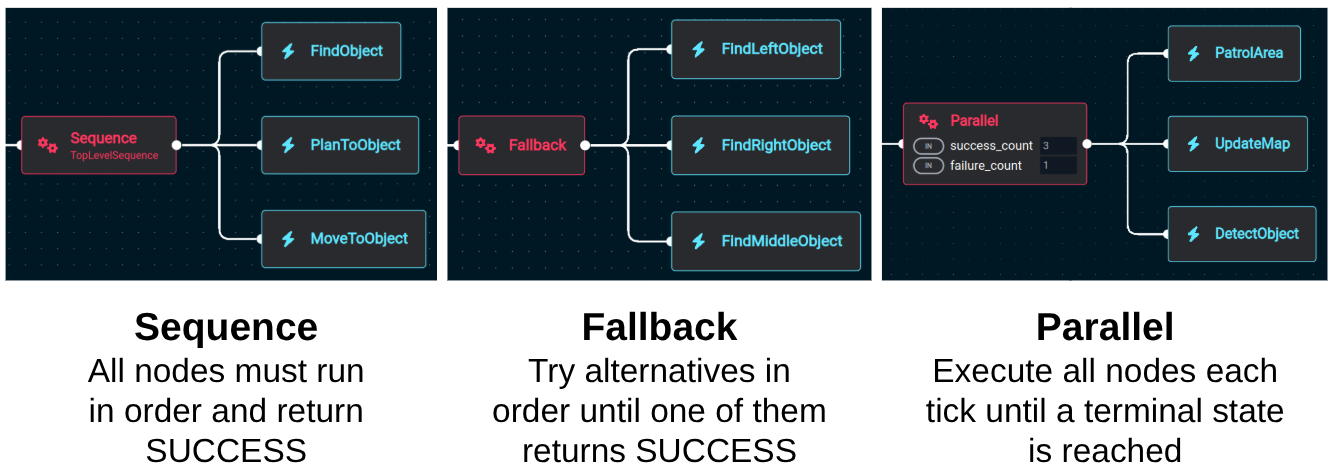
-
Decorators (Purple) modify the BT status of child node.
Example decorator nodes:

Refer to the Nodes Library documentation for common TreeNodes.
Types of Behaviors
MoveIt Pro Behaviors are derived from BehaviorTree.CPP BT::TreeNode classes.
There are four main types of nodes that inherit from this base class:
BT::ActionNode: The most common type of node that performs a task. Can returnSUCCESS,FAILURE, orRUNNINGas a status.BT::ConditionNode: A simplified case of action nodes that performs a simple check, and as such cannot returnRUNNING.BT::ControlNode: Controls the flow of execution based on child or sibling nodes.BT::DecoratorNode: Modifies the result of its child node.
Behavior Error Conventions
Behaviors in MoveIt Pro can encounter and report errors in several ways. Understanding these conventions will help you debug and design robust objectives.
-
Return Success:
The behavior completed its task successfully. -
Return Failure:
The behavior failed to complete its task. -
Return Running:
The behavior is still executing and has not yet completed. -
Throw an Exception (Objective Crash):
Severe errors may cause the behavior to throw an exception, which can crash the objective. Examples include:- Undefined or required ports missing
- Ports pointing to an empty blackboard entry
- Ports pointing to a blackboard entry of the wrong type
- C++ memory exceptions (e.g., bad allocation)
Always check your Behavior’s port connections and types, and handle TF lookup errors gracefully, to avoid unexpected crashes.
Objectives, Subtrees, and Behaviors
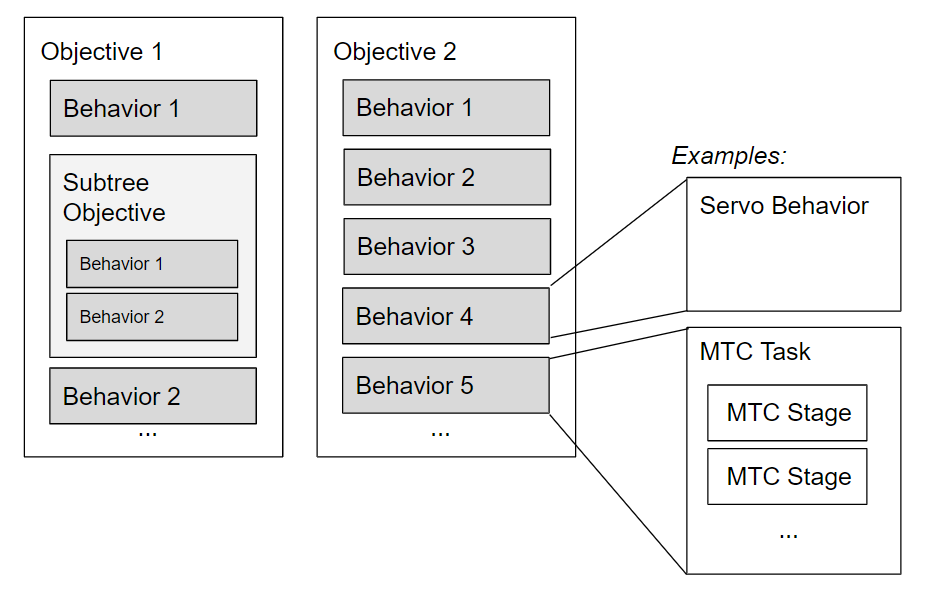
In MoveIt Pro, Objectives, Subtrees, and Behaviors are core concepts for structuring robotic applications using Behavior Trees. Understanding their roles helps you design scalable and maintainable task plans.
-
Objective:
An Objective is a top-level Behavior Tree that defines a complete robotic task or application (e.g., "Pick up an object", "Stack blocks"). Objectives can be run directly and may contain subtrees and behaviors. These are basically "applications" in MoveIt Pro, built as a Behavior Tree. They are a connected collection of Behavior nodes, much like a flow chart. Objectives can also be used within other Objectives as subtrees. -
Subtree:
A Subtree is a modular, reusable component within a larger Behavior Tree. It encapsulates a sequence of actions or logic and can be referenced by Objectives or other Subtrees. In MoveIt Pro, any Objective can also be used as a Subtree, but you can mark an Objective as 'Subtree-only' to indicate it’s not meant to be run standalone. -
Behavior:
A Behavior is a leaf node (Action Node) in the Behavior Tree that performs a specific robotic skill or operation (e.g., "Move to pose", "Open gripper"). Behaviors are the fundamental building blocks used within Objectives and Subtrees. Anyone can create their own Behaviors as extensions / plugins. For more information, see Creating Behaviors.A Behavior is run as a plugin within the MoveIt Pro Objective Server. This is advantageous in that you don't need to create separate launch files to start new Behaviors. This also allows developers to create a ROS package that contains your Behavior that can be side-loaded.
Behavior Data Port: Ports are used to read or write information on the Blackboard. MoveIt Pro Behaviors must have default values.
| Concept | Can Run Standalone? | Can Be Used as Subtree? | Typical Use Case | Example |
|---|---|---|---|---|
| Objective | Yes | Yes | Complete robotic task/application | Pick up object, Stack blocks |
| Subtree | No (if Subtree-only) | Yes | Modular, reusable logic within a tree | Get object pose, Approach bin |
| Behavior | No | Yes (as leaf node) | Single robotic skill or operation | Move to pose, Open gripper |
As your application grows, use Sequences and Subtrees to manage complexity with clear, labeled abstractions. Subtrees help you reuse logic, reduce duplication, and keep your Objectives organized and maintainable.
Creating Subtrees
There are two main ways to create subtrees in MoveIt Pro:
-
From the Behavior Tree Editor:
You can convert a sequence or control node into a subtree by clicking on the node in the Behavior Tree editor and selecting the "Create Subtree" icon that appears. This allows you to modularize a set of actions or logic into a reusable subtree. -
By Creating a New Objective:
Any Objective you create can also be used as a subtree within another Objective. This means you can design modular Objectives intended for reuse as subtrees in larger task plans.
Subtrees help you manage complexity by encapsulating common sequences or behaviors, making your Behavior Trees more organized and maintainable.